
{{ totalProductsCount }}

In cart {{totalProductsCount}} item(s)

Total:
{{sum | formatAmount}}

Your cart is empty

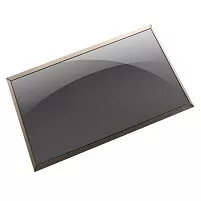
Display DELL WWKJX

Display DELL WWKJX Photo 1
Out of stock.
View similar!

Short description

The DELL WWKJX display features an 11.6" diagonal size with HD resolution, ensuring clear visuals. Compatible with DELL Chromebook 3100, this display is designed for reliable performance and easy installation, making it an ideal replacement part for your laptop.

Warranty: 2 Years
SKU: 4147031
delivery
Information regarding the items availability for purchase will be posted on this site
price
Item cost information will be published on this site
Together cheaper
{{product.price | formatAmount}}
{{product.title}}
{{productBundle.reference.specialPrice | formatAmount}}
{{productBundle.title}}
{{productBundlePreviousPrice | formatAmount}}
{{productBundleSpecialPrice | formatAmount}}

You saving {{productBundleYouSave | formatAmount}}

Product information

Description

The DELL WWKJX display is an 11.6" HD replacement screen designed for compatibility with the DELL Chromebook 3100. This panel provides an HD (1366×768) resolution in a compact diagonal size to restore clear visuals and consistent image quality. Intended as a direct replacement part, the display supports standard laptop mounting and connector positions for straightforward installation.

Advantages

The display offers a balance of compact size and HD clarity suitable for everyday computing tasks. Its factory-calibrated panel ensures consistent color reproduction and adequate brightness for typical indoor environments. As a purpose-built replacement for the Dell Chromebook 3100, the unit is designed for reliable fitment and electrical compatibility, reducing the need for additional adapters or modifications.

Suitable for

  • Replacing a damaged or non-functioning screen on a DELL Chromebook 3100
  • Repair shops performing laptop screen replacements
  • Users restoring display performance for web browsing, document editing, and educational use

Key specifications

  • Screen size: 11.6 inches diagonal
  • Resolution: HD 1366 × 768 pixels
  • Panel type: LCD (compatible with standard laptop LED backlight)
  • Aspect ratio: 16:9
  • Typical usage: replacement panel for compatible laptop model

How to use

Before installation, power off the laptop and disconnect the battery and power adapter. Remove the bezel and any retaining screws according to the service manual for the DELL Chromebook 3100. Disconnect the old display panel from the cable connector and carefully remove it from the lid assembly. Align the DELL WWKJX panel, connect the display cable firmly, secure the panel with the original screws, and reattach the bezel. Reconnect the battery and power on the device to verify correct operation and adjust display settings if necessary.

Usage recommendations

Handle the panel by its edges to avoid damaging the surface and circuitry. Use an anti-static wrist strap during installation to reduce the risk of electrostatic damage. Verify connector orientation before applying force and test the display before reassembling all exterior parts.

All features
Type:
Display
Compatibility:
Chromebook 3100
Display diagonal: iagonal of the visible part of the screen expressed in centimeters and inches.
11.6 "
Display resolution:
1366 x 768
Product colour:
Black
Brand compatibility:
Dell
Display type:
LCD
HD type:
HD
Quantity per pack:
1 pc(s)

Description

Machine translation. Load original

{{highlightedFeature.featureTitle}}:

{{product.title}}
{{product.price}}

{{getProductFeatureValueById(product, highlightedFeature.featureId)}}

Might be useful
{{product.manufacturerName}}
{{product.categoryName}}
{{product.title}}
{{product.specialPrice}}
{{product.price}}

Customer reviews

Customer questions

FAQ

What payment options are available?

AiO.lv offers several payment methods: Bank transfer. All transactions are 100% secure and encrypted.

Can this product be purchased for a company (with VAT)?

Yes. AiO.lv works with legal entities in Latvia and across Europe. The product price already includes VAT. For certain product categories, as well as for companies from other EU countries with a valid VAT number, a 0% VAT rate may apply. We issue the invoice immediately after the order is placed, support electronic BIS invoices, and automatically generate all necessary accounting documents. You can complete the purchase for a company online — simply select the company profile and choose bank transfer as the payment method during checkout.

What is the warranty period?

All Dell products come with an official 2 Years warranty. It covers all manufacturing defects and malfunctions that may occur during use. The warranty is valid at all authorized Dell service centers and through AiO.lv

Can the product be returned after purchase?

Yes, you can return the product within 14 days of purchase if you bought it as a consumer (not a legal entity). Returns are possible without giving any reason — the main condition is that the product retains its original appearance and full set of accessories. We will make the process as simple and convenient as possible: just contact our customer support team, and we will help you arrange the return.

Where should I contact for warranty service?

For warranty-related questions you can contact the AiO.lv (SIA VSPRO) customer support team. We will assist with consultation, warranty claim processing, and coordination with certified service centers.
warranty
14-Day Return Policy We are confident in our quality, but if the purchase doesn’t fit — you have 14 days to return the product with peace of mind.
shipping
Fast Delivery Get your orders as quickly as possible — right to your door, parcel lockers, or pickup points across Latvia and the EU.
payment
Secure Payment Pay the way you prefer: cash, VISA, MasterCard, Apple Pay, Google Pay, bank transfer, or 0% installment plan.
warranty
Quality Since 2008 AiO.lv has been on the market for over 18 years and has earned trust — with more than 6000 genuine positive reviews on Google.