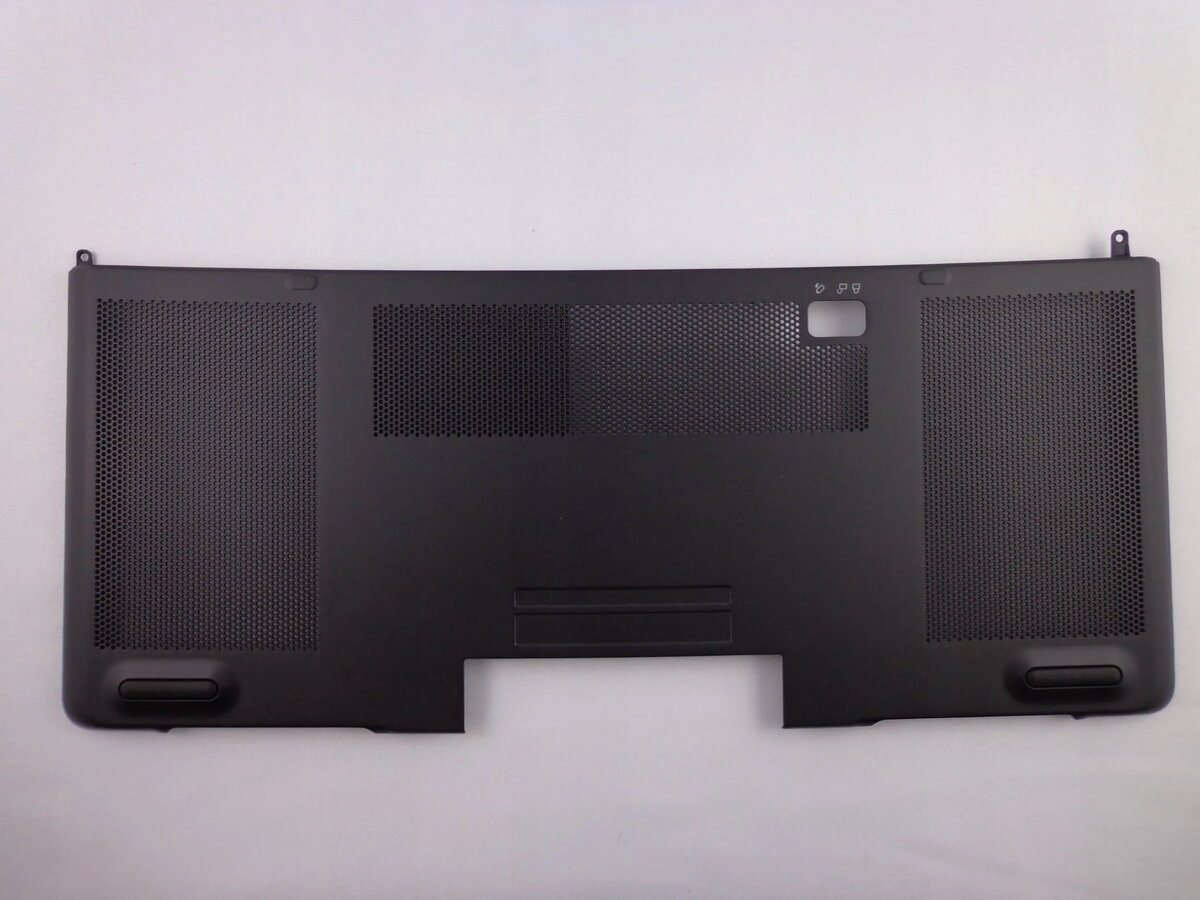
The Dell DOOR BOTTOM CHASSIS 7510 is a replacement lower chassis door designed for compatible Dell Precision 7510 mobile workstation models. It provides the structural cover for the underside of the laptop, protecting internal components and providing access points for service and upgrades when removed. Manufactured to match original Dell fit and finish, this chassis door maintains the laptop's intended airflow paths and mounting alignment.
Advantages
This lower chassis door restores the original external appearance and mechanical support of the laptop base while keeping internal components shielded from dust and debris. Built to OEM-compatible tolerances, it ensures correct alignment with ports, screw mounts and ventilation openings. The component contributes to maintaining thermal performance by preserving designed airflow and supporting secure attachment of internal hardware.
Подходит для
- Ремонт и замена повреждённого или изношенного нижнего корпуса Dell Precision 7510
- Техническое обслуживание и обслуживание ноутбука с целью доступа к компонентам
- Восстановление исходной конструкции и вентиляции при подготовке к продаже или передаче устройства
Key specifications
- Compatibility: Designed for Dell Precision 7510 series mobile workstation
- Material: Rigid molded plastic with integrated mounting points (OEM-compatible)
- Color/Finish: Manufacturer-matching finish to align with original chassis appearance
- Function: Provides structural underside coverage, dust protection and maintains airflow channels
- Mounting: Includes cutouts and screw locations to align with factory mounting points
How to use
Power off the laptop, disconnect all cables and remove the battery if applicable before beginning. Place the laptop on a static-safe work surface and remove the existing lower door by unscrewing the retaining screws and gently disengaging clips along the edges. Align the replacement lower chassis door with the laptop base, ensuring all cutouts for ports and vents match their corresponding openings, then press into place and secure with the appropriate screws. Reconnect the battery and any cables, then power on the system to verify proper fit and functionality.
Usage recommendations
Handle the chassis door with clean hands or gloves to avoid fingerprints on the finish. Use the correct size screws and avoid overtightening to prevent thread damage. If uncertain about disassembly, consult Dell service documentation or a qualified technician to ensure correct installation and to avoid voiding any remaining warranty.
Нижняя крышка корпуса Dell DOOR BOTTOM CHASSIS 7510 — запасная деталь, соответствующая оригинальной конструкции, предназначенная для сохранения защитных и механических функций основания ноутбука.
Преимущества
Замена обеспечивает восстановление внешнего вида и жёсткости основания, защищает внутренние компоненты от пыли и обеспечивает правильную направленность потоков воздуха. Изделие изготовлено в соответствии с допусками, совместимыми с оригиналом, что позволяет сохранить правильное расположение портов и креплений.
Подходит для
- Замены нижней крышки корпуса ноутбука Dell Precision 7510
- Производственного обслуживания и доступа к внутренним компонентам
- Восстановления заводской конструкции перед продажей или передачей устройства
Ключевые характеристики
- Совместимость: разработано для мобильной рабочей станции Dell Precision 7510
- Материал: прочный формованный пластик с интегрированными точками крепления
- Цвет/отделка: соответствие заводскому внешнему виду корпуса
- Функция: покрытие нижней части корпуса, защита от пыли и сохранение каналов вентиляции
- Крепление: вырезы и места для винтов, соответствующие заводским точкам крепления
Как использовать
Выключите ноутбук, отключите все кабели и при необходимости извлеките аккумулятор. Разместите устройство на антистатической поверхности и открутите винты крепления нижней крышки. Осторожно отсоедините защёлки и снимите старую крышку. Совместите новую крышку с основанием ноутбука, убедившись, что все вырезы для портов и вентиляции совпадают, затем закрепите винтами. Подключите аккумулятор и кабели и включите устройство для проверки корректной установки.
Рекомендации по использованию
При установке используйте подходящий инструмент и сохраняйте комплект крепёжных винтов. Избегайте чрезмерного затягивания винтов и прямого контакта острыми предметами с поверхностью крышки. При сомнениях обратитесь к официальной документации Dell или авторизованному сервису.
Dell DOOR BOTTOM CHASSIS 7510 ir apakšējais korpusa vāks, paredzēts rezerves daļai vai nomaiņai Dell Precision 7510 sērijas klēpjdatoriem. Tas nodrošina aizsardzību iekšējām komponentēm, atbalsta korpusa struktūru un saglabā oriģinālās gaisa plūsmas maršrutus.
Priekšrocības
Aizstājot apakšējo korpusa vāku, tiek atjaunots ierīces ārējais izskats un mehāniskā stabilitāte, kā arī nodrošināta aizsardzība pret putekļiem. Izstrādāts saskaņā ar ražotāja nodrošinātajiem izmēriem, lai nodrošinātu pareizu portu un stiprinājumu izvietojumu, kas palīdz saglabāt dzesēšanas efektivitāti.
Piemērots priekš
- Apakšējā korpusa vāka nomaiņa Dell Precision 7510 klēpjdatoriem
- Tehniskai apkopes darbu veikšanai un piekļuvei iekšējām sastāvdaļām
- Ierīces sagatavošana pārdošanai vai nodošanai, atjaunojot oriģinālo korpusa stāvokli
Atslēgas specifikācijas
- Saderība: paredzēts Dell Precision 7510 sērijas mobilajām darba stacijām
- Materiāls: stingrs veidots plastmasas korpuss ar integrētām stiprinājumu vietām
- Krāsa/Apdare: saskaņota ar oriģinālo korpusa izskatu
- Funkcija: apakšējā daļa nodrošina aizsardzību pret putekļiem un saglabā ventilācijas ceļus
- Montāža: izgriezumi un skrūvju vietas, kas atbilst rūpnīcas stiprinājumu punktiem
Kā lietot
Izslēdziet klēpjdatoru, atvienojiet strāvu un noņemiet akumulatoru, ja nepieciešams. Novietojiet ierīci uz antistatiskas virsmas un atskrūvējiet apakšējo vāku, uzmanīgi atbrīvojot aizslēgus. Novietojiet jauno vāku tā, lai visi atveres portiem un ventilācijai sakristu, nospiediet to vietā un nostipriniet ar atbilstošām skrūvēm. Pievienojiet akumulatoru un strāvas avotu un pārbaudiet, vai ierīce darbojas pareizi.
Ieteikumi lietošanai
Strādājiet ar tīrām rokām vai cimdos, lai izvairītos no pirkstu nospiedumiem uz virsmas. Izmantojiet pareizā izmēra skrūves un neuzspiediet pārmērīgi, lai neizbojātu vītņotas daļas. Ja neesat pārliecināts par demontāžu vai montāžu, sazinieties ar kvalificētu servisu vai skatiet ražotāja tehniskos norādījumus.