
Save time and money with our discounts!
In cart {{totalProductsCount}} item(s)
Your cart is empty
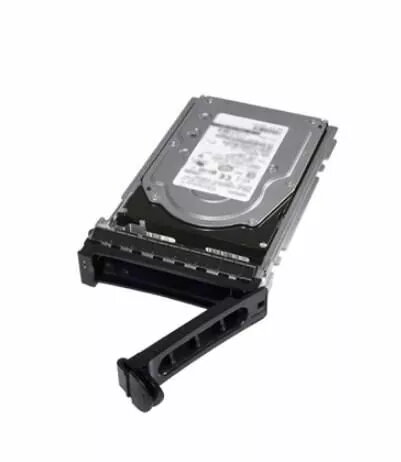
Dell 6TB 7.2K 3.5-inch SAS 12Gb/s 4Kn Enterprise Hard Drive
The Dell 6TB 7.2K 3.5-inch SAS 12Gb/s 4Kn Enterprise Hard Drive is a robust storage solution engineered for high-performance server environments and data-intensive workloads. Built with enterprise-grade components, this drive offers a reliable balance of capacity and speed, utilizing a 3.5-inch form factor and a 7200 RPM spindle speed to deliver consistent data access. The integration of a 12Gb/s SAS interface ensures high-speed connectivity, while the 4Kn sector format enhances storage efficiency and data integrity for modern operating systems and applications.
This hard drive provides significant benefits for enterprise infrastructures by offering a high capacity of 6TB, which allows for efficient data consolidation in large-scale storage arrays. The 12Gb/s SAS interface facilitates rapid data transfer rates, reducing latency in busy server environments. Furthermore, the 4Kn native sector format is specifically designed to improve storage density and error correction capabilities, ensuring that critical business data remains secure and accessible. Its durable construction is optimized for continuous operation, making it a dependable choice for demanding IT requirements.
This drive is not intended for use in standard desktop computers or laptops, as it requires a SAS controller and a 3.5-inch drive bay. It is also not suitable for environments that require the low power consumption or silent operation typical of consumer-grade solid-state drives.
To install the drive, ensure your server or storage array is powered down and disconnected from the power source. Insert the drive into a compatible 3.5-inch SAS drive bay, ensuring it is securely locked in place. Connect the drive to a SAS-compatible backplane or controller. Once installed, power on the system and configure the drive through your server's RAID controller or operating system disk management utility to initialize and format the storage space.
For optimal performance and data protection, it is recommended to use this drive within a RAID configuration managed by a dedicated hardware controller. Regularly monitor the drive's health status using enterprise management software to ensure long-term reliability.
{{highlightedFeature.featureTitle}}:
{{getProductFeatureValueById(product, highlightedFeature.featureId)}}
{{ productComparisonGenerationError }}
