
This is due to long delivery times and limited product warranties.
Powerful EcoFlow stations for energy anywhere!
In cart {{totalProductsCount}} item(s)
Your cart is empty
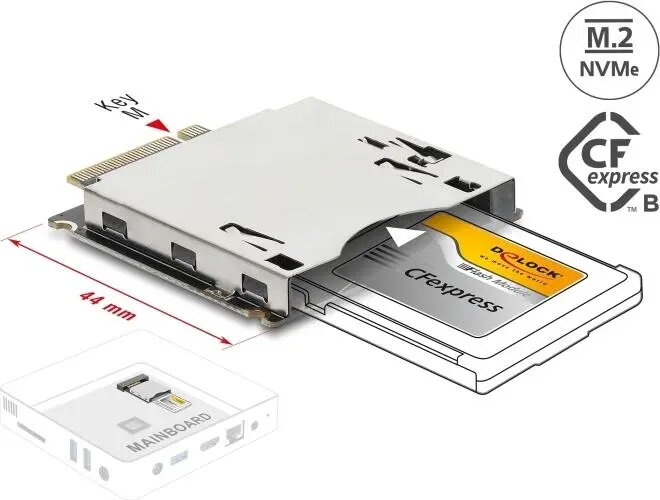
Delock M.2 Key M to CFexpress Type B Adapter
The Delock M.2 Key M to CFexpress Type B adapter is a specialized hardware solution designed to bridge the gap between M.2 NVMe SSD technology and the CFexpress Type B interface. This adapter enables users to utilize high-performance M.2 NVMe storage media within devices that are equipped with a CFexpress Type B slot, such as professional cameras or specialized industrial recording equipment. By facilitating this interface conversion, the adapter ensures that data can be transferred efficiently while maintaining the integrity of the connection in demanding professional environments.
The primary advantage of this adapter is its ability to provide a cost-effective and flexible storage solution for professionals who require high-speed data recording. It allows for the use of standard M.2 NVMe SSDs in hardware that would otherwise require proprietary or more expensive CFexpress cards. The robust design ensures a secure fit within the host device, minimizing the risk of connection failure during critical data capture tasks. Furthermore, the adapter is engineered to support the high data throughput necessary for modern high-resolution video recording and rapid burst photography.
This adapter may not be suitable for devices that do not strictly adhere to the CFexpress Type B physical and electrical standards. Additionally, it is not intended for use in consumer-grade laptops or desktop computers that lack a dedicated CFexpress card reader slot.
To use the adapter, carefully insert your compatible M.2 NVMe SSD into the M.2 slot on the adapter board, ensuring it is properly seated and secured. Once the SSD is installed, insert the entire adapter assembly into the CFexpress Type B slot of your host device. Ensure that the device is powered off before installation to prevent electrical damage. Once inserted, the host device should recognize the storage medium as a standard CFexpress card, allowing you to format and use it according to the device manufacturer's instructions.
Always ensure that the SSD is firmly seated in the adapter before inserting it into your camera or recording device to prevent data corruption or connection errors. Regularly check for firmware updates for your host device to ensure optimal performance and compatibility with the adapter.
{{highlightedFeature.featureTitle}}:
{{getProductFeatureValueById(product, highlightedFeature.featureId)}}