JBL speakers and headphones for pure and deep sound!
In cart {{totalProductsCount}} item(s)
Your cart is empty
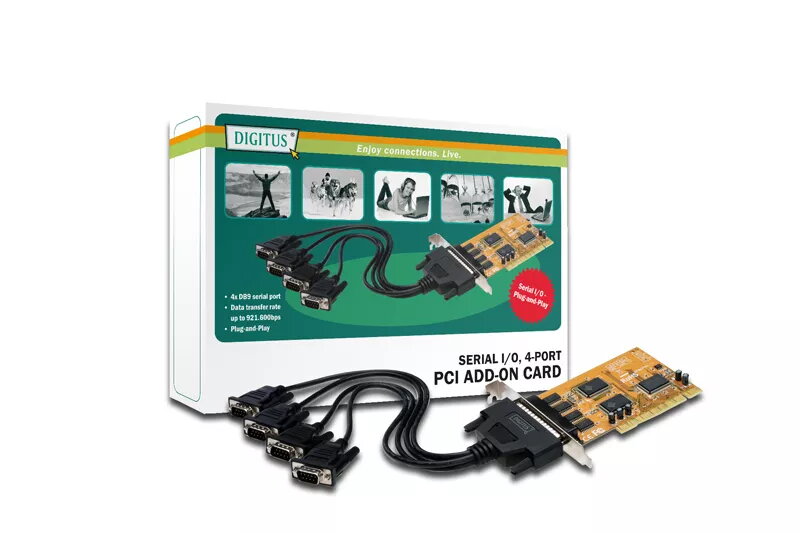
Serial PCI interface card DIGITUS DS-33002 — PCI host, 4× DB9, SUN1889 chipset, brown
DIGITUS DS-33002 is a PCI serial interface card that adds four DB9 serial ports to desktop systems via a universal PCI host connector. Based on the SUN1889 chipset, the card provides RS-232-compatible communication with data transfer rates up to 921,600 bps and supports both 3.3V and 5V PCI slots (32/64 bit). The card is supplied with basic accessories including a driver CD, a manual and an adapter cable, and it is compatible with a wide range of operating systems such as Windows CE/98SE/ME/NT/2000/XP/2003/Vista, Linux and DOS.
The DIGITUS DS-33002 offers four independent DB9 serial ports in a single PCI add-in card, enabling connection of multiple legacy or industrial RS-232 devices without occupying multiple slots. Its SUN1889 chipset delivers reliable serial throughput up to 921,600 bps and provides plug-and-play functionality where supported. The universal PCI interface ensures compatibility with both 3.3V and 5V systems, while the included driver CD and adapter cable simplify installation and initial setup.
Install the DIGITUS DS-33002 into an available PCI slot on a powered-off desktop PC, securing the card with the bracket screw. After booting, install the drivers from the supplied CD or download the appropriate driver for the target operating system. Connect serial devices to the DB9 ports using standard RS-232 cables or the included adapter cable. Configure COM port settings (baud rate, parity, data bits, stop bits and flow control) in the operating system or application to match the connected device’s requirements.
For reliable operation, use shielded serial cables for longer runs and set matching baud rate and flow control parameters on both ends. When installing in compact or crowded systems, verify available slot type and clearance for the card bracket. Keep drivers up to date for maximum compatibility and stability, and consult device manuals for specific COM port configuration details.
{{highlightedFeature.featureTitle}}:
{{getProductFeatureValueById(product, highlightedFeature.featureId)}}