{{ totalProductsCount }}

In cart {{totalProductsCount}} item(s)

Total:
{{sum | formatAmount}}

Your cart is empty

header-product Ducky Tinker 65 keyboard Gaming USB QWERTY US English Black
59.49 €

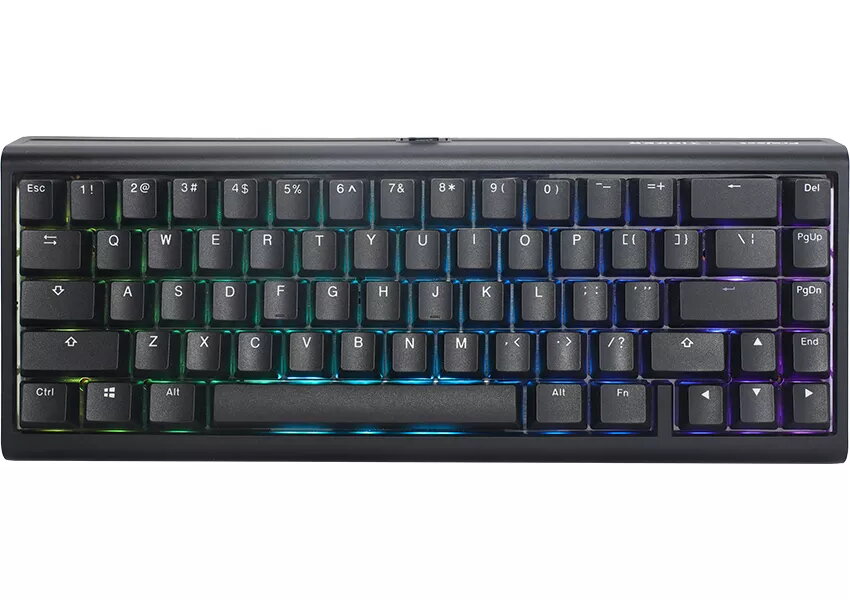
Ducky Tinker 65 keyboard Gaming USB QWERTY US English Black

Ducky Tinker 65 keyboard Photo 1
Keep track of price changes You keep track of price changes
Watch the price drop

Leave your address - as soon as the price of the product goes down, you'll know about it right away

You keep track of price changes

Ducky Tinker 65 keyboard Gaming USB QWERTY US English Black

{{email}}
You keep track of price changes

Ducky Tinker 65 keyboard Gaming USB QWERTY US English Black

{{email}}
{{selectedOffer && selectedOffer.price | formatAmount}}

Short description

The Ducky Tinker 65 keyboard features a compact 65% layout, wired USB connectivity, and mechanical switches. Designed for gaming, it includes RGB LED backlighting for an enhanced visual experience. Its sleek black design and QWERTY layout make it a stylish addition to any setup.
Available for order: 50 pcs.
Warranty: 2 Years
SKU: 10821234
Manufacturer: Ducky
free shipment

Cheapest delivery:

Unisend LV

Pick-up points

Unisend LV

Cost

1.79 €

Deliver

{{selectedOffer.parcelStationDeliveryString}}

Customer service center
2b. Kengaraga str., Riga, Latvia, LV-1063
10.08.2026 {{selectedOffer.officeDeliveryString}}
free
Courier Delivery Please note that in case of a large parcel additional delivery costs may apply!
13.08.2026 {{selectedOffer.courierDeliveryString}}
From 4.99 € (Weight: 0.95 kg)
Parcel couriers
Unisend LV / Venipak Pickup LV / Venipak Locker LV / Latvijas Pasts pakomāts / DPD Paku skapis / Omniva LV / Latvijas Pasts nodaļa
13.08.2026 {{selectedOffer.parcelStationDeliveryString}}
From 1.79 €
payment
Payment Methods:
Bank transfer, Bank cards on-line, Apple Pay, Google Pay
Together cheaper
{{product.price | formatAmount}}
{{product.title}}
{{productBundle.reference.specialPrice | formatAmount}}
{{productBundle.title}}
{{productBundlePreviousPrice | formatAmount}}
{{productBundleSpecialPrice | formatAmount}}

You saving {{productBundleYouSave | formatAmount}}

Product information

Description

The Ducky Tinker 65 keyboard is a compact mechanical keyboard in a 65% layout with wired USB connectivity and a US English QWERTY layout. Designed for gaming and productivity, this black keyboard features a south-facing PCB with RGB LED backlighting and a detachable USB Type-C cable. The barebone edition ships without switches and keycaps, allowing users to install their preferred mechanical switches and PBT keycaps. The board supports QMK/VIA programmability and offers a gasket mount with an FR4 plate for a balanced typing feel.

Advantages

The keyboard combines a small footprint with full functionality suitable for both desk-based work and gaming. Hot-swappable 5-pin sockets let users change switches without soldering, while the gasket mount and FR4 plate provide a controlled acoustic profile and comfortable actuation. Double-shot PBT keycaps maintain clear legends and resist shine and wear. RGB backlighting with adjustable brightness and speed enhances visibility and personalization. A 1000 Hz polling rate via USB HID ensures low-latency input for responsive performance.

Suitable for

  • Gamers who need a compact, responsive mechanical keyboard
  • Enthusiasts building a custom keyboard from a barebone kit
  • Typing and programming tasks where a small layout and programmable layers are useful
  • Users who prefer PBT keycaps and south-facing RGB for switch and keycap compatibility

Key specifications

  • Form factor: 65% layout
  • Device interface: Wired USB with detachable USB Type-C cable
  • PCB: South-facing RGB LED PCB
  • Hot-swap: 5-pin hot-swappable sockets (QMK/VIA compatible)
  • Mounting: Gasket mount with FR4 plate
  • Keycaps: Double-shot PBT construction (barebone ships without keycaps)
  • Keyboard language: US English QWERTY
  • Color: Black
  • Polling rate: 1000 Hz (USB HID)
  • Adjustable tilt: Two-step feet providing three angle positions

How to use

Install compatible 5-pin mechanical switches into the hot-swap sockets and fit your chosen keycaps if you purchased the barebone edition. Connect the keyboard to your computer using the detachable USB Type-C cable. Configure layers, macros, and lighting effects through QMK or VIA if you require custom keymaps; otherwise use the onboard functions to adjust RGB brightness, speed, and color. Place the keyboard on a stable surface and select one of the three tilt angles using the two-step feet for an ergonomic typing position.

Usage recommendations

For best compatibility with the south-facing RGB and PBT keycaps, choose switches and keycap sets designed for south-facing LED boards. When assembling, ensure switches are properly aligned and fully seated in the hot-swap sockets. Use QMK/VIA for persistent custom layouts and back up configurations regularly.

Specifications

Mouse included: A mouse is included with this product.
No
Backlight: Product has a built-in light source for its illuminating.
Yes
Numeric keypad: Small, palm-sized, seventeen key section of a computer keyboard, usually on the very far right. The numeric keypad features digits 0 to 9, addition (+), subtraction (-), multiplication (*) and division (/) symbols, a decimal point (.) and Num Lock and Enter keys. Laptop keyboards often do not have a numpad, but may provide numpad input by holding a modifier key (typically labelled "Fn") and operating keys on the standard keyboard.
No
Keyboard form factor: Keyboard size, e.g. standard, mini.
65%
Pointing device:
No
Keyboard layout: The type of keys on a keyboard, and their position on the keyboard. This can differ from country to country.
QWERTY
Device interface: The ports (sockets) where the device connects with other devices.
USB
Connectivity technology: The technology that enables connectivity of the device, e.g. wired or wireless.
Wired
Recommended usage: What the product should be used for, and how it should be used (e.g. ambient temperature).
Gaming
Power source type: What the power source is.
USB
Product colour: The colour e.g. red, blue, green, black, white.
Black
Keyboard language: The letters which are marked on the keys for convenience of the keyboard usage with specific language.
US English
All features

Weight & dimensions

Keyboard weight:
590 g
Keyboard dimensions (WxDxH):
320 x 125 x 40

System requirements

Windows operating systems supported: Windows vesions wich can be used with the device.
Yes

Mouse

Mouse included: A mouse is included with this product.
No

Power

Power source type: What the power source is.
USB

Features

USB 2.0 ports quantity: Number of USB 2.0 ports (connecting interfaces) in the device. USB 2.0 was released in April 2000 (now called "Hi-Speed"), adding higher maximum signaling rate of 480 Mbit/s (effective throughput up to 35 MB/s or 280 Mbit/s), USB 2.0 ports are usually black.
1
Hot-swap:
Yes
Detachable cable:
Yes
USB connector type: The type of USB connector/port that this product has.
USB Type-C

Design

Surface coloration: Type of surface coloration e.g. monotone, image.
Monochromatic
Product colour: The colour e.g. red, blue, green, black, white.
Black
Adjustable keyboard height:
Yes
Adjustable backlight:
Yes
Backlight colour:
Various
Backlight type:
RGB LED
Backlight: Product has a built-in light source for its illuminating.
Yes

Keyboard

Country of origin: Country where the device is made. Aka Country of manufacture (COM).
Taiwan
Polling rate:
1000
Rollover:
N-key rollover
Windows keys:
Yes
Keycaps:
Double shot
Keycaps material:
Polybutylene terephthalate (PBT)
Numeric keypad: Small, palm-sized, seventeen key section of a computer keyboard, usually on the very far right. The numeric keypad features digits 0 to 9, addition (+), subtraction (-), multiplication (*) and division (/) symbols, a decimal point (.) and Num Lock and Enter keys. Laptop keyboards often do not have a numpad, but may provide numpad input by holding a modifier key (typically labelled "Fn") and operating keys on the standard keyboard.
No
Keyboard form factor: Keyboard size, e.g. standard, mini.
65%
Pointing device:
No
Keyboard language: The letters which are marked on the keys for convenience of the keyboard usage with specific language.
US English
Keyboard layout: The type of keys on a keyboard, and their position on the keyboard. This can differ from country to country.
QWERTY
Keyboard key switch technology:
Cherry MX Red
Device interface: The ports (sockets) where the device connects with other devices.
USB
Connectivity technology: The technology that enables connectivity of the device, e.g. wired or wireless.
Wired
Recommended usage: What the product should be used for, and how it should be used (e.g. ambient temperature).
Gaming

Description

Machine translation. Load original

Similar products

{{product.title}} Show details Hide details

{{highlightedFeature.featureTitle}}:

{{getProductFeatureValueById(product, highlightedFeature.featureId)}}

{{product.price | formatAmount}}
Might be useful
{{product.manufacturerName}}
{{product.categoryName}}
{{product.title}}
{{product.specialPrice}}
{{product.price}}

Customer reviews

Customer questions

FAQ

How much does the Ducky Tinker 65 keyboard cost, and is it available for purchase?

The price is 59.49 € (valid at the time of publication and already includes all taxes). The item is available for order — 50 pcs. are in stock, and you can place your purchase right now with delivery across Latvia and Europe or choose pickup at the Riga collection point. We offer favorable purchase terms, including the option to split the payment into convenient monthly installments. Availability and price are updated in real time, so we recommend placing your order in advance.

If I order this product today, when will I receive my order?

If you place your order today, delivery will be as fast and convenient as possible. You will be able to pick up your order on 10.08.2026 at the Riga pickup point or choose delivery across Latvia and Europe. We carefully inspect every purchase and pack it securely for safe transportation.

What payment options are available?

AiO.lv offers several payment methods: Bank transfer, Bank cards on-line, Apple Pay, Google Pay. All transactions are 100% secure and encrypted.

Can this product be purchased for a company (with VAT)?

Yes. AiO.lv works with legal entities in Latvia and across Europe. The product price already includes VAT. For certain product categories, as well as for companies from other EU countries with a valid VAT number, a 0% VAT rate may apply. We issue the invoice immediately after the order is placed, support electronic BIS invoices, and automatically generate all necessary accounting documents. You can complete the purchase for a company online — simply select the company profile and choose bank transfer as the payment method during checkout.

What is the warranty period?

All Ducky products come with an official 2 Years warranty. It covers all manufacturing defects and malfunctions that may occur during use. The warranty is valid at all authorized Ducky service centers and through AiO.lv

Can the product be returned after purchase?

Yes, you can return the product within 14 days of purchase if you bought it as a consumer (not a legal entity). Returns are possible without giving any reason — the main condition is that the product retains its original appearance and full set of accessories. We will make the process as simple and convenient as possible: just contact our customer support team, and we will help you arrange the return.

Where should I contact for warranty service?

For warranty-related questions you can contact the AiO.lv (SIA VSPRO) customer support team. We will assist with consultation, warranty claim processing, and coordination with certified service centers.

How can I tell if this product suits my needs?

When making a choice, we recommend paying attention to the key features: mouse included, backlight, numeric keypad, keyboard form factor, pointing device, keyboard layout, device interface, connectivity technology, recommended usage, power source type, product colour, keyboard language, compatibility with your devices or usage conditions, material quality, functionality, and warranty terms. These characteristics will help you determine how well the model meets your needs.

Where can I download the instructions for Ducky Tinker 65 keyboard?

You can download the instructions in PDF format from the “Instructions” section on the product description page. The file contains complete information about installation, setup, and usage.

warranty
14-Day Return Policy We are confident in our quality, but if the purchase doesn’t fit — you have 14 days to return the product with peace of mind.
shipping
Fast Delivery Get your orders as quickly as possible — right to your door, parcel lockers, or pickup points across Latvia and the EU.
payment
Secure Payment Pay the way you prefer: cash, VISA, MasterCard, Apple Pay, Google Pay, bank transfer, or 0% installment plan.
warranty
Quality Since 2008 AiO.lv has been on the market for over 18 years and has earned trust — with more than 6000 genuine positive reviews on Google.