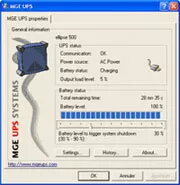
The Eaton Personal Solution-Pac is a comprehensive power management software bundle designed to provide robust monitoring and control for your uninterruptible power supply (UPS). This solution ensures that your connected hardware, such as PCs, workstations, and small business servers, remains protected during power fluctuations or outages. By facilitating point-to-point connectivity via the included RS232 cable, the software allows for seamless communication between your UPS and your computer system, enabling real-time visibility into power quality and system health.
Advantages
This software offers a user-friendly interface that simplifies complex power management tasks, making it an ideal choice for SOHO and small business environments. It provides advanced features such as automatic system shutdown during critical power events, which helps prevent data loss and hardware damage. Furthermore, the integration with operating system hibernation modes allows for the preservation of work in progress, ensuring that your system can resume exactly where it left off once power is restored. The bundle is highly versatile, supporting a wide array of operating systems to ensure compatibility across diverse IT infrastructures.
Suitable for
- Personal computers and home workstations
- Small business servers
- Environments requiring automated power failure alerts
- Systems needing controlled shutdown sequences to protect data
When it may not be suitable
This software is specifically designed for point-to-point connectivity via an RS232 interface and may not be suitable for modern environments that rely exclusively on USB or network-based management protocols without appropriate adapters. It is also intended for individual or small-scale deployments and may lack the advanced centralized management features required for large-scale enterprise data centers.
Key specifications
- Connectivity: RS232 cable included
- Operating System Compatibility: Windows, Mac OS, Linux, IBM AIX, and Novell Netware
- Functionality: Real-time power quality monitoring, automatic shutdown, and alert notifications
- Power Management: Support for system hibernation and automated state saving
How to use
To begin using the Eaton Personal Solution-Pac, connect your UPS to the target computer using the provided RS232 cable. Install the software from the included media onto your operating system. Once installed, launch the application to configure your preferred power management settings, such as the duration of battery runtime before an automatic shutdown is triggered. Ensure that the software is set to run in the background to maintain constant monitoring of your power supply.
What to consider before purchase
- Verify that your computer or server has an available RS232 serial port.
- Check the compatibility of your specific UPS model with the software version.
- Ensure your operating system version is supported by the software bundle.
Usage recommendations: Regularly test your UPS battery and software configuration by simulating a power outage to ensure that the automatic shutdown and hibernation features function correctly according to your specific system requirements.