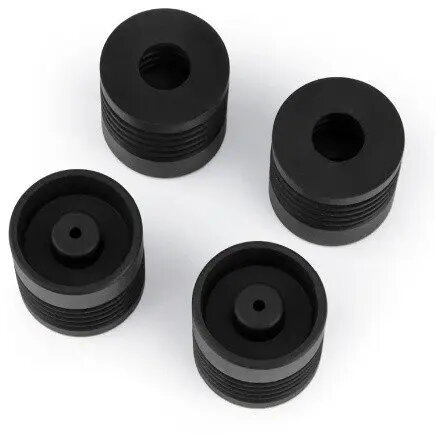
Set of four anti-vibration feet designed specifically for Elegoo Centauri and Centauri Carbon 3D printers. These replacement feet fit the original mounting points and are intended to reduce the transmission of vibrations from the printer to work surfaces, helping to stabilise the frame and reduce visible artifacts on printed parts. They serve as spare parts for maintenance or as direct replacements for worn or damaged feet on compatible Elegoo Centauri series machines.
Advantages
These anti-vibration feet are engineered to absorb and dampen mechanical vibrations generated during motion and printing, which can improve surface finish and dimensional consistency. Supplied as a pack of four, they allow full-foot replacement without sourcing individual components. The simple form factor enables straightforward installation and fits the printer’s existing mounting configuration, supporting quick maintenance and minimal downtime.
Suitable for
- Owners of Elegoo Centauri and Centauri Carbon 3D printers needing to replace worn or damaged feet
- Users seeking to reduce vibration-related print defects and ringing on prints
- Workspaces where improved isolation from desk or bench vibrations is required
When it may not be suitable
These feet are designed specifically for the Elegoo Centauri series; they may not fit other printer models or brands due to different mounting hole patterns or footprint dimensions. If isolation from low-frequency floor vibrations or heavy external disturbances is needed, larger dedicated vibration control platforms or external isolation accessories could be more effective than the small replacement feet.
Key specifications
- Quantity: pack of four anti-vibration feet
- Compatibility: designed for Elegoo Centauri and Centauri Carbon 3D printers
- Function: vibration damping and isolation between printer frame and supporting surface
- Material: elastomeric damping material combined with a rigid base (material composition optimized for vibration absorption)
- Mounting: fits original printer mounting points for direct replacement
How to use
Turn off and unplug the printer before performing maintenance. Remove the old feet by unscrewing or detaching them from the printer base according to the printer’s service instructions. Align each anti-vibration foot with the corresponding mounting point and secure using the same fasteners or screws removed earlier. After installation, place the printer on a level surface and verify that all feet sit evenly; adjust fastening if necessary to ensure stable contact and correct isolation.
What to consider before purchase
- Confirm your printer model is Elegoo Centauri or Centauri Carbon to ensure compatibility
- Check the condition of the existing mounting hardware and screws for re-use or replacement
- Consider whether additional isolation measures are required for your workspace or print accuracy needs
Usage recommendations
For best results, install all four feet at the same time to maintain even support and consistent damping. Periodically inspect the feet for signs of wear, cracking, or compression and replace them if their damping performance decreases. Combine with a stable, level work surface and avoid placing heavy vibrating equipment near the printer to minimise external disturbance.