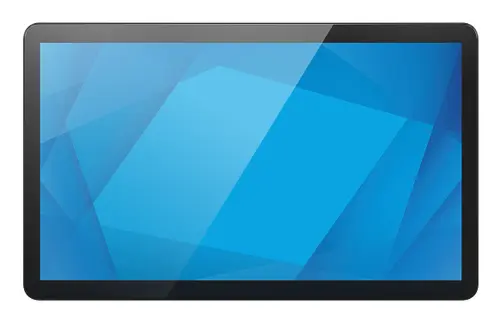
-
Contrast ratio (typical):
The difference in light intensity between the brightest white and the darkest black.
-
600:1
-
Viewing angle, horizontal:
Maximum horizontal angle at which a display can be viewed with acceptable visual performance.
-
170 °
-
Viewing angle, vertical:
Maximum vertical angle at which a display can be viewed with acceptable visual performance.
-
170 °
-
Weight:
Weight of the product without packaging (net weight). If possible, the net weight is given including standard accessories and supplies. Please note that sometimes the manufacturer leaves out the weight of accessories and/or supplies.
-
1.2 kg
-
Mean time between failures (MTBF):
Statistical model used to indicate product/mechanism reliability; expressed in hours and percentage of duty cycle. This number (in hours) does not indicate the mean time before failure for a single unit/mechanism.
-
50000 h
-
Operating relative humidity (H-H):
-
20 - 80
-
Storage temperature (T-T):
The minimum and maximum temperatures at which the product can be safely stored.
-
-20 - 60
-
Package weight:
Weight of the packaged product.
-
3100 g
-
AC adapter input voltage:
-
90 - 264
-
AC adapter output voltage:
-
12
-
Display diagonal:
Size of the display for this product, measured diagonally, usually in inches.
-
13.3 "
-
Operating temperature (T-T):
The minimum and maximum temperatures at which the product can be safely operated.
-
0 - 40
-
Storage relative humidity (H-H):
-
10 - 95
-
Display brightness:
Brightness is the amount of radiating light emitted from the screen. The brightness rating is measured in candellas per square meter, commonly known as 'nits'.
-
300 cd/m²
-
Height:
The measurement of the product from head to foot or from base to top.
-
194.9 mm
-
Response time:
The response time is the time difference between the moment that a source (for example a video card) sends a signal and that equipment (for example a monitor) receives or display the signal. (Used abbreviations: R/F = Rise and Fall.)
-
27 ms
-
Display resolution:
The number of distinct pixels in each dimension that can be displayed. It is usually quoted as width × height, with the units in pixels: for example, "1024 × 768" means the width is 1024 pixels and the height is 768 pixels. The higher the number of pixels, the sharper the image.
-
1920 x 1080
-
Width:
The measurement or extent of something from side to side.
-
318.9 mm
-
Depth:
The distance from the front to the back of something.
-
25.8 mm
-
Product colour:
The colour e.g. red, blue, green, black, white.
-
Black
-
RMS rated power:
RMS (Root mean square) is a measure of the continuous power required by a device, in particular audio amplifiers and loudspeakers.
-
4 W
-
Built-in speaker(s):
The device contains speaker(s) to produce sound.
-
Yes
-
Effective viewing area:
-
293.8 x 165.2
-
Package depth:
The distance from the front to the back of the packaging.
-
161 mm
-
Package height:
The distance from the top to the bottom of the packaging.
-
278 mm
-
Package width:
The distance from one side of the packaging to the other.
-
398 mm
-
Power:
Energy that is produced by mechanical, electrical, or other means and used to operate a device.
-
6.5 W
-
Touchscreen:
A screen of a laptop, smartphone, etc., that responds to touch so you can control the interface using your fingers.
-
Yes
-
Power source type:
What the power source is.
-
USB, DC
-
Touchscreen type:
There are a variety of touchscreen technologies that have different methods of sensing touch, including resistive and capacitive.
-
Projected Capacitive (PCAP)
-
Display type:
Type of display (screen) e.g. LCD.
-
TFT
-
Number of speakers:
The quantity of speakers included in/with the product.
-
2
-
Native aspect ratio:
The aspect ratio is the ratio of the width of an image to its height. The native aspect ratio is the one which the projector/display is particularly designed for. Images shown in native aspect ratio will utilize the entire resolution of the display and achieve maximum brightness. Images shown in other than native aspect ratio will always have less resolution and less brightness than images shown in native aspect ratio.
-
16:9
-
HD type:
Type of supported High Definition (e.g. Full HD, 4K Ultra HD).
-
Full HD
-
Panel type:
-
TFT-LCD
-
VESA mounting:
-
Yes
-
Number of colours:
-
16.2 million colours
-
Native refresh rate:
-
60 Hz
-
Compliance certificates:
Indicates which regulatory, safety, and environmental standards the product complies with, as verified by recognized authorities or certification bodies.
-
UKCA, BIS, BSMI, CB, CE, China Compulsory Certification (CCC), China RoHS, Federal Communications Commission (FCC), Industry Canada (IC), KCC, Norma Oficial Mexicana (NOM), PSE, RCM, REACH, RoHS, UL, VCCI, WEEE, cUL