
{{ totalProductsCount }}

In cart {{totalProductsCount}} item(s)

Total:
{{sum | formatAmount}}

Your cart is empty

header-product Wired Remote Control Elotouch E483757 — Press Button Interface for Elo TouchSystems

Wired Remote Control Elotouch E483757 — Press Button Interface for Elo TouchSystems

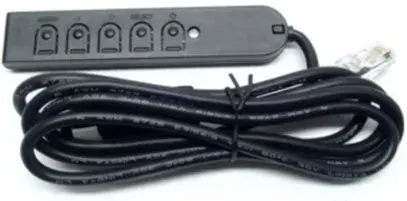
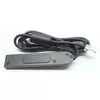
Wired Remote Control Elotouch E483757 Photo 1
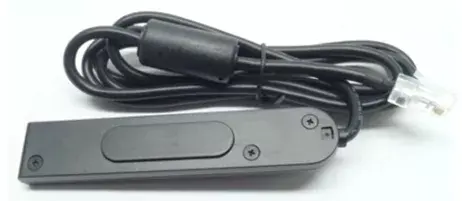
Wired Remote Control Elotouch E483757 Photo 2
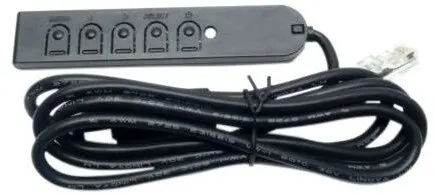
Wired Remote Control Elotouch E483757 Photo 3
Wired Remote Control Elotouch E483757 Photo 1
Wired Remote Control Elotouch E483757 Photo 2
Wired Remote Control Elotouch E483757 Photo 3
Out of stock.
View similar!

Short description

Wired remote control Elotouch E483757 with press-button input, designed for use with Elo TouchSystems devices. Single-device support and a wired interface provide reliable control for kiosks, POS terminals, interactive displays and touch systems. Compact button-based design suitable for maintenance, configuration and simple user input tasks.
Warranty: 2 Years
SKU: 11374410
Manufacturer: Elotouch
delivery
Information regarding the items availability for purchase will be posted on this site
price
Item cost information will be published on this site
Together cheaper
{{product.price | formatAmount}}
{{product.title}}
{{productBundle.reference.specialPrice | formatAmount}}
{{productBundle.title}}
{{productBundlePreviousPrice | formatAmount}}
{{productBundleSpecialPrice | formatAmount}}

You saving {{productBundleYouSave | formatAmount}}

Product information

Description

Wired remote control Elotouch E483757 is a compact press-button interface designed for use with Elo TouchSystems touch displays. The wired connection ensures stable communication and immediate response when adjusting on-screen display settings, performing configuration tasks or providing simple user input for kiosks, POS terminals and integrated touch systems. Its single-device support and tactile buttons make it suitable for maintenance and environments where straightforward physical controls are preferred over touch-only operation.

Advantages

The wired design provides consistent, low-latency control without reliance on wireless pairing or batteries. Physical press buttons give reliable, repeatable input for menu navigation and OSD adjustments. The compact footprint and straightforward interface simplify installation and use in service panels, behind counters, or inside kiosk enclosures. Built for compatibility with select Elo touchmonitors, the controller offers a direct hardware option for technicians and operators who need quick access to display settings.

Suitable for

  • Kiosk systems that require physical OSD controls
  • Point-of-sale terminals with integrated touch displays
  • Interactive signage and public information displays
  • Service and maintenance stations for display configuration
  • Environments where wireless devices are impractical

Key specifications

  • Interface type: wired press-button control for OSD navigation
  • Control method: tactile push buttons for menu selection and adjustment
  • Compatibility: designed for select Elo TouchSystems monitors and touch displays
  • Form factor: compact, panel-mountable or surface-mounted remote module
  • Intended use: display configuration, maintenance access and basic user input

How to use

Connect the remote control to the designated port on a compatible Elo touchmonitor according to the display's service manual or installation guide. Use the press buttons to navigate the on-screen display menu, change brightness, contrast and other display settings or perform simple configuration operations. The controller does not require wireless setup; once connected to the monitor it functions immediately as the hardware OSD input. Follow the monitor manufacturer’s instructions for OSD operation and safe handling during setup.

Usage recommendations

Install the remote in a location that protects the buttons from accidental activation and environmental contaminants. Use for routine adjustments and maintenance; for complex configuration changes, consult the display documentation. Avoid exposing the controller to liquids, extreme temperatures or excessive force to maintain reliable operation.

All features
Interface: Interface ports to connect pieces of equipment. USB (Universal Serial Bus) has become the most popular wired interface to connect peripherals. USB 2.0 supports speeds up to 480 Mbit/s (USB 1: 12 Mbit/s). The interface FireWire is also known as the IEEE 1394 standard. Enhanced IDE (EIDE)is sometimes referred to as Fast ATA, Fast IDE or ATA-2.
Wired
Input type: The way in which commands or signal are inputted in product.
Press buttons
Product colour: The colour e.g. red, blue, green, black, white.
Black
Compatible products: Other products that can be used with this product.
Elo 1940L Open Frame Touch Screen Monitor Elo 3243L Open Frame Touch Screen Monitor Elo 3209L Touch Screen Monitor Elo 4343L Touch Screen Monitor Elo 2440L Touch Screen Monitor Elo 3201L IDS Touch Screen Monitor Elo 4201L IDS Touch Screen Monitor Elo 5501L IDS Touch Screen Monitor Elo 7001L IDS Touch Screen Monitor
Number of devices supported: The amount of devices that can be used with this product.
1
Brand compatibility: What other brands this brand can be used with.
Elo TouchSystems
Built-in display: A display which is part of the product, so you do not need to attach another display.
No
Harmonized System (HS) code:
85299097

Description

Machine translation.

Similar products

{{product.title}}
Show details Hide details

{{highlightedFeature.featureTitle}}:

{{getProductFeatureValueById(product, highlightedFeature.featureId)}}

{{product.price | formatAmount}}
Might be useful
{{product.manufacturerName}}
{{product.categoryName}}
{{product.title}}
{{product.specialPrice}}
{{product.price}}

Customer reviews

Customer questions

FAQ

What payment options are available?

AiO.lv offers several payment methods: Bank transfer. All transactions are 100% secure and encrypted.

Can this product be purchased for a company (with VAT)?

Yes. AiO.lv works with legal entities in Latvia and across Europe. The product price already includes VAT. For certain product categories, as well as for companies from other EU countries with a valid VAT number, a 0% VAT rate may apply. We issue the invoice immediately after the order is placed, support electronic BIS invoices, and automatically generate all necessary accounting documents. You can complete the purchase for a company online — simply select the company profile and choose bank transfer as the payment method during checkout.

What is the warranty period?

All Elotouch products come with an official 2 Years warranty. It covers all manufacturing defects and malfunctions that may occur during use. The warranty is valid at all authorized Elotouch service centers and through AiO.lv

Can the product be returned after purchase?

Yes, you can return the product within 14 days of purchase if you bought it as a consumer (not a legal entity). Returns are possible without giving any reason — the main condition is that the product retains its original appearance and full set of accessories. We will make the process as simple and convenient as possible: just contact our customer support team, and we will help you arrange the return.

Where should I contact for warranty service?

For warranty-related questions you can contact the AiO.lv (SIA VSPRO) customer support team. We will assist with consultation, warranty claim processing, and coordination with certified service centers.
warranty
14-Day Return Policy We are confident in our quality, but if the purchase doesn’t fit — you have 14 days to return the product with peace of mind.
shipping
Fast Delivery Get your orders as quickly as possible — right to your door, parcel lockers, or pickup points across Latvia and the EU.
payment
Secure Payment Pay the way you prefer: cash, VISA, MasterCard, Apple Pay, Google Pay, bank transfer, or 0% installment plan.
warranty
Quality Since 2008 AiO.lv has been on the market for over 18 years and has earned trust — with more than 6000 genuine positive reviews on Google.