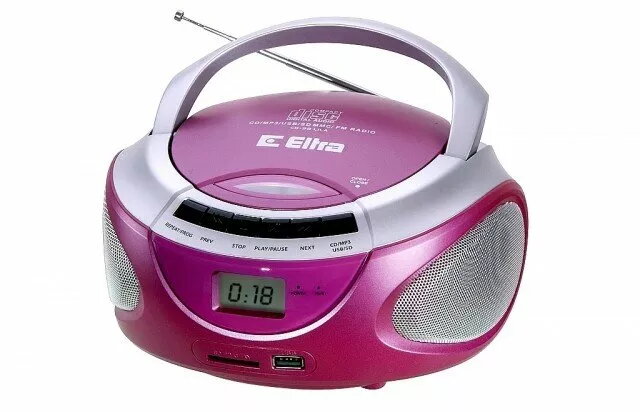
Eltra CD-98/USB is a compact CD player with built-in FM radio and USB playback in a pink finish. It plays standard audio CDs and reads MP3 files from USB drives, giving simple access to physical and digital music sources. The unit includes a front-loading CD tray, an FM tuner with manual tuning, and straightforward front-panel controls for play, pause, skip and stop, designed for everyday listening in home environments such as kitchens, bedrooms or small offices.
Advantages
The CD player combines three playback options—CD, USB and FM radio—into a single compact housing, reducing the need for multiple devices. Its front-panel controls and clear display make basic operation intuitive without complex menus. The pink finish offers a distinct visual style that fits casual or personal spaces. The device supports common audio CD formats and MP3 playback from standard USB flash drives for flexible listening.
Suitable for
- Listening to audio CDs at home (kitchen, bedroom)
- Playing MP3 collections from a USB flash drive
- Tuning into FM radio for music and local broadcasts
- Use in small offices or personal workspaces for background audio
Key specifications
- Playback modes: CD audio, USB (MP3)
- Radio: FM tuner with manual tuning
- Controls: front-panel buttons for play, pause, stop, skip and tuning
- Form factor: compact tabletop unit
- Finish: pink
How to use
Place the Eltra CD-98/USB on a stable, level surface and connect it to a suitable power outlet. To play a CD, open the front-loading tray, insert a standard audio disc with the label side up, close the tray and press Play. To listen from a USB drive, insert a compatible USB flash drive into the USB port; the player will read MP3 files and start playback using the front controls. To use FM radio, switch to the radio mode and tune to the desired frequency using the tuning controls. Adjust volume with the volume control and use basic playback buttons to navigate tracks or radio stations.
Usage recommendations
Use USB flash drives formatted in common file systems and containing standard MP3 files for best compatibility. Keep the device away from moisture and direct heat sources; clean the CD tray and discs before playback to reduce read errors. For stable FM reception, position the unit near a window or adjust the antenna orientation.