Leave your address - as soon as the price of the product goes down, you'll know about it right away
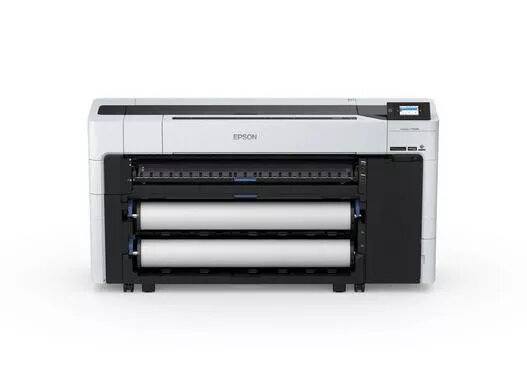
Epson T7700DM large format printer Wi-Fi Inkjet Colour 2400 x 1200 DPI A0
In cart {{totalProductsCount}} item(s)
Your cart is empty
Epson T7700DM large format printer Wi-Fi Inkjet Colour 2400 x 1200 DPI A0
Leave your address - as soon as the price of the product goes down, you'll know about it right away
Epson T7700DM large format printer Wi-Fi Inkjet Colour 2400 x 1200 DPI A0
The Epson SureColor T7700DM is a compact, integrated large-format multifunction printer offering high-quality colour printing, copying and scanning for offices and professional environments. It features a 36-inch dual light CIS scanner, 8 GB memory and a 960 GB self-encrypting SSD for secure file storage. The printer delivers up to 2400 x 1200 DPI print resolution, supports media up to A0 size and connects via Wi‑Fi or Ethernet for convenient network integration.
The T7700DM combines a space-saving flat-top design with automatic media loading and an intuitive scanning workflow, enabling fast, secure scanning to multiple destinations. It supports high-speed scanning up to 10 inches per second and simultaneous saving to onboard SSD, network locations and folders. Print quality is enhanced by the Epson PrecisionCore printhead and a 6-colour XD3 ink set (including Red) to produce vivid, accurate colour output. Administrative and security features include expanded memory, SSD encryption and compatibility with Epson Cloud Solutions PORT and Epson Device Admin for central device management.
Place the SureColor T7700DM on a stable, level surface with sufficient clearance for media loading and output. Connect the device to your network via Wi‑Fi or Ethernet and install drivers or management software recommended by Epson. Use the flat top and automatic media loading to feed originals for copying or scanning, and select the destination (onboard SSD, network folder or cloud) from the device interface. For printing, send files from your workstation using the appropriate driver and select media size up to A0 and the desired print quality settings.
For secure handling of sensitive projects, enable SSD encryption and use central management tools such as Epson Cloud Solutions PORT or Epson Device Admin. Use the included XD3 inks and recommended media types for consistent colour results, and perform regular firmware and driver updates to maintain performance and security.
{{highlightedFeature.featureTitle}}:
{{getProductFeatureValueById(product, highlightedFeature.featureId)}}