{{ totalProductsCount }}

In cart {{totalProductsCount}} item(s)

Total:
{{sum | formatAmount}}

Your cart is empty

header-product Epson SureColor SC-P6500D Large Format Inkjet Colour Printer A1 Wi-Fi Ethernet LAN

Epson SureColor SC-P6500D Large Format Inkjet Colour Printer A1 Wi-Fi Ethernet LAN

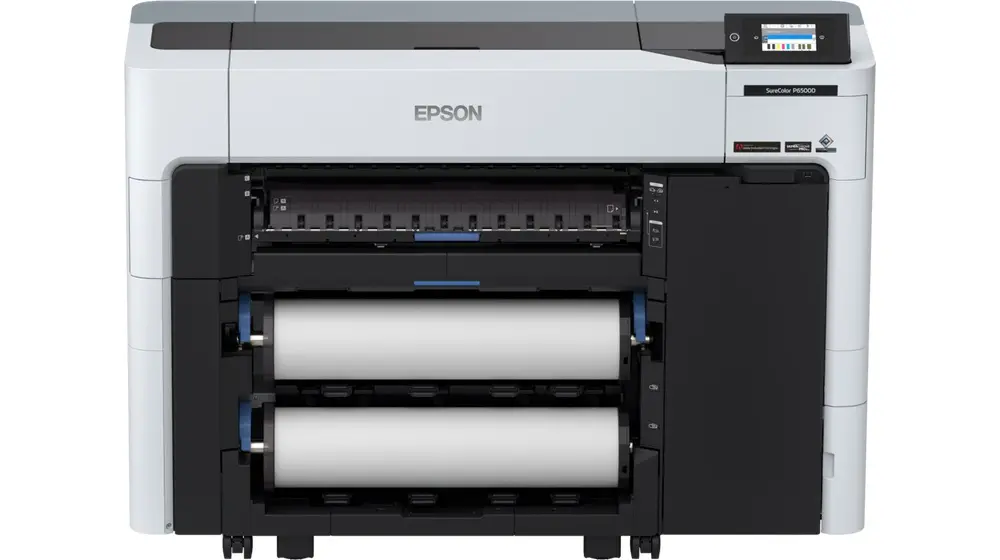
Epson SureColor SC-P6500D Printer Photo 1
Epson SureColor SC-P6500D Printer Photo 2
Epson SureColor SC-P6500D Printer Photo 1
Epson SureColor SC-P6500D Printer Photo 2
Out of stock.
View similar!

Short description

Epson SureColor SC-P6500D large format inkjet colour printer for professional printing up to A1 size with a maximum resolution of 2400 x 1200 DPI. Features Wi-Fi, Ethernet LAN, USB connectivity, and support for mobile printing via Apple AirPrint and Epson Cloud Solution PORT. Equipped with a built-in LCD touch display, multiple page description languages including PostScript 3 and PDF 1.7, and a versatile paper handling system suitable for cut sheets.
Warranty: 1 Year
SKU: 10157797

delivery
Information regarding the items availability for purchase will be posted on this site
price
Item cost information will be published on this site
Together cheaper
{{product.price | formatAmount}}
{{product.title}}
{{productBundle.reference.specialPrice | formatAmount}}
{{productBundle.title}}
{{productBundlePreviousPrice | formatAmount}}
{{productBundleSpecialPrice | formatAmount}}

You saving {{productBundleYouSave | formatAmount}}

Product information

Description

The Epson SureColor SC-P6500D is a professional large format inkjet colour printer designed for high-quality printing up to A1 size. Featuring a maximum resolution of 2400 x 1200 DPI, this device delivers sharp details and accurate colour reproduction using a versatile seven-colour ink set including magenta, grey, cyan, matte black, photo black, red, and yellow. Built with modern connectivity options such as Wi-Fi, Ethernet LAN, and USB ports, it supports seamless integration into various office and studio environments while enabling convenient mobile printing through Apple AirPrint and Epson Cloud Solution PORT. The printer includes a built-in LCD touch display for straightforward operation and supports multiple page description languages including PostScript 3 and PDF 1.7 for efficient workflow management.

Advantages

This colour inkjet printer offers exceptional precision and clarity for professional applications, ensuring every print meets strict visual standards. The inclusion of a comprehensive colour set allows for smooth gradients and deep contrasts across various media types. Connectivity flexibility ensures that multiple users can access the device effortlessly via wireless networks, wired local area networks, or direct USB connections. Furthermore, the integrated LCD touch display simplifies device management, job monitoring, and configuration tasks directly from the unit.

Suitable for

  • Producing professional A1 technical drawings and architectural plans
  • Printing high-resolution graphic design presentations and marketing materials
  • Creating vivid photographic prints and fine art reproductions on cut sheet media
  • Daily office and studio document printing via network or mobile devices

When it may not be suitable

This device does not support scanning or copying functions, meaning it cannot be used as a multi-function office all-in-one machine. Additionally, it is primarily designed for cut sheet media handling and may not fit workflows that rely exclusively on continuous roll feeds for high-volume production.

Key specifications

  • Inkjet print technology with maximum resolution of 2400 x 1200 DPI
  • Maximum print size of A1 with support for cut sheets
  • Printing colours include Magenta, Grey, Cyan, Matte Black, Photo Black, Red, and Yellow
  • Connectivity via Wi-Fi, Ethernet LAN, and USB port
  • Supported page description languages include PostScript 3, PDF 1.7, HP-RTL, HP-GL/2, and ESC/P-R
  • Built-in LCD touch display and mobile printing via Apple AirPrint and Epson Cloud Solution PORT

How to use

Set up the printer on a stable, flat surface and connect it to your power source using the appropriate AC input voltage range. Connect the device to your network via Wi-Fi or Ethernet LAN, or plug in directly using a USB cable according to your workspace requirements. Install the required ink cartridges in the designated slots and load cut sheets into the paper tray. Send your print jobs from a connected computer or mobile device using compatible software or mobile printing applications, utilizing the LCD touch display to monitor progress and adjust printer settings as needed.

What to consider before purchase

  • Verify that your workspace has adequate physical space to accommodate an A1 large format printer
  • Ensure your workflow aligns with cut sheet media handling rather than roll-based printing
  • Confirm that your network infrastructure supports Wi-Fi or Ethernet LAN connectivity if network sharing is required
  • Check that your software applications are compatible with the supported page description languages such as PostScript 3 and PDF 1.7

Regularly check ink levels and perform routine maintenance routines through the touch display to maintain optimal print quality and prevent nozzle clogs during extended periods of use.

Specifications

Built-in display: A display which is part of the product, so you do not need to attach another display.
Yes
USB port: The device features a socket into which a USB cable can be plugged.
Yes
Wi-Fi: Popular technology that allows an electronic device to exchange data or connect to the internet wirelessly using radio waves.
Yes
Ethernet LAN: An Ethernet LAN (Local Area Network) interface is present, for a wired conection via a cable.
Yes
Cut sheets:
Yes
Maximum print size: The maximum size that an image can be printed with a good resolution.
A1 (594 x 841 mm)
Scanning: To convert a document or picture into digital form for storage or processing on a computer, by scanning it using a scanner.
No
Copying: Description of copying function (colour or monochrome).
No
Maximum resolution: Maximum printing resolution.
2400 x 1200
Colour: The main colour of the product.
Yes
Print technology: Indicates the method used to print by this product.
Inkjet
Product colour: The colour e.g. red, blue, green, black, white.
Black, White
Paper tray media types:
Cut sheet
Printing colours: The colours that can be produced by the printer.
Magenta, Grey, Cyan, Matte Black, Photo black, Red, Yellow
Page description languages:
PostScript 3, PDF 1.7, HP-RTL, HP-GL/2, ESC/P-R
All features

Weight & dimensions

Weight: Weight of the product without packaging (net weight). If possible, the net weight is given including standard accessories and supplies. Please note that sometimes the manufacturer leaves out the weight of accessories and/or supplies.
118.1 kg
Height: The measurement of the product from head to foot or from base to top.
975 mm
Depth: The distance from the front to the back of something.
499 mm
Width: The measurement or extent of something from side to side.
1365 mm

System requirements

Windows operating systems supported: Windows vesions wich can be used with the device.
Windows 10, Windows 11
Mac operating systems supported: Mac operating systems e.g. OS X can be used with the device.
Y

Power

AC input frequency:
50/60
AC input voltage: The voltage of the AC electricity that is inputted into the product.
100 - 240
Power consumption (typical): Amount of power consumed by this model, often expressed in watts (W). Typical values that manufacturers give are power consumption when off, standby/suspended mode, typical use, maximum usage.
70 W
Power consumption (standby): The amount of electricity that is consumed when the product is on standby.
0.3 W

Performance

Country of origin: Country where the device is made. Aka Country of manufacture (COM).
Indonesia
Sound power level (standby):
6.3 dB
Internal memory: The amount of memory, usually measured in bytes (e.g. MB, GB), which is installed in the system's hardware.
4096 MB
Control type: The way in which the device is controlled.
Touch
Colour display:
Yes
Display: The description of display that can includes display type, resolution, size etc.
LCD
Built-in display: A display which is part of the product, so you do not need to attach another display.
Yes
Product colour: The colour e.g. red, blue, green, black, white.
Black, White

Ports & interfaces

Mobile printing technologies: Apps etc. which allow users to send a print job from a smartphone or tablet to a printer via a wireless network.
Apple AirPrint, Epson Cloud Solution PORT
Direct printing: With direct printing it is possible to print your photographs or other documents directly to a printer from a compatible device, without the use of a computer.
Yes
Ethernet LAN data rates: The different speed levels of the Ethernet LAN connection.
10, 1000, 100
USB 2.0 ports quantity: Number of USB 2.0 ports (connecting interfaces) in the device. USB 2.0 was released in April 2000 (now called "Hi-Speed"), adding higher maximum signaling rate of 480 Mbit/s (effective throughput up to 35 MB/s or 280 Mbit/s), USB 2.0 ports are usually black.
1
USB port: The device features a socket into which a USB cable can be plugged.
Yes
Wi-Fi: Popular technology that allows an electronic device to exchange data or connect to the internet wirelessly using radio waves.
Yes
Ethernet LAN: An Ethernet LAN (Local Area Network) interface is present, for a wired conection via a cable.
Yes

Paper handling

Auto take-up reel:
Yes
Roll weight (rear roll):
6800 g
Maximum roll diameter: The maximum size of roll that can be used, measured by the diameter which is the distance from one side to the other with a straight line passing through the centre of the roll.
170 mm
Maximum roll length:
91.5 m
Media thickness:
0.1 - 1.5
Cut sheets:
Yes
ISO A-series sizes (A0...A9): Different sizes of paper from A0 (big) to A9 (small). A4 is the most common size used for printing documents.
A1, A2, A3, A4
Paper tray media types:
Cut sheet
Maximum print size: The maximum size that an image can be printed with a good resolution.
A1 (594 x 841 mm)

Scanning

Scanning: To convert a document or picture into digital form for storage or processing on a computer, by scanning it using a scanner.
No

Copying

Copying: Description of copying function (colour or monochrome).
No

Printing

Printing colours: The colours that can be produced by the printer.
Magenta, Grey, Cyan, Matte Black, Photo black, Red, Yellow
Page description languages:
PostScript 3, PDF 1.7, HP-RTL, HP-GL/2, ESC/P-R
Maximum resolution: Maximum printing resolution.
2400 x 1200
Colour: The main colour of the product.
Yes
Print technology: Indicates the method used to print by this product.
Inkjet

Description

Machine translation.

Similar products

{{product.title}}
Show details Hide details

{{highlightedFeature.featureTitle}}:

{{getProductFeatureValueById(product, highlightedFeature.featureId)}}

{{product.price | formatAmount}}
Might be useful
{{product.manufacturerName}}
{{product.categoryName}}
{{product.title}}
{{product.specialPrice}}
{{product.price}}

Customer reviews

Customer questions

FAQ

What payment options are available?

AiO.lv offers several payment methods: Bank transfer, Leasing for legal entities. All transactions are 100% secure and encrypted.

Can this product be purchased for a company (with VAT)?

Yes. AiO.lv works with legal entities in Latvia and across Europe. The product price already includes VAT. For certain product categories, as well as for companies from other EU countries with a valid VAT number, a 0% VAT rate may apply. We issue the invoice immediately after the order is placed, support electronic BIS invoices, and automatically generate all necessary accounting documents. You can complete the purchase for a company online — simply select the company profile and choose bank transfer as the payment method during checkout.

What is the warranty period?

All Epson products come with an official 2 Years warranty. It covers all manufacturing defects and malfunctions that may occur during use. The warranty is valid at all authorized Epson service centers and through AiO.lv

Can the product be returned after purchase?

Yes, you can return the product within 14 days of purchase if you bought it as a consumer (not a legal entity). Returns are possible without giving any reason — the main condition is that the product retains its original appearance and full set of accessories. We will make the process as simple and convenient as possible: just contact our customer support team, and we will help you arrange the return.

Where should I contact for warranty service?

For warranty-related questions you can contact the AiO.lv (SIA VSPRO) customer support team. We will assist with consultation, warranty claim processing, and coordination with certified service centers.

How can I tell if this product suits my needs?

When making a choice, we recommend paying attention to the key features: built-in display, usb port, wi-fi, ethernet lan, cut sheets, maximum print size, scanning, copying, maximum resolution, colour, print technology, product colour, paper tray media types, printing colours, page description languages, compatibility with your devices or usage conditions, material quality, functionality, and warranty terms. These characteristics will help you determine how well the model meets your needs.

Where can I download the instructions for Epson SureColor SC-P6500D Printer?

You can download the instructions in PDF format from the “Instructions” section on the product description page. The file contains complete information about installation, setup, and usage.
warranty
14-Day Return Policy
We are confident in our quality, but if the purchase doesn’t fit — you have 14 days to return the product with peace of mind.
shipping
Fast Delivery
Get your orders as quickly as possible — right to your door, parcel lockers, or pickup points across Latvia and the EU.
payment
Secure Payment
Pay the way you prefer: cash, VISA, MasterCard, Apple Pay, Google Pay, bank transfer, or 0% installment plan.
warranty
Quality Since 2008
AiO.lv has been on the market for over 18 years and has earned trust — with more than 6000 genuine positive reviews on Google.