
{{ totalProductsCount }}

In cart {{totalProductsCount}} item(s)

Total:
{{sum | formatAmount}}

Your cart is empty

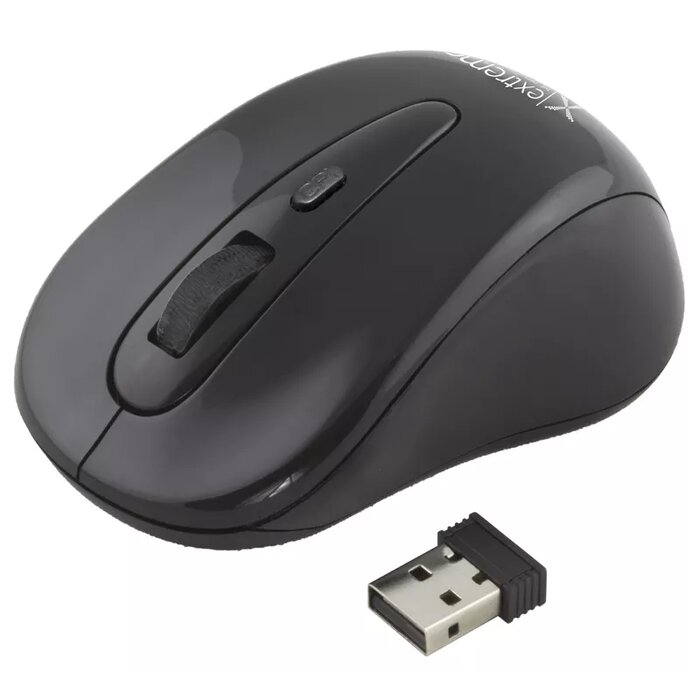
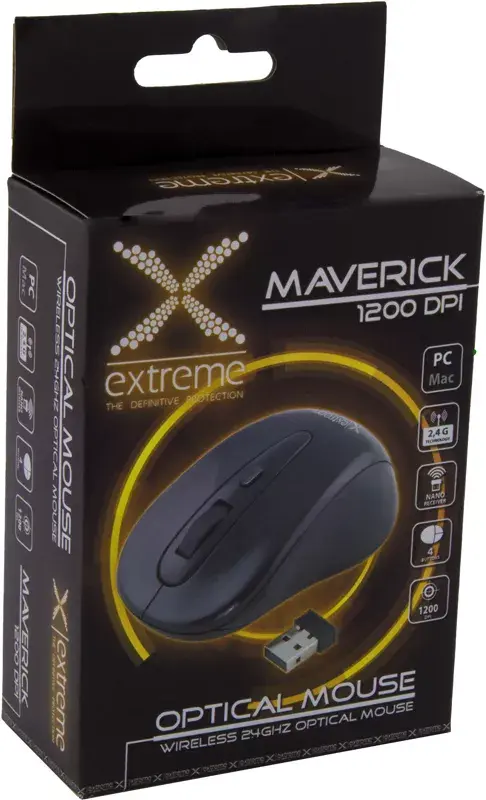
header-product Wireless Optical Mouse Esperanza XM104K 2.4GHz

Wireless Optical Mouse Esperanza XM104K 2.4GHz

Wireless Optical Mouse Esperanza XM104K Photo 1
Wireless Optical Mouse Esperanza XM104K Photo 2
Wireless Optical Mouse Esperanza XM104K Photo 1
Wireless Optical Mouse Esperanza XM104K Photo 2
Out of stock.
View similar!

Short description

The Esperanza XM104K Wireless Optical Mouse features a 1200 DPI sensor for precise tracking. Its 2.4GHz wireless technology ensures a stable connection without delays. The ergonomic design provides comfort during extended use, making it ideal for both work and gaming. The mouse is compatible with various operating systems and is easy to set up, offering a hassle-free experience for users.
Warranty: 2 Years
SKU: 512112
Manufacturer: ESPERANZA
delivery
Information regarding the items availability for purchase will be posted on this site
price
Item cost information will be published on this site
Together cheaper
{{product.price | formatAmount}}
{{product.title}}
{{productBundle.reference.specialPrice | formatAmount}}
{{productBundle.title}}
{{productBundlePreviousPrice | formatAmount}}
{{productBundleSpecialPrice | formatAmount}}

You saving {{productBundleYouSave | formatAmount}}

Product information

Description

The Esperanza XM104K 2.4GHz wireless optical mouse provides a straightforward pointing solution with a 1200 DPI optical sensor for accurate cursor control. Its wireless connection operates on the 2.4GHz band to deliver stable responsiveness and freedom from cables. The compact, ergonomic shape and standard button layout make it suitable for everyday office tasks, web browsing and casual gaming, while simple plug-and-play setup ensures quick installation on most systems.

Advantages

The wireless design eliminates cable clutter and offers more flexible placement on the desk. A 1200 DPI sensor balances sensitivity and precision for common computing tasks. The ergonomic profile supports comfortable use during extended sessions, and the straightforward USB receiver and plug-and-play compatibility reduce setup time across a variety of operating systems.

Suitable for

  • Office work: document editing, spreadsheets and email
  • Home use: web browsing, media playback and general tasks
  • Casual gaming where high polling rates and adjustable DPI are not required
  • Portable setups and laptop users who need a compact external mouse

When it may not be suitable

This mouse may not meet the needs of professional gamers or users who require very high DPI settings, adjustable sensitivity on the fly, or advanced programmable buttons. It also may be less suitable where multi-device Bluetooth pairing or USB-C receivers are required, as it uses a standard 2.4GHz USB dongle for connectivity.

Key specifications

  • Connection: 2.4GHz wireless via USB receiver
  • Sensor type: optical
  • Sensitivity: 1200 DPI
  • Buttons: standard left, right and scroll wheel
  • Power: battery powered (battery type and life vary with use)
  • Design: ergonomic, compact form factor
  • Compatibility: compatible with common desktop and laptop operating systems

How to use

Insert the USB receiver into an available USB port on your computer and ensure batteries are installed in the mouse. The device typically uses plug-and-play detection; wait for the operating system to recognize the receiver and configure the mouse automatically. Position the mouse on a flat surface and adjust hand placement for comfort. Use the scroll wheel and buttons in the usual manner; for specific system settings such as pointer speed, open your operating system's mouse settings to adjust sensitivity and scrolling behavior.

What to consider before purchase

  • Confirm that you have an available USB-A port for the 2.4GHz receiver
  • Check battery requirements and consider spare batteries for uninterrupted use
  • Assess whether 1200 DPI and the standard button set meet your workflow or gaming needs
  • Ensure the ergonomic shape fits your hand size and preferred grip style

Usage recommendations

For reliable performance, place the USB receiver directly into the computer or use a short USB extension if the receiver is blocked by the laptop frame. Use on a non-reflective, flat mouse pad for optimal tracking. Replace batteries as soon as responsiveness decreases to maintain a consistent connection and stable pointer movement.

Description

Machine translation. Load original

{{highlightedFeature.featureTitle}}:

{{product.title}}
{{product.price}}

{{getProductFeatureValueById(product, highlightedFeature.featureId)}}

Might be useful
{{product.manufacturerName}}
{{product.categoryName}}
{{product.title}}
{{product.specialPrice}}
{{product.price}}

Customer reviews

Customer questions

FAQ

What payment options are available?

AiO.lv offers several payment methods: Bank transfer. All transactions are 100% secure and encrypted.

Can this product be purchased for a company (with VAT)?

Yes. AiO.lv works with legal entities in Latvia and across Europe. The product price already includes VAT. For certain product categories, as well as for companies from other EU countries with a valid VAT number, a 0% VAT rate may apply. We issue the invoice immediately after the order is placed, support electronic BIS invoices, and automatically generate all necessary accounting documents. You can complete the purchase for a company online — simply select the company profile and choose bank transfer as the payment method during checkout.

What is the warranty period?

All ESPERANZA products come with an official 2 Years warranty. It covers all manufacturing defects and malfunctions that may occur during use. The warranty is valid at all authorized ESPERANZA service centers and through AiO.lv

Can the product be returned after purchase?

Yes, you can return the product within 14 days of purchase if you bought it as a consumer (not a legal entity). Returns are possible without giving any reason — the main condition is that the product retains its original appearance and full set of accessories. We will make the process as simple and convenient as possible: just contact our customer support team, and we will help you arrange the return.

Where should I contact for warranty service?

For warranty-related questions you can contact the AiO.lv (SIA VSPRO) customer support team. We will assist with consultation, warranty claim processing, and coordination with certified service centers.
warranty
14-Day Return Policy We are confident in our quality, but if the purchase doesn’t fit — you have 14 days to return the product with peace of mind.
shipping
Fast Delivery Get your orders as quickly as possible — right to your door, parcel lockers, or pickup points across Latvia and the EU.
payment
Secure Payment Pay the way you prefer: cash, VISA, MasterCard, Apple Pay, Google Pay, bank transfer, or 0% installment plan.
warranty
Quality Since 2008 AiO.lv has been on the market for over 18 years and has earned trust — with more than 6000 genuine positive reviews on Google.