


EXSYS EX-1328 USB to Ethernet Network Card Wired 1000 Mbit/s

Offer for a legal entity, non-cash payment.
Short description

Cheapest delivery:
Unisend LV
Product information
Description
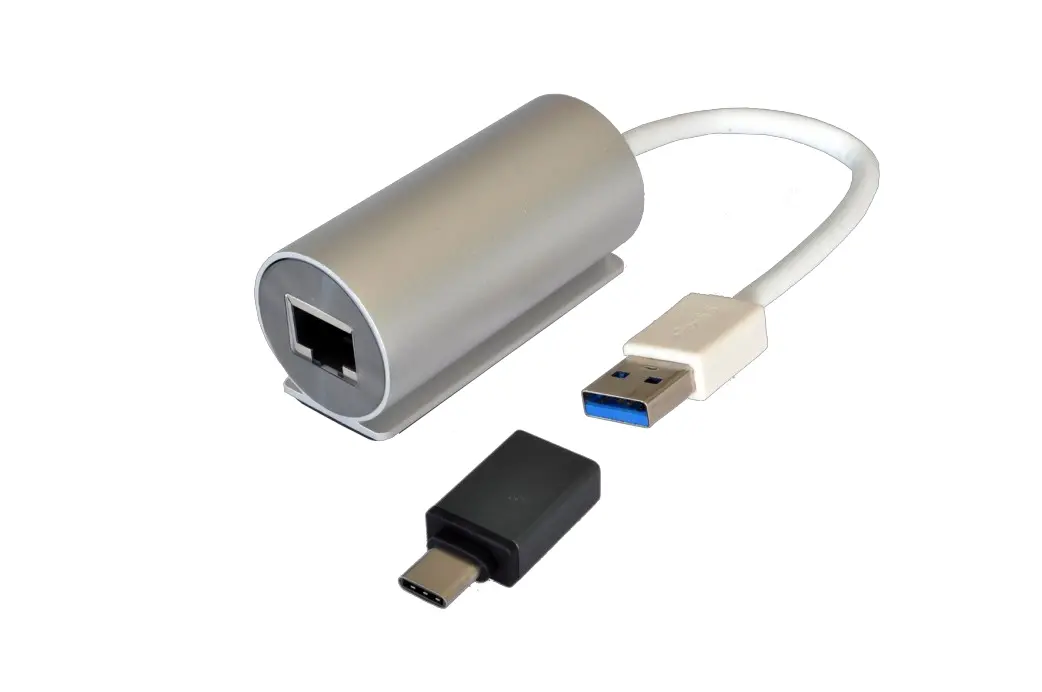
The EXSYS EX-1328 USB to Ethernet Network Card Wired 1000 Mbit/s provides a reliable wired internet connection for your desktop computer or notebook. Designed by Exsys, this device features a USB host interface and an Ethernet interface to expand your network capabilities. It offers stable performance with a maximum data transfer rate of 1000 Mbit/s, making it suitable for everyday office tasks, web browsing, and data transfer.
Advantages
The Exsys EX-1328 network card allows for straightforward integration into your existing setup without requiring you to open the computer system. Its compact and versatile design incorporates a stylish round case and includes an adapter with an A-female to C-male connector for broad compatibility. Because it supports standard networking protocols, it ensures reliable communication across various network environments.
Suitable for
- Expanding wired internet access on compatible notebooks and desktop computers
- Establishing stable network connections in office environments
- Providing backup or secondary network interfaces for compatible systems
When it may not be suitable
This network card may not be suitable if your device lacks an available USB port or if you require wireless connectivity, as it is strictly a wired solution. Additionally, devices requiring specialized enterprise-grade fiber optic connections will need alternative hardware.
Key specifications
- Connectivity technology: Wired
- Host interface: USB
- Interface: Ethernet
- Maximum data transfer rate: 1000 Mbit/s
- Networking standards: IEEE 802.3, IEEE 802.3u, IEEE 802.3x, IEEE 802.3ab, IEEE 802.3az
- Product colour: White, Black, Grey
- Weight: 0.2 kg
How to use
To use the EXSYS EX-1328 network card, connect the USB host interface to an available USB port on your compatible notebook or desktop computer, utilizing the included adapter if necessary. Connect an Ethernet cable from your router or switch to the Ethernet port on the device. The operating system will typically recognize the hardware, allowing you to complete any standard driver installation if prompted without needing to open your computer system.
What to consider before purchase
- Verify that your computer or notebook has an available USB port for connection
- Check that your network infrastructure supports gigabit speeds to fully utilize the maximum data transfer rate
- Confirm compatibility with your operating system prior to installation
For optimal network performance, always use certified Ethernet cables and ensure your operating system drivers are up to date before connecting the device.
Features
- Connectivity technology:
- Wired
- Interface:
- Ethernet
- Host interface:
- USB
- Maximum data transfer rate:
- 1000 Mbit/s
- Weight:
- 0.2 kg
- Networking standards:
- IEEE 802.3u, IEEE 802.3x, IEEE 802.3az, IEEE 802.3ab, IEEE 802.3
- Product colour:
- White, Black, Grey

Product comparison
The network card Exsys EX-1328 is compared with alternative network cards from brands such as Exsys, Digitus, InLine, and DeLOCK. All options provide wired Ethernet connectivity, but the key distinction lies in the host interface: the main product utilizes a USB host interface, whereas most alternatives are internal expansion cards designed to be installed inside a desktop computer via PCI Express or M.2 slots. This makes the parent product a versatile external solution, while competitors are geared towards permanent internal installation.
⚙️ Below is a comparison of technical specifications, covering connectivity technology, host interface, maximum data transfer rate, and port count.
| Parameter | Exsys EX-1328 | Exsys EX-60102 | Digitus Gigabit Ethernet | InLine 51125T | DeLOCK 89021 | DeLOCK 62949 | Practical significance |
|---|---|---|---|---|---|---|---|
| Connectivity technology | Wired | Wired | Wired | Wired | Wired | Wired | All devices deliver stable and reliable wired network connections. |
| Host interface | USB | PCI Express | PCIe | PCI Express | PCI Express 2.0 | M.2 | The USB interface of the parent product allows external connection without opening the computer case, unlike internal cards. |
| Maximum data transfer rate | 1000 Mbit/s | 1000 Mbit/s | 1000 Mbit/s | 2500 Mbit/s | 1000 Mbit/s | 1000 Mbit/s | Most cards support standard gigabit speed, except for the InLine model which offers an enhanced 2.5 Gbps speed. |
| Port count | 1 port | 1 port | 2 ports | Not specified | 2 ports | Not specified | Cards featuring two ports are beneficial for handling multiple network connections or creating local routing configurations. |
◎ The following table evaluates which product is best suited for specific use cases and system environments.
| Use case | Recommended product | Why |
|---|---|---|
| Connecting to a laptop or a PC without free internal expansion slots | Exsys EX-1328 | The external USB connection enables effortless setup without needing to open the computer casing. |
| Upgrading a desktop computer with a permanent internal card | Exsys EX-60102 | The PCI Express interface integrates seamlessly and securely inside standard desktop towers. |
| Expanding network capacity with dual ports in a workstation or server | Digitus Gigabit Ethernet or DeLOCK 89021 | Having two ports on a PCIe interface allows simultaneous multi-line network management. |
| High-bandwidth professional networking environments | InLine 51125T | Supports speeds up to 2500 Mbit/s for demanding data transfer requirements. |
| Compact system builds with dedicated internal slots | DeLOCK 62949 | Utilizes an M.2 host interface designed for modern space-saving motherboard configurations. |
The network card Exsys EX-1328 differs significantly from the alternative products by offering an external USB connection instead of requiring internal installation. It is most suitable for users who need reliable gigabit wired networking without opening their computer system, such as laptop users or systems lacking free PCIe slots. Competitor products are generally preferred for stationary desktop computers and servers where internal expansion cards are more appropriate.


