


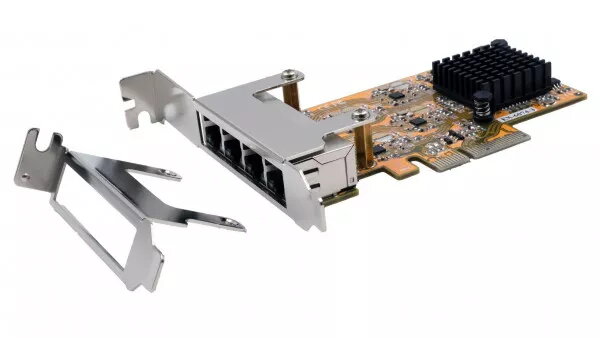
Internal Ethernet Network Card EXSYS EX-6074-3 1000 Mbit/s PCI Express
Offer for a legal entity, non-cash payment.
Short description

Cheapest delivery:
Unisend LV
Product information
Description
The Internal Ethernet Network Card EXSYS EX-6074-3 1000 Mbit/s PCI Express is designed to provide high-speed wired connectivity for desktop computers. Featuring a PCI Express host interface compatible with PCIe x4 to x16 slots, this network card delivers a maximum data transfer rate of up to 1000 Mbit per second per port. It utilizes individual Realtek chips for each output to ensure efficient processing and stable network performance. The sleek grey hardware design integrates easily into existing computer setups while offering reliable internet and local network access.
Advantages
This network card enhances overall network performance by supporting high data transfer speeds, making large file transfers faster and more efficient. It features NWay Auto-Negotiation to automatically adapt to network speeds of 10, 100, or 1000 Mbit/s, along with support for both Half and Full Duplex modes. The inclusion of Auto-MDI/MDI-X simplifies cable connection by automatically detecting straight-through and crossover cables. Additionally, the package includes a low profile bracket, enabling installation in slim computer cases with a height of up to 8 cm, thereby increasing hardware compatibility.
Suitable for
- Upgrading desktop computers with high-speed wired Ethernet connectivity
- Handling large data transfers across local networks efficiently
- Installation in standard desktop towers as well as slim computer cases using the included low profile bracket
- Environments requiring reliable and stable network connections compliant with multiple networking standards
When it may not be suitable
This internal network card is not suitable for laptops, mobile devices, or computers lacking an available PCI Express slot. It is also not designed for wireless network connectivity, as it exclusively supports wired Ethernet connections.
Key specifications
- Host interface: PCI Express (compatible with PCIe x4 to x16 slots)
- Connectivity technology: Wired Ethernet
- Maximum data transfer rate: 1000 Mbit/s per port
- Networking standards supported: IEEE 802.3, IEEE 802.3u, IEEE 802.3ab, IEEE 802.3x, IEEE 802.3az, IEEE 802.1p, IEEE 802.1Q
- Duplex modes: Half and Full Duplex
- Auto-Negotiation and Auto-MDI/MDI-X support
- Product colour: Grey
How to use
To use the network card, power off your desktop computer, disconnect it from the power source, and open the computer case. Insert the card firmly into an available PCI Express slot (x4 to x16) and secure it to the chassis. If using a slim computer case, replace the standard bracket with the included low profile bracket before installation. Close the computer case, connect the power, and turn on the system. Install the appropriate drivers for your operating system to enable full functionality, then connect your Ethernet cable to the port.
What to consider before purchase
- Verify that your computer motherboard has an available PCI Express slot ranging from x4 to x16.
- Check the physical dimensions of your computer case to determine whether the standard bracket or the included low profile bracket is required.
- Confirm that your operating system is supported by the network card drivers.
Usage recommendations: Ensure your computer is completely powered off and unplugged before installing internal components. Handle the card by its edges to avoid electrostatic discharge damage to sensitive electronic circuits.
Features
- Connectivity technology:
- Wired
- Interface:
- Ethernet
- Host interface:
- PCI Express
- Maximum data transfer rate:
- 1000 Mbit/s
- Networking standards:
- IEEE 802.3u, IEEE 802.3x, IEEE 802.3az, IEEE 802.3ab, IEEE 802.3, IEEE 802.1p, IEEE 802.1Q
- Product colour:
- Grey


