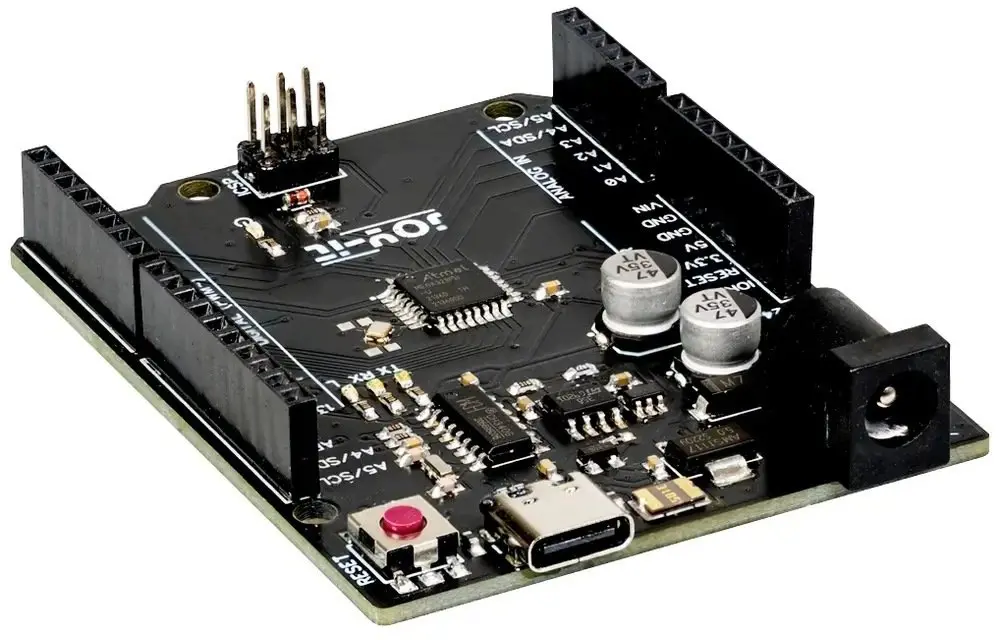
The Extralink ARD-One-C Microcontroller UNO Rev3 is a reliable and versatile development board designed for electronic projects, prototyping, and automation tasks. Based on the proven ATMega328 chip, this microcontroller is fully compatible with the Arduino UNO ecosystem, allowing users to leverage a vast library of existing code, shields, and tutorials. Featuring a modern USB-C interface for both programming and power supply, it bridges the gap between classic hardware design and contemporary connectivity standards, making it an essential tool for hobbyists, students, and professional developers alike.
Advantages
The integration of a USB-C interface ensures a secure, reversible, and modern connection for power and data transmission, eliminating the hassle of older USB standards. Full compatibility with Arduino UNO guarantees seamless integration with a wide variety of expansion shields, sensors, and actuators available on the market. Powered by the ATMega328 microcontroller, the board delivers stable processing performance suitable for a broad spectrum of embedded systems development. Its standardized layout provides easy access to digital and analog input/output pins, facilitating quick assembly and testing of custom electronic circuits without complicated wiring.
Suitable for
- Prototyping electronic circuits and embedded systems
- Educational projects and learning microcontroller programming
- Building home automation and sensor monitoring devices
- Small-scale robotics and DIY hardware projects
- Testing code and hardware shields compatible with Arduino UNO
When it may not be suitable
This microcontroller may not be appropriate for projects requiring high-speed data processing, complex operating systems, or heavy wireless communication, as it lacks built-in Wi-Fi and Bluetooth capabilities. It is also unsuited for industrial applications requiring specialized ruggedized certifications or extreme environmental resistance.
Key specifications
- Microcontroller: ATMega328
- Board compatibility: Arduino UNO Rev3
- Interface: USB-C for programming and power supply
- Digital I/O pins: Standard configuration matching UNO layout
- Analog input pins: Standard configuration matching UNO layout
How to use
To begin using the Extralink ARD-One-C, connect the board to a computer using a compatible USB-C cable. Ensure that the appropriate development environment, such as the Arduino IDE, is installed on your system. Select the correct board and port settings within the software environment to establish communication. Write your code or load an existing sketch, then upload it to the microcontroller. Once uploaded, connect your sensors, actuators, or shields to the corresponding digital and analog pins to execute your intended electronic project or automation task.
What to consider before purchase
- Verify that your project requirements align with the processing capabilities of the ATMega328 chip
- Ensure you have a suitable USB-C cable for connection to your computer
- Check compatibility if you plan to use specific hardware shields or advanced peripheral modules
- Determine whether your application requires onboard wireless connectivity, which this model does not provide
Always disconnect the microcontroller from the power source before modifying physical circuit connections to prevent accidental damage to the components.