Leave your address - as soon as the price of the product goes down, you'll know about it right away
Monitor Mount Fellowes LDT66-T01 single-arm stand-alone monitor arm
In cart {{totalProductsCount}} item(s)
Your cart is empty
Monitor Mount Fellowes LDT66-T01 single-arm stand-alone monitor arm
Leave your address - as soon as the price of the product goes down, you'll know about it right away
Monitor Mount Fellowes LDT66-T01 single-arm stand-alone monitor arm
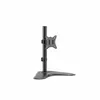
Monitor mount Fellowes LDT66-T01 single-arm stand-alone monitor arm is a single-arm mounting solution designed to hold one VESA-compatible display. The arm attaches to a desk surface and provides adjustable height, tilt and swivel for ergonomic positioning of a single screen. The stand-alone design keeps the installation compact and is suitable for individual workstations in offices, home setups and shared spaces where desk space efficiency and display adjustability are required.
The single-arm construction delivers stable support for one monitor while enabling smooth height adjustment, tilt and swivel movements to place the screen at a comfortable viewing angle. The stand-alone clamp/base option minimises desk footprint and eliminates the need for multiple mounting points. Compatibility with standard VESA patterns ensures straightforward installation with a wide range of modern monitors. Cable routing along the arm keeps cables organised and reduces clutter around the work area.
Mount the Fellowes LDT66-T01 arm to the desk using the supplied clamp or base following the manufacturer’s fitting instructions. Attach a VESA-compatible monitor to the arm’s mounting plate and tighten the mounting screws to secure the display. Adjust the arm height, tilt and swivel to align the screen with eye level and the desired viewing angle. Route display cables along the integrated cable management channels to maintain a tidy workspace. Make small incremental adjustments to find a comfortable ergonomic position and recheck mounting points periodically to ensure continued stability.
Verify monitor weight and VESA pattern compatibility before installation and follow the desk thickness limits for correct clamp/base mounting. Adjust screen position gradually and use cable management to prevent strain on connector ports.
{{highlightedFeature.featureTitle}}:
{{getProductFeatureValueById(product, highlightedFeature.featureId)}}