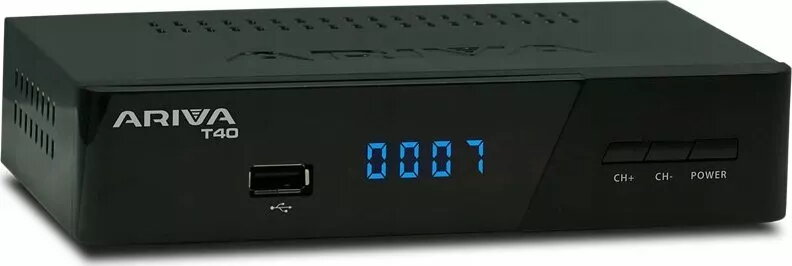
The Ferguson Ariva T40 is a high-definition satellite receiver engineered to provide clear and stable signal reception for digital satellite television. This compact device serves as a central hub for your home entertainment, combining reliable broadcast decoding with versatile multimedia functionality. By integrating a USB port, the receiver supports external storage devices, allowing users to expand their viewing experience beyond live broadcasts through recording and media playback features.
Advantages
This receiver offers a seamless balance between performance and ease of use. Its high-definition output ensures that television content is displayed with clarity, while the inclusion of PVR functionality allows users to record their favorite programs directly to an external drive. The compact design ensures that the unit fits discreetly into any home theater setup without occupying significant space. Furthermore, the intuitive interface simplifies channel management and media navigation, making it accessible for users of all technical levels.
Suitable for
- Viewing high-definition digital satellite television channels.
- Recording live television programs for later viewing via external USB storage.
- Playing back multimedia files such as photos, music, and videos from external drives.
- Users looking for a compact and reliable satellite signal decoder.
When it may not be suitable
This device is designed specifically for satellite signal reception and will not function with terrestrial (DVB-T/T2) or cable (DVB-C) television signals. Additionally, it does not feature built-in internet connectivity or smart streaming applications, making it unsuitable for users who primarily rely on online video-on-demand services.
Key specifications
- High-definition signal processing.
- Integrated USB port for external storage.
- PVR (Personal Video Recorder) functionality.
- Support for common multimedia file formats.
- Compact and lightweight chassis.
How to use
To begin using the Ferguson Ariva T40, connect your satellite dish cable to the designated input port on the rear panel. Connect the receiver to your television using a compatible high-definition cable. Once powered on, follow the on-screen menu prompts to perform an initial channel scan to detect available satellite broadcasts. To utilize recording or media playback features, insert a formatted USB storage device into the front or rear port and navigate to the media menu using the remote control.
What to consider before purchase
- Ensure your satellite dish is correctly aligned and compatible with the receiver.
- Verify that your television has an available input port matching the receiver output.
- Check if your external USB drive is formatted in a file system compatible with the receiver for recording purposes.
Usage recommendations
For the best performance, use a high-speed USB flash drive or external hard drive for recording functions to prevent data errors. Keep the device in a well-ventilated area to maintain optimal operating temperatures during extended use.