Powerful EcoFlow stations for energy anywhere!
In cart {{totalProductsCount}} item(s)
Your cart is empty
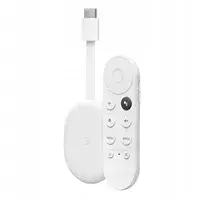
Google Chromecast HD Smart TV Dongle with Android
The Google Chromecast HD is a compact and efficient Smart TV dongle designed to upgrade your viewing experience by connecting directly to your television's HDMI port. Running on the intuitive Android operating system, this device provides seamless access to a vast library of streaming services, applications, and digital content. With support for 1080p high-definition resolution, it delivers crisp and clear visuals for your favorite movies, shows, and videos. The device is powered via a USB connection and features a sleek, minimalist white aesthetic that blends discreetly with any home entertainment setup.
One of the primary benefits of the Google Chromecast HD is its ability to turn virtually any display with an HDMI input into a fully functional smart media player. The integration of dual-band Wi-Fi 5 ensures a stable and reliable connection, minimizing buffering during high-definition playback. Its compact form factor allows it to remain hidden behind the television, keeping your entertainment area clean and organized. Furthermore, the Android-based interface is user-friendly, offering personalized recommendations and easy navigation through various content platforms.
This device is optimized for 1080p resolution and does not support 4K Ultra HD streaming. If you own a 4K television and wish to utilize its full resolution capabilities, this specific model may not meet your requirements.
To begin using the Google Chromecast HD, simply plug the device into an available HDMI port on your television and connect the provided USB power cable. Once powered on, switch your television input to the corresponding HDMI source and follow the on-screen instructions to connect the device to your local Wi-Fi network. After the initial setup is complete, you can navigate the interface using the included remote or cast content directly from your smartphone, tablet, or computer.
For the best streaming experience, ensure the device is placed in an area with a strong Wi-Fi signal and keep the software updated to the latest version provided by the manufacturer.
{{highlightedFeature.featureTitle}}:
{{getProductFeatureValueById(product, highlightedFeature.featureId)}}
{{ productComparisonGenerationError }}