{{ totalProductsCount }}

In cart {{totalProductsCount}} item(s)

Total:
{{sum | formatAmount}}

Your cart is empty

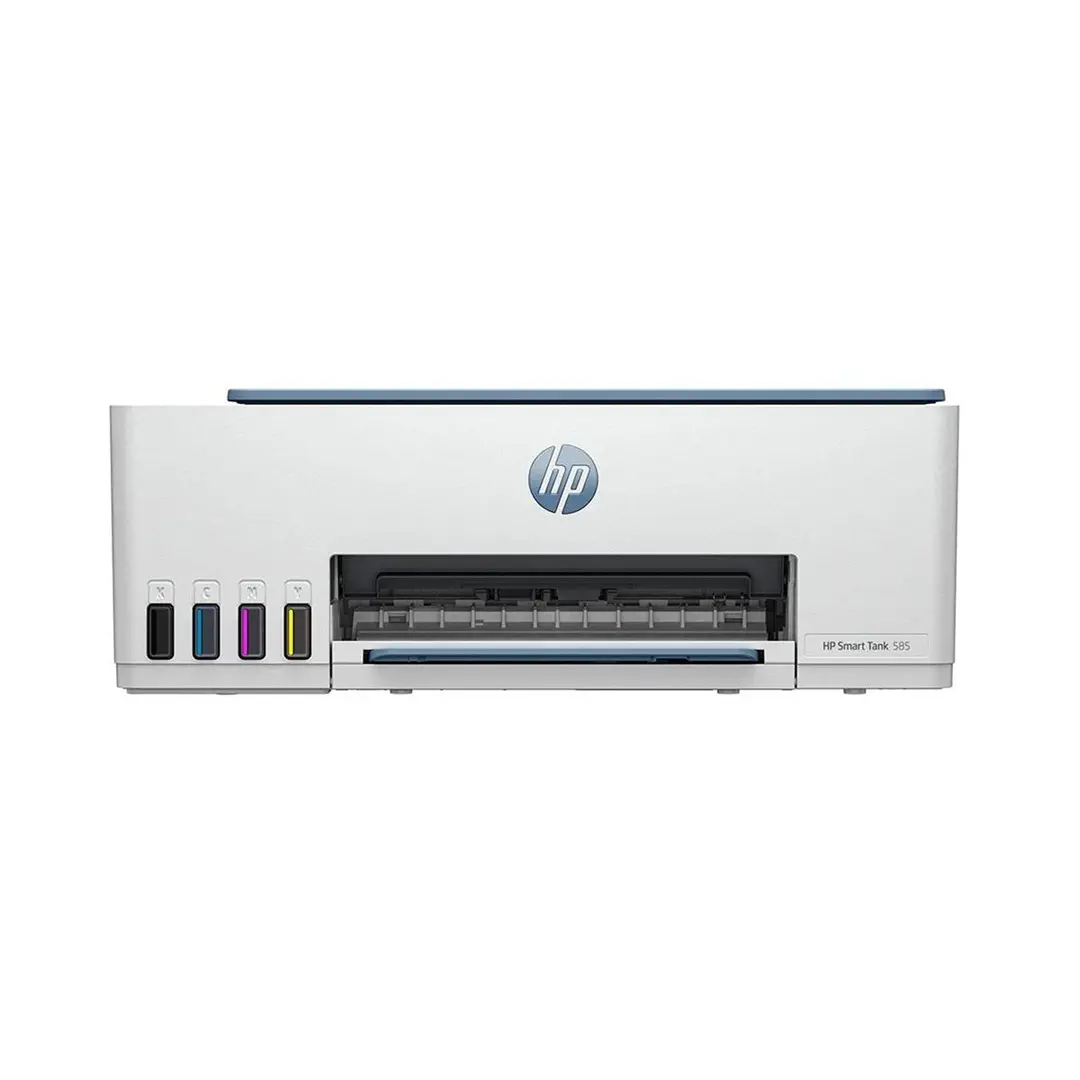
header-product Hewlett Packard Smart Tank 585 1F3Y4A Multifunction Printer 3-in-1

Hewlett Packard Smart Tank 585 1F3Y4A Multifunction Printer 3-in-1

Hewlett Packard Smart Tank 585 1F3Y4A Multifunction Printer Photo 1
Out of stock.
View similar!

Short description

Hewlett Packard Smart Tank 585 1F3Y4A 3-in-1 multifunction device designed for printing, scanning, and copying. This reliable inkjet printer features an integrated ink tank system for high-volume, cost-effective printing at home or in small offices. It delivers sharp text and vibrant color documents while ensuring seamless connectivity and user-friendly operation.
Warranty: 2 Years
SKU: 12669136
Manufacturer: Hewlett Packard
delivery
Information regarding the items availability for purchase will be posted on this site
price
Item cost information will be published on this site
Together cheaper
{{product.price | formatAmount}}
{{product.title}}
{{productBundle.reference.specialPrice | formatAmount}}
{{productBundle.title}}
{{productBundlePreviousPrice | formatAmount}}
{{productBundleSpecialPrice | formatAmount}}

You saving {{productBundleYouSave | formatAmount}}

Product information

Description

The Hewlett Packard Smart Tank 585 1F3Y4A Multifunction Printer 3-in-1 is a reliable inkjet printing solution designed to handle everyday printing, scanning, and copying tasks with ease. Featuring an integrated ink tank system, this device is built to deliver high-volume and cost-effective document output for home environments and small offices. Combining sharp text reproduction with vibrant color output, it meets diverse document needs while maintaining efficient operation and seamless connectivity.

Advantages

This multifunction printer utilizes an innovative integrated ink tank system that significantly reduces printing costs per page while minimizing the need for frequent cartridge replacements. The transparent tanks allow for effortless ink level monitoring at a glance, preventing unexpected interruptions during important tasks. Designed to deliver crisp, professional-quality text and vivid graphics, the device ensures consistent results across a wide variety of documents. Its versatile 3-in-1 functionality consolidates printing, scanning, and copying into a single compact unit, saving valuable desk space in home or office settings.

Suitable for

  • Printing everyday documents, reports, and school assignments
  • Scanning contracts, forms, and photographs to digital formats
  • Copying text and image materials quickly without a computer
  • Small office and home office environments requiring cost-effective color output

When it may not be suitable

This device may not meet the demands of enterprise-level offices requiring extremely high monthly duty cycles and ultra-fast industrial printing speeds. Additionally, users who primarily print professional photographic materials on specialty heavy-weight photo paper may require a dedicated photo printer with a higher color count.

Key specifications

  • Device type: 3-in-1 multifunction printer
  • Functions: Printing, scanning, copying
  • Technology: Inkjet with integrated ink tank system
  • Output: Color and monochrome

How to use

Unbox the printer and place it on a stable, flat surface near a power outlet and your computer or Wi-Fi router. Fill the integrated ink tanks using the supplied bottles, following the color-coded indicators to ensure accurate placement. Load standard paper into the input tray and adjust the paper guides gently to secure the stack. Install the print heads according to the on-screen instructions or the setup guide. Connect the printer to your computer or mobile device using the available network or USB options, install the recommended driver software or application, and complete the alignment process before initiating your first print, scan, or copy job.

What to consider before purchase

  • Evaluate your average monthly printing volume to ensure compatibility with an inkjet tank system
  • Verify available desk space to accommodate the physical dimensions of the 3-in-1 device
  • Check compatibility with your existing operating systems and network setup
  • Consider whether color printing capabilities are necessary for your workflow
Usage recommendations: Keep the ink tanks filled above the minimum line and perform regular print head maintenance cycles through the printer software to ensure optimal print quality and prevent nozzle clogs over extended periods of non-use.

Description

Machine translation.

Similar products

{{product.title}}
Show details Hide details

{{highlightedFeature.featureTitle}}:

{{getProductFeatureValueById(product, highlightedFeature.featureId)}}

{{product.price | formatAmount}}

Product comparison

The Hewlett Packard Smart Tank 585 1F3Y4A Multifunction Printer 3-in-1 is compared against several similar options designed for home and office environments: HP Smart Tank 585 (alternative listing), HP Smart Tank 750, Brother DCP-T436W, and HP Smart Tank 7305. All of these products share an integrated ink tank system for cost-effective color printing, scanning, and copying, alongside wireless Wi-Fi connectivity. The main differences lie in monthly duty cycles, paper tray capacities, automatic duplex printing support, fax capabilities, and internal memory.

⚙️ The table below compares key technical characteristics: print technology, monthly duty cycle, paper input capacity, and duplex printing support.

SpecificationHP Smart Tank 585HP Smart Tank 750Brother DCP-T436WHP Smart Tank 7305Practical significance
Device type3-in-1 (print, scan, copy)All-in-one with fax3-in-1 (print, scan, copy)3-in-1 (print, scan, copy)All models handle core everyday tasks, but the HP Smart Tank 750 adds fax functionality.
Print technologyThermal inkjetThermal inkjetInkjetThermal inkjetDelivers sharp text and vibrant color output for documents and photos alike.
Input capacity100 sheets250 sheetsStandard home capacity250 sheetsModels with 250-sheet input trays require less frequent paper reloading during busy print jobs.
Automatic duplex printingNo (copy only)Yes (print, copy, scan)NoYes (print only)Duplex support saves paper and increases efficiency when handling multi-page documents.

◎ The table below evaluates which product is most suitable for different user needs and usage scenarios.

Use caseRecommended productWhy
Standard home office and everyday document tasksHewlett Packard Smart Tank 585 1F3Y4A Multifunction Printer 3-in-1A well-balanced, cost-effective choice for households and small offices needing reliable color printing and scanning without extra enterprise features.
High-volume office workflows and heavy printingHP Smart Tank 750Offers a much larger paper capacity and automatic duplexing, making it better suited for heavier document workloads.
Alternative choice for basic wireless printingBrother DCP-T436WProvides a similar straightforward feature set from Brother for everyday home document management.

Hewlett Packard Smart Tank 585 1F3Y4A Multifunction Printer 3-in-1 differs from the alternative models by offering a streamlined, highly cost-effective ink tank solution tailored to everyday users without burdening you with heavy-duty enterprise features. It is most suitable for home offices, students, and small workgroups that require dependable color documents and wireless convenience. A buyer would prefer this model over higher-end alternatives when they want reliable tank-based printing without paying for advanced high-volume office capabilities they do not need.

Might be useful
{{product.manufacturerName}}
{{product.categoryName}}
{{product.title}}
{{product.specialPrice}}
{{product.price}}

Customer reviews

Customer questions

FAQ

What payment options are available?

AiO.lv offers several payment methods: Bank transfer. All transactions are 100% secure and encrypted.

Can this product be purchased for a company (with VAT)?

Yes. AiO.lv works with legal entities in Latvia and across Europe. The product price already includes VAT. For certain product categories, as well as for companies from other EU countries with a valid VAT number, a 0% VAT rate may apply. We issue the invoice immediately after the order is placed, support electronic BIS invoices, and automatically generate all necessary accounting documents. You can complete the purchase for a company online — simply select the company profile and choose bank transfer as the payment method during checkout.

What is the warranty period?

All Hewlett Packard products come with an official 2 Years warranty. It covers all manufacturing defects and malfunctions that may occur during use. The warranty is valid at all authorized Hewlett Packard service centers and through AiO.lv

Can the product be returned after purchase?

Yes, you can return the product within 14 days of purchase if you bought it as a consumer (not a legal entity). Returns are possible without giving any reason — the main condition is that the product retains its original appearance and full set of accessories. We will make the process as simple and convenient as possible: just contact our customer support team, and we will help you arrange the return.

Where should I contact for warranty service?

For warranty-related questions you can contact the AiO.lv (SIA VSPRO) customer support team. We will assist with consultation, warranty claim processing, and coordination with certified service centers.
warranty
14-Day Return Policy We are confident in our quality, but if the purchase doesn’t fit — you have 14 days to return the product with peace of mind.
shipping
Fast Delivery Get your orders as quickly as possible — right to your door, parcel lockers, or pickup points across Latvia and the EU.
payment
Secure Payment Pay the way you prefer: cash, VISA, MasterCard, Apple Pay, Google Pay, bank transfer, or 0% installment plan.
warranty
Quality Since 2008 AiO.lv has been on the market for over 18 years and has earned trust — with more than 6000 genuine positive reviews on Google.