Hurry and order now – up to 50% off!

{{ totalProductsCount }}
In cart {{totalProductsCount}} item(s)
In cart {{totalProductsCount}} item(s)
Total:
{{sum | formatAmount}}
Your cart is empty
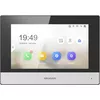 Video Intercom System Hikvision DS-KH6320-WTE2
Product specification Video Intercom System Hikvision DS-KH6320-WTE2
Manufacturer:
Hikvision
Category:
Control Systems
Description
The Hikvision DS-KH6320-WTE2 is a 7-inch video intercom system featuring an LCD/TFT display with a resolution of 1024 x 600 pixels. It supports Wi-Fi standards 802.11b/g/n and network protocols like TCP/IP and SIP. With a compact design (200mm width, 15.1mm depth, 140mm height) and low power consumption of 6W, it is ideal for modern homes. The sleek black and grey finish adds a touch of elegance.
The Hikvision DS-KH6320-WTE2 is a 7-inch video intercom indoor station designed for residential control systems. It features an LCD/TFT display with a 1024 x 600 pixel resolution and supports Wi‑Fi 802.11b/g/n connectivity as well as common network protocols such as TCP/IP and SIP. The unit has a compact form factor with a width of 200 mm, height of 140 mm and depth of 15.1 mm, consumes 6 W of power, and is finished in black and grey. The DS-KH6320-WTE2 can be used as part of a two‑wire video intercom solution that includes outdoor stations and a two‑wire distributor, enabling power and audio/video transmission over minimal cabling and straightforward integration with CCTV and mobile remote access.
Advantages
The DS-KH6320-WTE2 combines a high-resolution 7-inch display with low power consumption, enabling clear visual communication while keeping energy use minimal. Its support for Wi‑Fi and standard IP/SIP protocols allows for network integration and remote control via compatible mobile applications. The compact dimensions and slim profile make it suitable for wall mounting in a range of interiors. Use in a two‑wire system reduces installation complexity by allowing reuse of existing wiring and simplifies upgrades from older intercom installations.
Suitable for
- Residential apartments and houses requiring a wall‑mounted indoor intercom display
- Upgrading existing two‑wire intercom installations to a video-capable system
- Integrating with home CCTV systems for centralized monitoring
- Properties where remote access and SIP/TCP‑IP connectivity are desired
Key specifications
- Display: 7-inch LCD/TFT, 1024 x 600 pixels
- Network: Wi‑Fi 802.11b/g/n, TCP/IP, SIP protocol support
- Power consumption: 6 W
- Dimensions: 200 mm (W) × 140 mm (H) × 15.1 mm (D)
- Finish: black and grey
- System compatibility: two‑wire intercom architectures with outdoor station and distributor; integration with CCTV and mobile app control
How to use
Mount the indoor station on a suitable wall location at comfortable viewing height and connect it to the two‑wire distributor according to the system wiring diagram, using the provided power and audio/video lines. Configure network settings to connect the unit to the local Wi‑Fi network or wired IP system and register the device with a SIP server if required for VoIP calling. Pair the indoor station with outdoor stations through the two‑wire distributor and verify video, audio, and call functions. Install the manufacturer’s mobile application and follow its setup steps to enable remote viewing and notifications.
Usage recommendations
Place the indoor station where the display is easily visible from primary living areas and avoid direct sunlight on the screen to maintain image clarity. When upgrading an older two‑wire system, inspect existing cabling for continuity and shielding; replacing damaged sections before installation will ensure optimal video and audio performance. For remote access, secure the network with strong Wi‑Fi credentials and, where available, enable manufacturer-recommended encryption or firewall rules.
Specifications
- Colour:
- Yes
- Wi-Fi standards:
- Wi-Fi 4 (802.11n), 802.11g, 802.11b
- Power consumption (typical): Power consumption in switched-on state expressed in W.
- 6 W
- Supported network protocols:
- TCP/IP, SIP, RTSP
- Operating relative humidity (H-H):
- 10 - 90
- Compatible memory cards:
- MicroSD (TransFlash)
- Display diagonal: iagonal of the visible part of the screen expressed in centimeters and inches.
- 7 "
- Built-in microphone:
- Yes
- Operating temperature (T-T):
- -10 - 55
- Height:
- 140 mm
- Display resolution:
- 1024 x 600
- Width:
- 200 mm
- Depth:
- 15.1 mm
- Connectivity technology:
- Wireless
- Product colour:
- Grey, Black
- Voice codecs:
- G.711u
- Built-in speaker(s):
- Yes
- Operating system installed:
- Linux
- Wi-Fi:
- Yes
- Touchscreen:
- Yes
- Noise-canceling:
- Yes
- Maximum memory card size:
- 32 GB
- Echo cancellation:
- Yes
- Touchscreen type:
- Capacitive
- Display technology:
- LCD/TFT
- Memory card slot:
- Yes
- Indoor unit included:
- Yes
- Outdoor unit included:
- No

Reasons to buy
Built for Effortless Communication
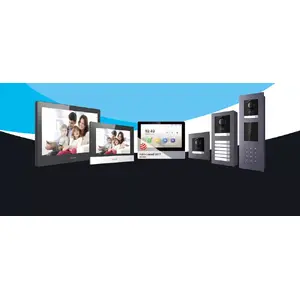
Hikvision's Video Intercom line offers a comprehensive range of products to enable more efficient and convenient two-way audio and video verification for entry control. Choose from our high-performance IP-based products, analog-based products, or 2-wire products to suit your project needs.All products can be configured and managed easily using the iVMS-4200 platform. If you are using the IP or 2-wire video intercom products, our mobile app gives you the power of remote operation. Use it to receive calls, play video, and even unlock the door.Our video intercom systems can also be integrated with CCTV and alarm systems. This adds protection for video intercom products used in residential areas or commercial premises that require higher security levels.