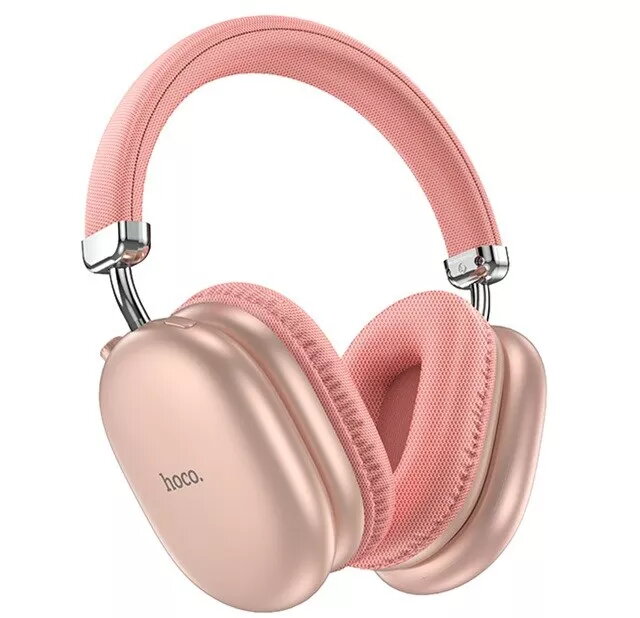
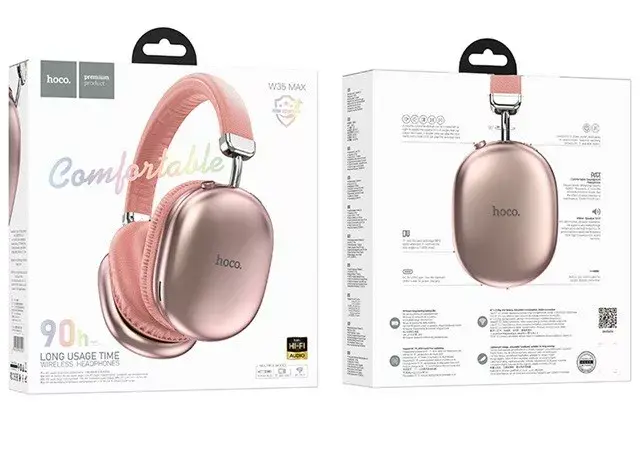
The Hoco W35 Max Joy Wireless Bluetooth Headset in pink is designed to deliver a high-quality audio experience combined with a modern, stylish aesthetic. These headphones utilize advanced Bluetooth 5.0 technology to ensure a stable and seamless connection with your smartphone, tablet, or laptop, allowing you to enjoy your favorite music and media without the restriction of cables. The ergonomic design focuses on user comfort, making them suitable for extended listening sessions, while the integrated controls provide effortless management of your audio playback and incoming calls.
Advantages
The primary benefit of the Hoco W35 Max Joy is its combination of reliable wireless performance and long-lasting battery life, which ensures that your device remains ready for use throughout the day. The headset offers excellent noise isolation, effectively reducing ambient sounds to provide a more immersive listening experience. Furthermore, the lightweight construction and soft ear cushions contribute to a comfortable fit, while the intuitive interface allows for quick adjustments to volume and track selection without needing to reach for your connected device.
Suitable for
- Daily music listening and media consumption
- Taking hands-free phone calls while on the move
- Commuting and traveling
- Office work or remote learning environments
When it may not be suitable
This headset may not be the ideal choice for professional studio recording or high-end audiophile monitoring where extreme sound accuracy is required. Additionally, users who prefer wired connections for zero-latency gaming or those who require specialized water resistance for intense athletic activities might find other specialized models more appropriate.
Key specifications
- Connectivity: Bluetooth 5.0
- Color: Pink
- Integrated microphone for calls
- On-ear control buttons
- Long-lasting battery capacity
How to use
To begin using the Hoco W35 Max Joy, ensure the headset is fully charged using the provided cable. Activate Bluetooth on your mobile device and put the headset into pairing mode by holding the power button until the indicator light flashes. Select the headset from the list of available Bluetooth devices on your phone to establish a connection. Once paired, you can use the physical buttons on the earcups to play or pause music, adjust the volume, and answer or end phone calls.
What to consider before purchase
- Compatibility with your specific Bluetooth-enabled devices
- The physical fit and size of the headband for your comfort
- Your typical usage environment and need for noise isolation
- Charging requirements and battery life expectations
Usage recommendations
For optimal performance, keep the headset firmware updated if applicable and ensure the charging port remains clean and free of debris. Store the device in a cool, dry place when not in use to maintain the integrity of the battery and materials.