Filters you can trust. Pure water every day.
In cart {{totalProductsCount}} item(s)
Your cart is empty
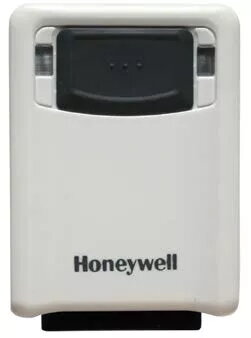
Fixed bar code reader Honeywell Vuquest 3320g
The Honeywell Vuquest 3320g compact area-imaging scanner is a fixed barcode reader designed for reliable 1D and 2D barcode capture in retail, light industrial and kiosk environments. Lightweight and small, the device delivers aggressive decoding of 1D, PDF and 2D codes and supports digital image capture. Powered by Adaptus Imaging Technology 6.0 and compatible with TotalFreedom 2.0 plug-ins, the Vuquest 3320g provides flexible on-device decoding and formatting while offering wired connectivity options such as RS-232, USB and keyboard wedge.
The Vuquest 3320g combines a compact, ergonomic design with robust scanning performance: aggressive reading of barcodes on reflective surfaces (including mobile phone screens), low visible illumination to reduce user discomfort, universal mounting options and dependable presentation-mode scanning. Its external I/O control enables triggering of peripherals (beepers, photo eyes or illumination), expanding its use beyond typical handheld tasks. The scanner’s low weight and slim profile make it suitable for handheld, wearable or fixed-mount installations.
Connect the Vuquest 3320g to your host system using the appropriate wired interface (USB, RS-232 or keyboard wedge), mount the scanner in handheld or fixed presentation position as required, and configure decoding settings using Honeywell configuration tools or on-device programming. Aim the scanner at the barcode so the imaging window captures the code; the device will decode and transmit the data to the host. Use presentation mode for fixed installations and the thumb-activated trigger for handheld or wearable use.
Install the scanner in a stable position for fixed-mount use and verify external I/O connections when integrating peripherals. For consistent read rates, keep the imaging window clean and ensure adequate, non-reflective lighting; enable TotalFreedom 2.0 plug-ins only when needed to support proprietary symbologies.
{{highlightedFeature.featureTitle}}:
{{getProductFeatureValueById(product, highlightedFeature.featureId)}}
{{ productComparisonGenerationError }}