Dreame vacuums for fast and efficient cleaning!
In cart {{totalProductsCount}} item(s)
Your cart is empty
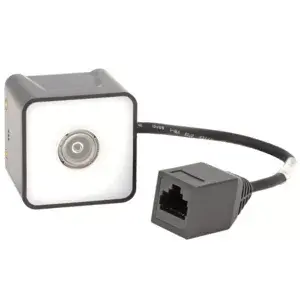
Honeywell HF520 barcode scanner kit HF520-R1-0USB with 50 cm scan range, USB interface
Honeywell HF520 barcode scanner kit HF520-R1-0USB is a compact wired scanner designed for short- to medium-range barcode reading. The kit offers a 50 cm maximum scan range and connects to POS terminals or PCs via a USB interface. It is intended for retail points of sale, inventory management and logistic checkpoints where reliable, fast capture of printed barcodes is required. The plug-and-play design and compact form factor allow quick deployment on counters or workstations without complex installation.
The scanner provides accurate capture of linear printed barcodes at distances up to 50 cm and transmits decoded data over a standard USB connection for immediate use by POS or inventory software. Its compact housing and ergonomic shape reduce desk footprint while supporting repeated scanning tasks. The kit configuration includes the necessary cabling for direct connection to host systems, enabling a straightforward, no-driver setup in most operating environments.
Connect the Honeywell HF520 scanner to a USB port on a POS terminal or computer using the supplied cable. Position items so the printed barcode faces the scanner window and trigger the read using the scanner’s built-in activation method. The decoded data will appear in the active input field of the connected application as if entered from a keyboard, enabling immediate processing in checkout or inventory software. For continuous scanning workflows, mount the scanner on a counter or stand if available and adjust the item positioning to maintain the recommended scan distance.
For optimal performance with printed barcodes, clean the scanner window regularly and ensure labels are not wrinkled or heavily soiled. Use the scanner within the specified 0–50 cm range and test integration with your POS or inventory application prior to full deployment to confirm field mapping and input behavior.
{{highlightedFeature.featureTitle}}:
{{getProductFeatureValueById(product, highlightedFeature.featureId)}}
{{ productComparisonGenerationError }}