
{{ totalProductsCount }}

In cart {{totalProductsCount}} item(s)

Total:
{{sum | formatAmount}}

Your cart is empty

header-product Label printer Honeywell PD4500B

Label printer Honeywell PD4500B

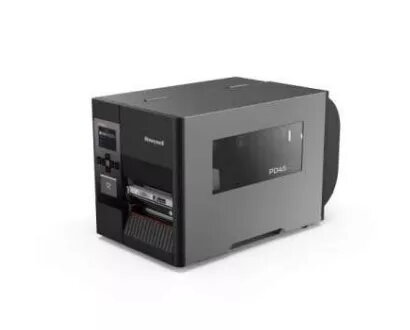
Label printer PD4500B Photo 1
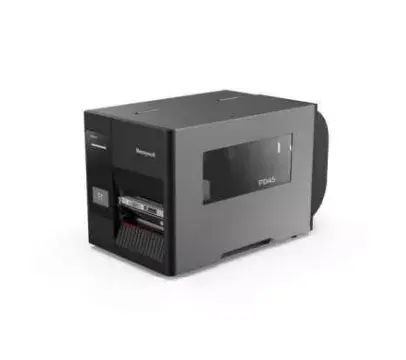
Label printer PD4500B Photo 2
Label printer PD4500B Photo 1
Label printer PD4500B Photo 2
Out of stock.
View similar!

Short description

The Honeywell PD4500B label printer features direct thermal and thermal transfer printing technologies with a maximum resolution of 203 x 203 DPI. It offers a fast print speed of 200 mm/sec and is designed for wired connectivity. The sleek black design makes it a stylish addition to any workspace, while its high performance ensures efficient label printing for various applications.
Warranty: 2 Years
SKU: 4329980

delivery
Information regarding the items availability for purchase will be posted on this site
price
Item cost information will be published on this site
Together cheaper
{{product.price | formatAmount}}
{{product.title}}
{{productBundle.reference.specialPrice | formatAmount}}
{{productBundle.title}}
{{productBundlePreviousPrice | formatAmount}}
{{productBundleSpecialPrice | formatAmount}}

You saving {{productBundleYouSave | formatAmount}}

Product information

Description

The Honeywell PD45 (PD4500B) is a commercial-grade label printer designed for manufacturing, retail, transportation and logistics, healthcare, and government environments. It supports both direct thermal and thermal transfer printing and includes smart printing capability that lets users run apps inside the printer to configure and fine-tune settings without a host PC. The printer uses an Arm Cortex‑A7 800 MHz processor, 128 MB flash and 128 MB DDR3 SDRAM, and supports multiple printer languages (FP/DP/IPL/ZPL/DPL). Its metal frame, minimal internal mechanical parts and compact design provide durability, while a large glass window and side-opening cover simplify status checking and media loading. The PD45 (PD4500B) model offers a maximum print width of 108 mm, print speed up to 200 mm/sec and a 203 x 203 dpi resolution, in a black housing weighing approximately 9.25 kg.

Advantages

The PD45 combines a robust all-metal frame and reduced internal moving parts for increased durability and a compact footprint. Smart printing capability and support for multiple printer command languages reduce reliance on host computers and simplify integration. Dual media guides, two adjustable pressure bars and patented dual sensor positioning deliver accurate media handling with a minimum label height of 5 mm and vertical position accuracy of 0.75 mm. Tool-free access to the print head, removable front sensor and a large viewing window make maintenance and consumable replacement straightforward.

Suitable for

  • High-volume label printing in manufacturing and warehousing
  • Retail and point-of-sale labeling
  • Shipping, transportation and logistics labels
  • Healthcare labeling and specimen tracking
  • Government and institutional labeling tasks

Key specifications

  • Print technology: Direct thermal / Thermal transfer
  • Maximum print width: 108 mm
  • Resolution: 203 x 203 dpi
  • Maximum print speed: 200 mm/sec
  • Processor & memory: Arm Cortex‑A7 800 MHz; 128 MB flash; 128 MB DDR3 SDRAM
  • Supported printer languages: FP / DP / IPL / ZPL / DPL
  • Display: LED
  • Product colour: Black
  • Weight: 9.25 kg

How to use

Open the side cover for ribbon and media loading using the side-opening mechanism, place labels and ribbon on the appropriate spindles and adjust the double media guides and pressure bars for correct alignment. Install the printer driver via onekey installation or configure settings using the built-in apps to fine-tune print parameters. For switching between direct thermal and thermal transfer modes, install or remove ribbon as required and select the proper print mode in the printer settings. Replace the print head or front sensor by following the tool-free access steps to avoid damage and facilitate cleaning of the rubber roller.

Usage recommendations

Use media and ribbon types that match the chosen printing mode (direct thermal media for direct thermal mode; compatible thermal transfer ribbon for thermal transfer) and keep the viewing window and sensors clean for consistent print quality. Regularly inspect and adjust pressure bars and media guides to prevent ribbon wrinkles and maintain accurate media feeding. When integrating into existing systems, verify language/command compatibility (FP/DP/IPL/ZPL/DPL) and use the printer’s internal apps to minimize host PC dependencies.

Specifications

Ethernet LAN:
No
Display:
LED
Print technology:
Direct thermal / thermal transfer
Print speed:
200 mm/sec
Weight:
9.25 kg
Maximum printing width:
108 mm
Product colour:
Black
All features

Ports & interfaces

Ethernet LAN:
No
Connectivity technology:
Wired
RS-232 ports:
1
USB port:
Yes

Logistics data

Harmonized System (HS) code:
84433210

Operational conditions

Operating relative humidity (H-H):
20 - 85
Storage temperature (T-T):
-20 - 70
Operating temperature (T-T):
5 - 40
Storage relative humidity (H-H):
20 - 85

Power

AC input frequency:
50 - 60
AC input voltage:
100 - 240

Design

Display:
LED
Display diagonal: iagonal of the visible part of the screen expressed in centimeters and inches.
2.36 "
Product colour:
Black

Printing

Colour:
No
Maximum resolution:
203 x 203
Print technology:
Direct thermal / thermal transfer
Print speed:
200 mm/sec
Maximum printing width:
108 mm
Minimum print length:
4800 mm

Weight & dimensions

Weight:
9.25 kg
Height:
270 mm
Width:
249 mm
Depth:
438 mm

Paper handling

Ribbon length:
450 m
Maximum roll diameter:
80 mm
Ribbon width:
110 mm

Description

Machine translation. Load original

Similar products

{{product.title}} Show details Hide details

{{highlightedFeature.featureTitle}}:

{{getProductFeatureValueById(product, highlightedFeature.featureId)}}

{{product.price | formatAmount}}
Might be useful
{{product.manufacturerName}}
{{product.categoryName}}
{{product.title}}
{{product.specialPrice}}
{{product.price}}

Customer reviews

Customer questions

FAQ

What payment options are available?

AiO.lv offers several payment methods: Bank transfer. All transactions are 100% secure and encrypted.

Can this product be purchased for a company (with VAT)?

Yes. AiO.lv works with legal entities in Latvia and across Europe. The product price already includes VAT. For certain product categories, as well as for companies from other EU countries with a valid VAT number, a 0% VAT rate may apply. We issue the invoice immediately after the order is placed, support electronic BIS invoices, and automatically generate all necessary accounting documents. You can complete the purchase for a company online — simply select the company profile and choose bank transfer as the payment method during checkout.

What is the warranty period?

All Honeywell products come with an official 2 Years warranty. It covers all manufacturing defects and malfunctions that may occur during use. The warranty is valid at all authorized Honeywell service centers and through AiO.lv

Can the product be returned after purchase?

Yes, you can return the product within 14 days of purchase if you bought it as a consumer (not a legal entity). Returns are possible without giving any reason — the main condition is that the product retains its original appearance and full set of accessories. We will make the process as simple and convenient as possible: just contact our customer support team, and we will help you arrange the return.

Where should I contact for warranty service?

For warranty-related questions you can contact the AiO.lv (SIA VSPRO) customer support team. We will assist with consultation, warranty claim processing, and coordination with certified service centers.

How can I tell if this product suits my needs?

When making a choice, we recommend paying attention to the key features: ethernet lan, display, print technology, print speed, weight, maximum printing width, product colour, compatibility with your devices or usage conditions, material quality, functionality, and warranty terms. These characteristics will help you determine how well the model meets your needs.

Where can I download the instructions for Label printer PD4500B?

You can download the instructions in PDF format from the “Instructions” section on the product description page. The file contains complete information about installation, setup, and usage.
warranty
14-Day Return Policy We are confident in our quality, but if the purchase doesn’t fit — you have 14 days to return the product with peace of mind.
shipping
Fast Delivery Get your orders as quickly as possible — right to your door, parcel lockers, or pickup points across Latvia and the EU.
payment
Secure Payment Pay the way you prefer: cash, VISA, MasterCard, Apple Pay, Google Pay, bank transfer, or 0% installment plan.
warranty
Quality Since 2008 AiO.lv has been on the market for over 18 years and has earned trust — with more than 6000 genuine positive reviews on Google.