Hurry and order now – up to 50% off!
In cart {{totalProductsCount}} item(s)
Your cart is empty
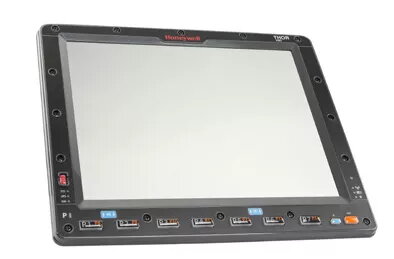
Barcode Reader Accessory Honeywell VM3530FRONTPNL
The Honeywell VM3530FRONTPNL is a front panel accessory designed to improve the usability and durability of compatible Honeywell barcode reader terminals. Featuring a black finish and a resistive touchscreen, this panel is intended for standard temperature operating environments and provides a reliable interface for data entry and scanning tasks. It connects seamlessly with the VM3 series front assemblies to restore or upgrade the device surface while maintaining original form and function.
This front panel offers a robust construction suited for frequent use in retail and warehouse settings, with a resistive touchscreen that accepts input from finger, gloved hand, or stylus. The standard temperature rating ensures stable operation in typical indoor environments. The design preserves device ergonomics and maintains clear touch response to support accurate barcode scanning and quick data capture workflows.
Power down the host device and follow the manufacturer’s service instructions to remove the existing front panel. Align the replacement panel with the device bezel and secure it using the original fasteners or clips. Reconnect any necessary cable or connector assemblies and power on the terminal. Verify touch responsiveness and perform a quick scan test to confirm that the barcode reader and touchscreen operate correctly after installation.
Use this front panel in indoor, standard-temperature environments and avoid exposing it to extremes of heat, cold, or moisture. Clean the touchscreen surface with a soft, lint-free cloth and a manufacturer-approved cleaner; avoid abrasive materials and excessive liquid. When replacing parts, follow Honeywell service guidelines or consult trained service personnel to ensure proper installation and device integrity.
{{highlightedFeature.featureTitle}}:
{{getProductFeatureValueById(product, highlightedFeature.featureId)}}