Powerful EcoFlow stations for energy anywhere!

{{ totalProductsCount }}
In cart {{totalProductsCount}} item(s)
In cart {{totalProductsCount}} item(s)
Total:
{{sum | formatAmount}}
Your cart is empty
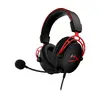 HP HyperX Cloud Alpha Over-Ear Wired Gaming Headset with Removable Microphone and 3.5mm Jack Red Black
Product specification HP HyperX Cloud Alpha Over-Ear Wired Gaming Headset with Removable Microphone and 3.5mm Jack Red Black
Manufacturer:
HP
Category:
Headphones
Description
HP HyperX Cloud Alpha is an over-ear wired gaming headset featuring a 3.5mm audio connection, a frequency range of 13 to 27,000 Hz, and a removable electret condenser microphone. Designed for PC and compatible audio devices, it delivers stereo sound with a weight of 298 grams.
The HP HyperX Cloud Alpha Over-Ear Wired Gaming Headset with Removable Microphone and 3.5mm Jack Red Black is designed to deliver reliable stereo sound for various audio setups. Featuring a closed acoustic system with circumaural ear coupling, this wired gaming headset focuses on providing a balanced listening experience with a frequency range spanning from 13 to 27,000 Hz. The device includes a removable electret condenser microphone, making it straightforward to switch between voice communication and solo listening tasks. Weighing 298 grams, it combines a structured over-ear design with a 1.3-meter connection cable and included PC extension cable for desktop use.
Advantages
This headset utilizes a wired 3.5mm connection, ensuring broad compatibility with personal computers, consoles, and mobile devices without requiring complex software installations. The inclusion of a detachable microphone and a removable audio cable allows the device to function as a standard set of headphones when voice input is not required. The lightweight construction of 298 grams and the circumaural ear cup design help maintain physical comfort during extended periods of use at a desk or gaming setup.
Suitable for
- Playing computer games on PCs and compatible gaming consoles
- Listening to music and media on mobile devices and laptops
- Voice communication during online multiplayer sessions and team meetings
- General media consumption requiring a wired audio connection
When it may not be suitable
This headset may not be suitable for users who require wireless mobility, as it relies entirely on a wired 3.5mm audio connection. Additionally, it lacks active noise cancellation features, which might limit its effectiveness in extremely loud or noisy environments.
Key specifications
- Over-ear circumaural design with closed acoustic system
- 3.5mm audio jack connection
- Frequency response range of 13 to 27,000 Hz
- Removable electret condenser microphone
- Impedance of 65 ohms
- Sensitivity of 98 dB
- Cable length of 1.3 meters with included PC extension cable
- Weight of 298 grams
How to use
To begin using the headset, connect the 3.5mm audio cable to the headset port and plug the other end into the 3.5mm audio jack of your computer, console, or compatible mobile device. If additional length is needed for a desktop setup, attach the included PC extension cable. Insert the removable microphone into the designated port on the left ear cup if voice input is required. Adjust the headband and ear cups to ensure a comfortable fit over your ears before starting your audio application or game.
What to consider before purchase
- Verify that your device features a standard 3.5mm audio port or prepare an appropriate adapter if necessary.
- Consider whether a wired connection meets your daily mobility and spatial requirements.
- Check if the microphone and cable features align with your intended use for gaming or general media.
Usage recommendations: Store the headset in a dry, safe place when not in use to protect the cables and microphone port from physical strain. Clean the ear cups gently with a dry or slightly damp cloth and avoid wrapping the cable too tightly around the headband to maintain its longevity.

14-Day Return Policy
We are confident in our quality, but if the purchase doesn’t fit — you have 14 days to return the product with peace of mind.

Fast Delivery
Get your orders as quickly as possible — right to your door, parcel lockers, or pickup points across Latvia and the EU.

Secure Payment
Pay the way you prefer: cash, VISA, MasterCard, Apple Pay, Google Pay, bank transfer, or 0% installment plan.

Quality Since 2008
AiO.lv has been on the market for over 18 years and has earned trust — with more than 6000 genuine positive reviews on Google.