
Dreame vacuums for fast and efficient cleaning!
In cart {{totalProductsCount}} item(s)
Your cart is empty
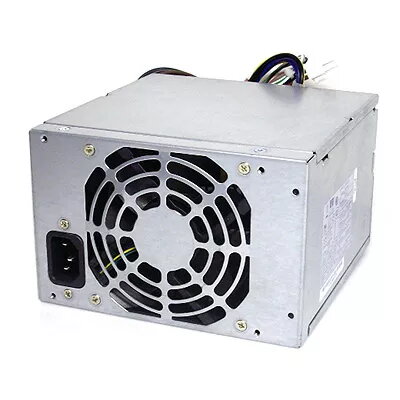
Power Supply Unit HP 508154-001-RFB 320W Metallic
The HP 508154-001-RFB 320W Metallic power supply unit is a replacement internal PSU designed for compatible HP and Compaq desktop systems. It provides a rated output of 320 watts with AC input support from 100–240V at 50–60Hz and carries an 80 PLUS efficiency certification. The unit is non-modular and comes in a metallic enclosure that contributes to mechanical robustness and heat dissipation. It is offered as a service-part compatible with systems such as Compaq 6000 MT, 6005 Pro MT, and HP 8100 Elite CMT.
The PSU delivers stable 320W output across a wide AC input range, suitable for standard office and business desktops. Its 80 PLUS certification indicates verified efficiency, which reduces wasted energy and system heat. The metallic housing improves durability and supports passive heat dispersion. As a direct-replacement unit matching the HP part number 508154-001-RFB and EAN 5711045935039, compatibility with listed Compaq and HP models is simplified for maintenance and repairs.
Before installation, disconnect power from the desktop and ground yourself to prevent static discharge. Remove the system cover according to the service manual of your Compaq or HP model. Disconnect the existing PSU connectors from the motherboard, drives, and peripherals, then unfasten and remove the old unit. Position the HP 508154-001-RFB PSU in the drive bay or chassis mounting points, secure it with the appropriate screws, and reconnect all power connectors to the motherboard and devices in the same configuration. Replace the system cover, reconnect external power, and power on the system to verify stable operation and normal boot.
Use this power supply in systems within the specified AC input range and avoid connecting devices that collectively exceed the 320W rated output. For prolonged reliability, ensure adequate case airflow and periodic dust removal. When servicing enterprise systems, verify firmware and BIOS compatibility where applicable and consult the official HP service documentation for torque and mounting specifications.
{{highlightedFeature.featureTitle}}:
{{getProductFeatureValueById(product, highlightedFeature.featureId)}}
{{ productComparisonGenerationError }}
