{{ totalProductsCount }}

In cart {{totalProductsCount}} item(s)

Total:
{{sum | formatAmount}}

Your cart is empty

header-product HP NVIDIA RTX A1000 8 GB GDDR6 Graphics Card with Mini Bracket and 4mDP

HP NVIDIA RTX A1000 8 GB GDDR6 Graphics Card with Mini Bracket and 4mDP

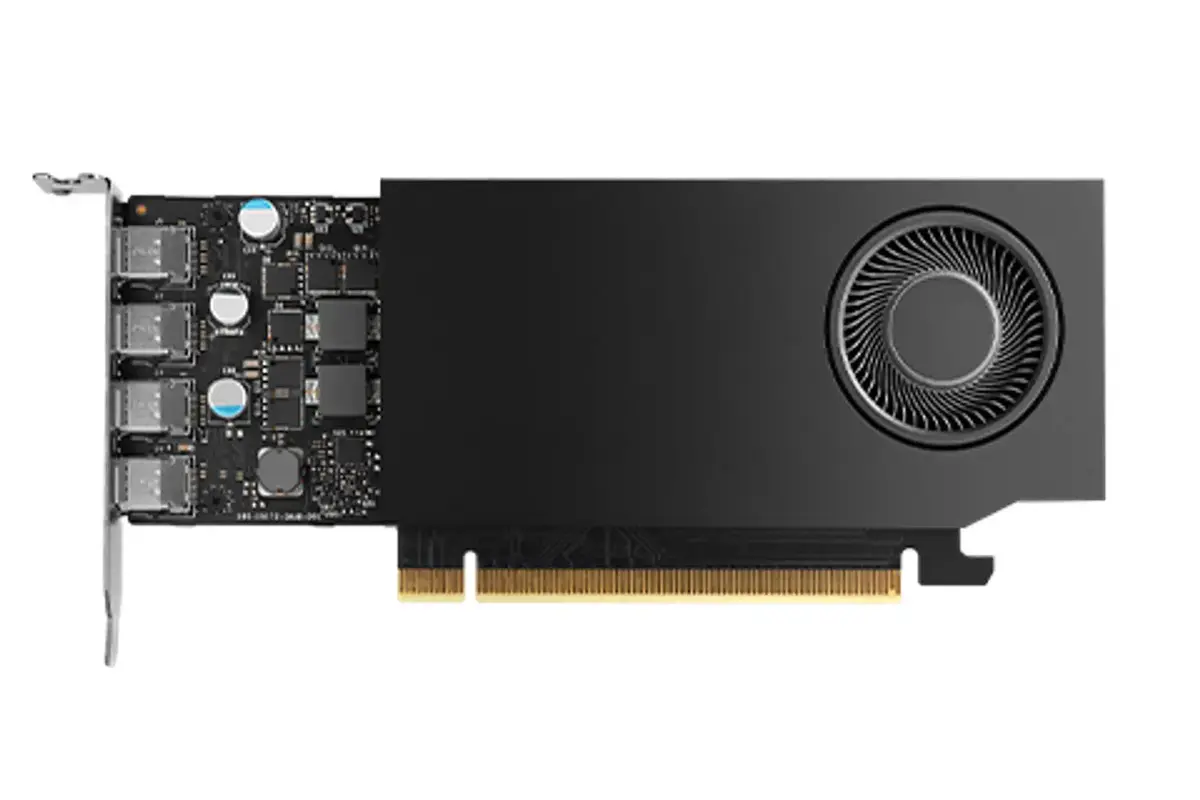
HP NVIDIA RTX A1000 8 GB Graphics Card Photo 1
Out of stock.
View similar!

Short description

The HP NVIDIA RTX A1000 is a professional-grade graphics card featuring 8 GB of GDDR6 memory and a 128-bit bus. Designed for high-performance computing, it utilizes a PCI Express x8 4.0 interface and supports a maximum resolution of 7680 x 4320 pixels. Equipped with active cooling and four Mini DisplayPort outputs, this card is ideal for demanding workstation tasks, multi-monitor setups, and professional graphics applications requiring reliable performance.
Warranty: 2 Years
SKU: 12586704
delivery
Information regarding the items availability for purchase will be posted on this site
price
Item cost information will be published on this site
Together cheaper
{{product.price | formatAmount}}
{{product.title}}
{{productBundle.reference.specialPrice | formatAmount}}
{{productBundle.title}}
{{productBundlePreviousPrice | formatAmount}}
{{productBundleSpecialPrice | formatAmount}}

You saving {{productBundleYouSave | formatAmount}}

Product information

Description

The HP NVIDIA RTX A1000 is a professional-grade graphics card engineered to deliver reliable performance for demanding workstation environments. Featuring 8 GB of high-speed GDDR6 memory and a 128-bit memory bus, this card provides the necessary bandwidth for complex graphical tasks and data-intensive applications. It utilizes the PCI Express x8 4.0 interface to ensure efficient data transfer, making it a robust solution for professionals who require stability and precision in their daily computing workflows.

Advantages

This graphics card offers significant advantages for professional users, primarily through its specialized architecture designed for high-performance computing. The inclusion of 8 GB of GDDR6 memory allows for smooth handling of large datasets and intricate 3D models, while the active cooling system with a dedicated fan ensures consistent thermal management during extended periods of operation. With support for four Mini DisplayPort outputs, the card facilitates seamless multi-monitor configurations, enhancing productivity for users who need to manage multiple applications simultaneously across a wide visual workspace.

Suitable for

  • Professional 3D modeling and CAD applications
  • Multi-monitor workstation setups
  • Video editing and content creation workflows
  • Data visualization and professional graphics rendering

This graphics card may not be suitable for high-end gaming enthusiasts looking for top-tier consumer-grade frame rates in the latest AAA titles, as it is specifically optimized for professional stability and workstation-class software rather than gaming performance. Additionally, it may not be the ideal choice for small form factor cases that lack the necessary clearance for the included bracket or for systems that do not support the PCI Express x8 4.0 interface.

Key specifications

  • Graphics Processor: NVIDIA RTX A1000
  • Memory: 8 GB GDDR6
  • Memory Bus: 128-bit
  • Interface: PCI Express x8 4.0
  • Maximum Resolution: 7680 x 4320 pixels
  • Outputs: 4 x Mini DisplayPort
  • Cooling: Active cooling with 1 fan
  • Power Consumption: 50 W
  • Software Support: DirectX 12.0 and OpenGL 4.6

How to use

To install the HP NVIDIA RTX A1000, ensure your workstation is powered off and disconnected from the electrical supply. Insert the card into an available PCI Express x8 or x16 slot on your motherboard, ensuring it is firmly seated. Secure the bracket to the chassis using the appropriate screws. Connect your monitors to the four Mini DisplayPort outputs. Once installed, power on your system and download the latest professional drivers from the NVIDIA website to ensure optimal compatibility and performance with your specific software applications.

What to consider before purchase

  • Verify that your workstation has an available PCI Express x8 or x16 slot.
  • Ensure your power supply unit can accommodate the 50 W power requirement.
  • Check that your monitors are compatible with Mini DisplayPort connections or that you have the necessary adapters.
  • Confirm that your computer chassis has sufficient space for the card dimensions and the included bracket.
Usage recommendations: For the best results, keep your graphics drivers updated to the latest version provided by the manufacturer to ensure compatibility with the latest professional software updates and security patches. Maintain adequate airflow within your workstation case to allow the active cooling system to operate efficiently.

Specifications

Power consumption (typical): Amount of power consumed by this model, often expressed in watts (W). Typical values that manufacturers give are power consumption when off, standby/suspended mode, typical use, maximum usage.
50 W
Cooling type: The method used to cool the device or to cool the air around the device.
Active
Dual Link DVI: A dual-link DVI interface sends data over both of the DVI links to the monitor, and this is how higher resolutions are achieved. With dual-link DVI, a resolution of 2048 x 1536 is possible.
No
OpenGL version: OpenGL (Open Graphics Library) is a specification defining a cross-language cross-platform API for writing applications that produce 3D computer graphics (and 2D computer graphics as well). The interface consists of over 250 different function calls which can be used to draw complex three-dimensional scenes from simple primitives.
4.6
DirectX version: DirectX is a collection of APIs (application programming interfaces) for easily handling tasks related to game programming on the Microsoft Windows operating system.
12.0
TV tuner integrated: Device has an in-built TV tuner.
No
DisplayPorts quantity: Number of DisplayPorts. A DisplayPort is a digital display interface developed by the Video Electronics Standards Association (VESA). The interface is primarily used to connect a video source to a display device such as a computer monitor, though it can also be used to carry audio, USB, and other forms of data.
0
DVI-I ports quantity: This is the amount of DVI-I interfaces. Digital Visual Interface (DVI) is a video display interface developed by the Digital Display Working Group (DDWG). The digital interface is used to connect a video source to a display device, such as a computer monitor. DVI-I is DVI integrated, which means it can support digital and analog.
0
DVI-D ports quantity: This is the amount of DVI-I interfaces. Digital Visual Interface (DVI) is a video display interface developed by the Digital Display Working Group (DDWG). The digital interface is used to connect a video source to a display device, such as a computer monitor. DVI-D means DVI digital, which means it can only support digital, but not analog.
0
HDMI ports quantity: The number of sockets (ports) for HDMI connections. HDMI (High-Definition Multimedia Interface) is a compact audio/video interface for transferring uncompressed video data and compressed/uncompressed digital audio data from a HDMI-compliant device ("the source device") to a compatible computer monitor, video projector, digital television, or digital audio device. HDMI is a digital replacement for existing analog video standards.
0
Interface type:
PCI Express x8 4.0
Memory bus: Hardware and software that connects the main memory to the memory controller in computer systems. Originally, general-purpose buses like VMEbus and the S-100 bus were used, but to reduce latency, modern memory buses are designed to connect directly to DRAM chips, and thus are designed by chip standards bodies such as JEDEC.
128 bit
Graphics card memory type: The type of memory used by the video card. Often a combination of dedicated memory (Video RAM or VRAM) and dynamic system memory is used. UMA stands for Unified Memory Architecture, and is a computer memory architecture that allows the graphics processing unit to share system memory. Other abreviations: RAM = Random Access Memory, SDRAM = synchronous dynamic RAM, DDR = double-data-rate.
GDDR6
Discrete graphics card memory:
8 GB
CUDA: CUDA (aka Compute Unified Device Architecture) is a parallel computing platform and programming model created by NVIDIA and implemented by the graphics processing units (GPUs) that they produce. CUDA gives program developers direct access to the virtual instruction set and memory of the parallel computational elements in CUDA GPUs.
Yes
Maximum resolution: The maximum number of pixels that can be displayed in the image. It is usually quoted as width × height,: for example, "1024 × 768" means the width is 1024 pixels and the height is 768 pixels.
7680 x 4320
Graphics processor: Also known as a graphics processing unit (GPU), this is a specialized electronic circuit designed to rapidly manipulate and alter memory to accelerate the creation of images in a frame buffer intended for output to a display. GPUs are used in embedded systems, mobile phones, personal computers, workstations, and game consoles. Modern GPUs are very efficient at manipulating computer graphics.
RTX A1000
Graphics processor family: The category to which the graphics processor (GPU) belongs e.g. Southern Islands family of Radeon processors (made by AMD), GeForce 600 (made by NVIDIA).
NVIDIA
All features

Logistics data

Country of origin: Country where the device is made. Aka Country of manufacture (COM).
China

Other features

UNSPSC-code:
43201401

Technical details

General Product Safety Regulation (GPSR) URL:
https://support.hp.com/us-en/document/ish_6126692-6126777-16?openCLC=true

Power

Power consumption (typical): Amount of power consumed by this model, often expressed in watts (W). Typical values that manufacturers give are power consumption when off, standby/suspended mode, typical use, maximum usage.
50 W

Design

Product colour: The colour e.g. red, blue, green, black, white.
Black
Illumination: The device has illumination.
No
Number of fans: The quantity of fans (apparatus with rotating blades that creates a current of air for cooling or ventilation).
1 fan(s)
Cooling type: The method used to cool the device or to cool the air around the device.
Active

Performance

Dual Link DVI: A dual-link DVI interface sends data over both of the DVI links to the monitor, and this is how higher resolutions are achieved. With dual-link DVI, a resolution of 2048 x 1536 is possible.
No
HDCP: High-bandwidth Digital Content Protection (HDCP) is a form of digital copy protection to prevent copying of digital audio and video content as it travels across connections.
Yes
HDCP version:
2.2
OpenCL version:
3.0
OpenGL version: OpenGL (Open Graphics Library) is a specification defining a cross-language cross-platform API for writing applications that produce 3D computer graphics (and 2D computer graphics as well). The interface consists of over 250 different function calls which can be used to draw complex three-dimensional scenes from simple primitives.
4.6
DirectX version: DirectX is a collection of APIs (application programming interfaces) for easily handling tasks related to game programming on the Microsoft Windows operating system.
12.0
TV tuner integrated: Device has an in-built TV tuner.
No
Peak INT8 Performance:
107.8
Peak Half Precision (FP16) performance:
53.8 TFLOPS

Ports & interfaces

VGA (D-Sub) ports quantity: Number of VGA (D-Sub) ports (connecting interfaces) in the device. The VGA (D-Sub) connector is a 15 pin connector between a computer and a monitor. It was first introduced in 1987 by IBM.
0
Mini DisplayPorts quantity:
4
DisplayPort version:
1.4a
USB Type-C ports quantity:
0
DVI-I ports quantity: This is the amount of DVI-I interfaces. Digital Visual Interface (DVI) is a video display interface developed by the Digital Display Working Group (DDWG). The digital interface is used to connect a video source to a display device, such as a computer monitor. DVI-I is DVI integrated, which means it can support digital and analog.
0
DVI-D ports quantity: This is the amount of DVI-I interfaces. Digital Visual Interface (DVI) is a video display interface developed by the Digital Display Working Group (DDWG). The digital interface is used to connect a video source to a display device, such as a computer monitor. DVI-D means DVI digital, which means it can only support digital, but not analog.
0
DisplayPorts quantity: Number of DisplayPorts. A DisplayPort is a digital display interface developed by the Video Electronics Standards Association (VESA). The interface is primarily used to connect a video source to a display device such as a computer monitor, though it can also be used to carry audio, USB, and other forms of data.
0
HDMI ports quantity: The number of sockets (ports) for HDMI connections. HDMI (High-Definition Multimedia Interface) is a compact audio/video interface for transferring uncompressed video data and compressed/uncompressed digital audio data from a HDMI-compliant device ("the source device") to a compatible computer monitor, video projector, digital television, or digital audio device. HDMI is a digital replacement for existing analog video standards.
0
Interface type:
PCI Express x8 4.0

Memory

Memory bandwidth (max):
192 GB/s
Memory bus: Hardware and software that connects the main memory to the memory controller in computer systems. Originally, general-purpose buses like VMEbus and the S-100 bus were used, but to reduce latency, modern memory buses are designed to connect directly to DRAM chips, and thus are designed by chip standards bodies such as JEDEC.
128 bit
Graphics card memory type: The type of memory used by the video card. Often a combination of dedicated memory (Video RAM or VRAM) and dynamic system memory is used. UMA stands for Unified Memory Architecture, and is a computer memory architecture that allows the graphics processing unit to share system memory. Other abreviations: RAM = Random Access Memory, SDRAM = synchronous dynamic RAM, DDR = double-data-rate.
GDDR6
Discrete graphics card memory:
8 GB

Processor

Maximum displays per videocard:
4
CUDA cores:
2304
CUDA: CUDA (aka Compute Unified Device Architecture) is a parallel computing platform and programming model created by NVIDIA and implemented by the graphics processing units (GPUs) that they produce. CUDA gives program developers direct access to the virtual instruction set and memory of the parallel computational elements in CUDA GPUs.
Yes
Maximum resolution: The maximum number of pixels that can be displayed in the image. It is usually quoted as width × height,: for example, "1024 × 768" means the width is 1024 pixels and the height is 768 pixels.
7680 x 4320
Graphics processor: Also known as a graphics processing unit (GPU), this is a specialized electronic circuit designed to rapidly manipulate and alter memory to accelerate the creation of images in a frame buffer intended for output to a display. GPUs are used in embedded systems, mobile phones, personal computers, workstations, and game consoles. Modern GPUs are very efficient at manipulating computer graphics.
RTX A1000
Graphics processor family: The category to which the graphics processor (GPU) belongs e.g. Southern Islands family of Radeon processors (made by AMD), GeForce 600 (made by NVIDIA).
NVIDIA

Description

Machine translation. Load original

Similar products

{{product.title}}
Show details Hide details

{{highlightedFeature.featureTitle}}:

{{getProductFeatureValueById(product, highlightedFeature.featureId)}}

{{product.price | formatAmount}}

Product comparison

The HP NVIDIA RTX A1000 8 GB GDDR6 Graphics Card with Mini Bracket and 4mDP is compared against several similar professional-grade graphics cards featuring the NVIDIA RTX A1000 processor from brands like PNY, Lenovo, and GIGABYTE. All compared products share the exact same core GPU architecture, 8 GB of GDDR6 memory on a 128-bit bus, PCI Express 4.0 x8 interface, and active cooling systems rated at 50 W. The primary differences lie in the brand packaging, specific bracket inclusions, and display output configurations provided with the HP version.

⚙️ The specifications comparison table below details the key technical parameters, including the graphics processor, memory capacity, bus width, interface, cooling, and accessory differences.

SpecificationHP NVIDIA RTX A1000 (Main)PNY RTX A1000 (VCNRTXA1000-SB)PNY RTX A1000 (VCNRTXA1000-PL)Lenovo 4X61Q73041GIGABYTE PNY RTX A1000HP NVIDIA RTX A1000 (Alternative)Practical Significance
Graphics ProcessorNVIDIA RTX A1000NVIDIA RTX A1000NVIDIA RTX A1000NVIDIA RTX A1000NVIDIA RTX A1000NVIDIA RTX A1000All cards deliver identical computing performance for professional workloads due to the shared GPU.
Memory & Bus8 GB GDDR6, 128 bit8 GB GDDR6, 128 bit8 GB GDDR6, 128 bit8 GB GDDR6, 128 bit8 GB GDDR6, 128 bit8 GB GDDR6, 128 bitThe memory buffer and bandwidth are identical across all options, ensuring equal rendering capabilities.
Interface & CoolingPCIe 4.0 x8, ActivePCIe 4.0 x8, ActivePCIe 4.0 x8, ActivePCIe 4.0 x8, ActivePCIe 4.0 x8, ActivePCIe 4.0 x8, ActivePower draw and thermal management are completely consistent among all listed alternatives.
Brackets & OutputsMini Bracket and 4mDPStandardStandardStandardStandardStandardThe HP version includes specialized mini mounting brackets and multi-display output readiness.

◎ The suitability table below evaluates common use cases and user profiles to help determine the most appropriate model for your workstation setup.

Use CaseRecommended ProductWhy
Multi-monitor professional workstations with space constraintsHP NVIDIA RTX A1000 8 GB GDDR6 Graphics Card with Mini Bracket and 4mDPThe included mini bracket and dedicated multi-display setup features make this version optimal for specialized workstation enclosures.
Standard professional CAD and visualization systemsPNY RTX A1000 or Lenovo 4X61Q73041These alternative models suit standard workstation builds where specialized bracket bundles are unnecessary.
Opt for the HP NVIDIA RTX A1000 8 GB GDDR6 Graphics Card with Mini Bracket and 4mDP if your setup benefits from the included mini mounting bracket and tailored multi-display output configuration. Choose the alternative options from PNY or Lenovo if standard retail packaging and fittings match your hardware requirements.
Might be useful
{{product.manufacturerName}}
{{product.categoryName}}
{{product.title}}
{{product.specialPrice}}
{{product.price}}

Customer reviews

Customer questions

FAQ

What payment options are available?

AiO.lv offers several payment methods: Bank transfer. All transactions are 100% secure and encrypted.

Can this product be purchased for a company (with VAT)?

Yes. AiO.lv works with legal entities in Latvia and across Europe. The product price already includes VAT. For certain product categories, as well as for companies from other EU countries with a valid VAT number, a 0% VAT rate may apply. We issue the invoice immediately after the order is placed, support electronic BIS invoices, and automatically generate all necessary accounting documents. You can complete the purchase for a company online — simply select the company profile and choose bank transfer as the payment method during checkout.

What is the warranty period?

All HP products come with an official 2 Years warranty. It covers all manufacturing defects and malfunctions that may occur during use. The warranty is valid at all authorized HP service centers and through AiO.lv

Can the product be returned after purchase?

Yes, you can return the product within 14 days of purchase if you bought it as a consumer (not a legal entity). Returns are possible without giving any reason — the main condition is that the product retains its original appearance and full set of accessories. We will make the process as simple and convenient as possible: just contact our customer support team, and we will help you arrange the return.

Where should I contact for warranty service?

For warranty-related questions you can contact the AiO.lv (SIA VSPRO) customer support team. We will assist with consultation, warranty claim processing, and coordination with certified service centers.

How can I tell if this product suits my needs?

When making a choice, we recommend paying attention to the key features: power consumption (typical), cooling type, dual link dvi, opengl version, directx version, tv tuner integrated, displayports quantity, dvi-i ports quantity, dvi-d ports quantity, hdmi ports quantity, interface type, memory bus, graphics card memory type, discrete graphics card memory, cuda, maximum resolution, graphics processor, graphics processor family, compatibility with your devices or usage conditions, material quality, functionality, and warranty terms. These characteristics will help you determine how well the model meets your needs.

Where can I download the instructions for HP NVIDIA RTX A1000 8 GB Graphics Card?

You can download the instructions in PDF format from the “Instructions” section on the product description page. The file contains complete information about installation, setup, and usage.
warranty
14-Day Return Policy We are confident in our quality, but if the purchase doesn’t fit — you have 14 days to return the product with peace of mind.
shipping
Fast Delivery Get your orders as quickly as possible — right to your door, parcel lockers, or pickup points across Latvia and the EU.
payment
Secure Payment Pay the way you prefer: cash, VISA, MasterCard, Apple Pay, Google Pay, bank transfer, or 0% installment plan.
warranty
Quality Since 2008 AiO.lv has been on the market for over 18 years and has earned trust — with more than 6000 genuine positive reviews on Google.