
Save time and money with our discounts!
In cart {{totalProductsCount}} item(s)
Your cart is empty
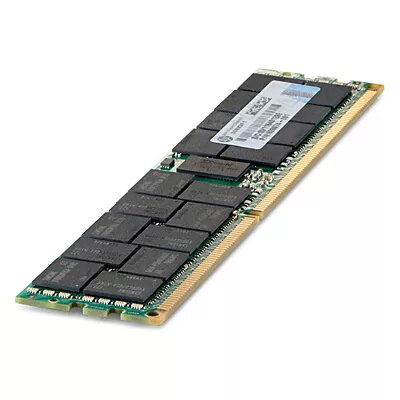
Memory Module HP 16GB DDR3 1333MHz
The HP 16GB DDR3 1333MHz memory module is a 16 GB, 240-pin DIMM designed for use in compatible PCs and servers. This single-module, Dual Rank x4 unit operates at a low voltage of 1.35 V and uses DDR3 technology with a memory clock speed of 1333 MHz and CAS latency 9. The module is intended to expand system memory capacity and improve multitasking and workload handling in supported platforms that accept DDR3 PC3L-10600 registered memory.
This HP memory module provides a full 16 GB capacity in a single DIMM, enabling increased available RAM without occupying multiple slots. Operating at 1.35 V (PC3L) reduces power consumption compared with standard-voltage DDR3 modules, which can be beneficial for energy-sensitive systems. The CAS-9 timing and 1333 MHz frequency deliver reliable latency and throughput for general server and workstation tasks. The 240-pin DIMM form factor and registered design support compatibility with systems that require ECC/registered memory.
Power down the computer or server and disconnect it from the power source before installing the memory module. Open the system chassis according to the manufacturer's instructions and locate the appropriate 240-pin DIMM slot(s). Align the module with the slot key and press firmly and evenly until the retaining clips engage. After installation, close the chassis, reconnect power, and start the system. Verify that the new 16 GB module is recognized by checking the BIOS/UEFI memory information or the operating system system information tools. If the platform requires matched modules or specific slot population rules, follow the system vendor's guidelines for optimal configuration.
Use this HP 16GB DDR3 1333MHz module in systems that explicitly support DDR3 PC3L-10600 registered memory and 240-pin DIMM modules. For systems with ECC or registered memory requirements, install modules in matched pairs or per vendor guidance to ensure stability. Confirm BIOS/firmware compatibility and update system BIOS if needed before deploying into production environments.
{{highlightedFeature.featureTitle}}:
{{getProductFeatureValueById(product, highlightedFeature.featureId)}}
{{ productComparisonGenerationError }}
