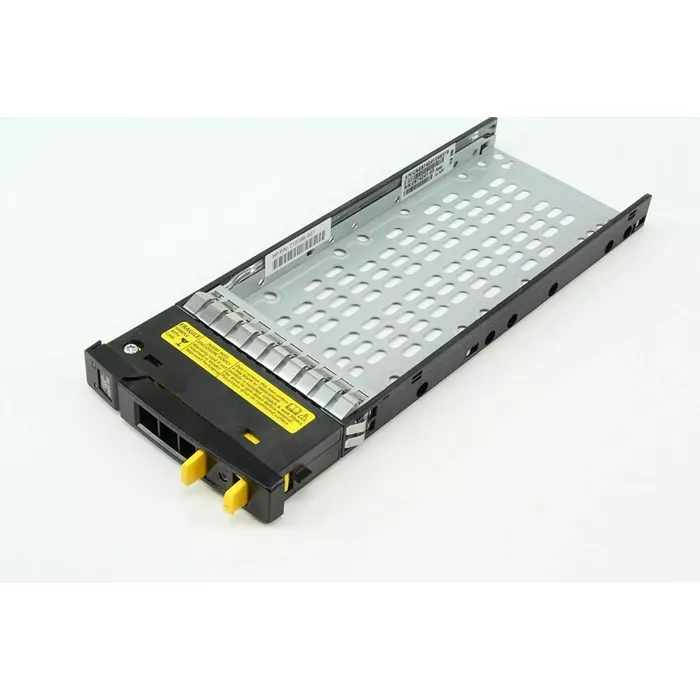
In this overview, the main product HP 3PAR M6710 2.5" Hard Drive Tray Caddy is compared with alternative drive mounting and connection solutions from Dell, StarTech, SILVERSTONE, and QOLTEC. The common purpose for most of the discussed items is the installation or connection of hard drives and solid-state drives, yet their form factors, target hardware, and usage scenarios differ significantly. The main distinction of the HP 3PAR M6710 model lies in its specialization for HP 3PAR enterprise storage systems and the 2.5" form factor, whereas competing solutions are designed for Dell servers, laptops, desktop expansion slots, or external USB connection.
⚙️ Below is a comparison of key characteristics and design features, including supported drive form factor, equipment compatibility, and mounting type.
| Comparison parameter | HP 3PAR M6710 2.5" Hard Drive Tray Caddy | 3.5-inch Hard Drive Tray Caddy Dell 58CWC-RFB | Hard Drive Caddy Dell 2.5" Pro Slim / Slim Plus | 2.5" Hot Swap Hard Drive Tray StarTech.com SATSASTRX25 | Internal hard drive enclosure SILVERSTONE SST-EXB02 | Hard Drive Adapter QOLTEC 51859 USB 3.0 | Practical significance of differences |
|---|
| Device type | Drive tray caddy | Drive tray caddy | Drive tray caddy | Hot-swap supported drive tray | Internal enclosure for PCI slot | External adapter with USB interface | Determines how the drive integrates: inside a server, laptop, expansion slot, or as an external unit. |
| Supported drive form factor | 2.5" HDD and SSD | 3.5" HDD | 2.5" SATA HDD and SSD | 2.5" HDD | 2.5" drives | 2.5" SATA3 HDD and SSD | Limits physical size and compatible drive types, preventing mismatched hardware purchases. |
| Target hardware | HP 3PAR storage systems | Dell servers and workstations | Dell Pro Slim / Slim Plus laptops | Compatible hot-swap chassis bays | Desktop PCs (PCI slot installation) | Any PC or laptop with a USB 3.0 port | Requires strict adherence to the target device's hardware platform and connector interfaces. |
| Main purpose | Stable drive placement in storage systems | Drive installation in Dell servers | Replacing an optical drive with a secondary drive | Quick access and replacement of drives | Compact internal mounting inside PC chassis | Data transfer, backups, and drive cloning | Each item is optimized for a specific task — from server maintenance to portable file management. |
◎ The table below evaluates product suitability for various user needs, usage scenarios, and technical requirements.
| Use case | Recommended product | Why |
|---|
| Enterprise HP system maintenance | HP 3PAR M6710 2.5" Hard Drive Tray Caddy | Designed specifically for HP 3PAR server hardware and provides secure placement for 2.5" drives. |
| Dell server administration | 3.5-inch Hard Drive Tray Caddy Dell 58CWC-RFB | Provides standard mounting for 3.5" drives into compatible Dell server chassis bays. |
| Dell laptop upgrade | Hard Drive Caddy Dell 2.5" Pro Slim / Slim Plus | Allows installation of a secondary drive into the dedicated laptop slim bay instead of an optical drive. |
| Quick drive swapping in compact systems | 2.5" Hot Swap Hard Drive Tray StarTech.com SATSASTRX25 | Supports hot-swapping and is convenient for frequent removal of 2.5" drives. |
| Drive installation when PC bays are limited | Internal hard drive enclosure SILVERSTONE SST-EXB02 | Enables fitting a 2.5" drive into an available PCI slot inside the desktop PC chassis. |
| Temporary drive connection and diagnostics | Hard Drive Adapter QOLTEC 51859 USB 3.0 | Connects via USB and is ideal for testing, cloning, and transferring files without opening the PC. |
Recommendation: HP 3PAR M6710 2.5" Hard Drive Tray Caddy is optimally suited for users and administrators who need standard 2.5" drive installation in HP 3PAR data storage systems. Choose this model if you work with matching enterprise hardware. For servers of other brands, laptops, PC expansion slots, or external connection tasks, alternative options from Dell, StarTech, SILVERSTONE, or QOLTEC will be more suitable.