
JBL speakers and headphones for pure and deep sound!
In cart {{totalProductsCount}} item(s)
Your cart is empty
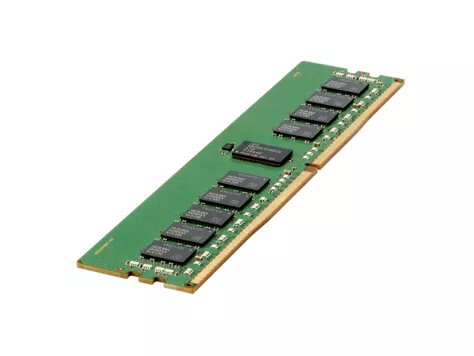
Memory Module HPE DDR4 16GB 2400MHz
The HPE DDR4 16GB 2400MHz memory module is a 288-pin DIMM designed for use in HPE ProLiant Gen9 servers, Apollo family, Synergy and blade systems as well as compatible workstations and servers that accept DDR4 ECC RDIMM. With a capacity of 16 GB and a clock speed of 2400 MHz (DDR4), this module supports error-correcting code (ECC) operation and a CAS latency of 17 to deliver stable memory performance for multitasking, virtualization and database workloads. The module operates at 1.2 V and is supplied in a green heatspreader-style PCB finish.
This HPE memory module is qualified and tested for use in supported HPE server platforms, providing compatibility verification and system-level tuning. DDR4 SmartMemory technology enables improved performance at multiple DIMM-per-channel configurations compared with typical third-party modules and supports advanced system features such as fault prediction when used with HPE management tools. Lower operating voltage reduces power consumption and thermal load compared with equivalent DDR3 modules, which can contribute to reduced cooling requirements and quieter operation in dense server environments.
Power down the server or workstation and follow the platform-specific maintenance instructions before installing memory. Open the server chassis, locate the memory sockets for the intended CPU and populate DIMM slots according to the motherboard or HPE platform documentation to maintain supported channel population and performance. Insert the module firmly into the 288-pin DIMM slot until the retention clips engage. After installation, close the chassis and power on the system; verify that the BIOS/ROM and system management tools recognize the new memory and confirm operating frequency and ECC status.
Install modules in matched pairs or sets as recommended by the system documentation to ensure optimal performance and memory channel utilization. Use HPE firmware and system management (for example, HPE OneView) to enable fault prediction and to confirm that memory is operating at the expected speed and timings. For mixed-capacity configurations consult platform guidelines and populate slots in the correct order to avoid reduced performance.
{{highlightedFeature.featureTitle}}:
{{getProductFeatureValueById(product, highlightedFeature.featureId)}}
{{ productComparisonGenerationError }}
