


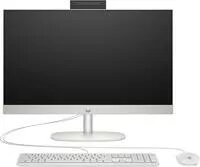
Computer HP All-in-One PC 24-cr0110ng AMD Ryzen 3 7320U 8GB DDR5 1TB Windows 11
Offer for a legal entity, non-cash payment.
Short description


Cheapest delivery:
Unisend LV
Product information
Description
The HP All-in-One PC 24-cr0110ng combines a 23.8" Full HD display with an integrated system design to save desk space while delivering everyday computing performance. Equipped with an AMD Ryzen 3 7320U processor, 8GB of DDR5 memory and a 1TB internal drive, this All-in-One runs Windows 11 and is intended for general productivity, web browsing, media playback and home office tasks. The slim chassis and built-in peripherals reduce cable clutter and provide a compact desktop footprint suitable for small workspaces and living areas.
Advantages
The system pairs a modern low-power AMD Ryzen 3 7320U processor with fast DDR5 memory to provide responsive multitasking for common applications. The 23.8" FHD display offers clear visuals for documents, video calls and streaming. A 1TB internal drive supplies ample local storage for files and applications, and the integrated All-in-One format simplifies setup by combining display, compute and basic I/O in one unit. Windows 11 delivers a current operating environment with security updates and productivity features.
Suitable for
- Home office and remote work where space is limited
- Everyday productivity: office applications, email, and web browsing
- Multimedia playback and video calls
- Light photo editing and content management
- Family and student use for study and entertainment
Key specifications
- Display: 23.8" Full HD (1920 x 1080)
- Processor: AMD Ryzen 3 7320U (mobile low-power CPU)
- Memory: 8GB DDR5 RAM
- Storage: 1TB internal drive (single-drive configuration)
- Operating system: Windows 11
- Form factor: All-in-One with integrated display and chassis
- Integrated peripherals: built-in webcam, speakers and Wi-Fi connectivity
How to use
Place the All-in-One on a stable surface within reach of a power outlet and connect any required peripherals such as keyboard or mouse if not using the included units. Follow the on-screen Windows 11 setup prompts to configure language, user account and network settings. Use the built-in display and webcam for video conferencing, and store documents, photos and applications on the internal 1TB drive. Keep the system updated through Windows Update to maintain security and compatibility.
Usage recommendations
For consistent performance, allow Windows Update and drivers to install after first setup, keep available storage capacity above 15–20% for optimal drive performance, and maintain regular backups of important files to external storage or cloud services. Use a surge protector to protect the unit from power spikes.


