
JBL speakers and headphones for pure and deep sound!
In cart {{totalProductsCount}} item(s)
Your cart is empty
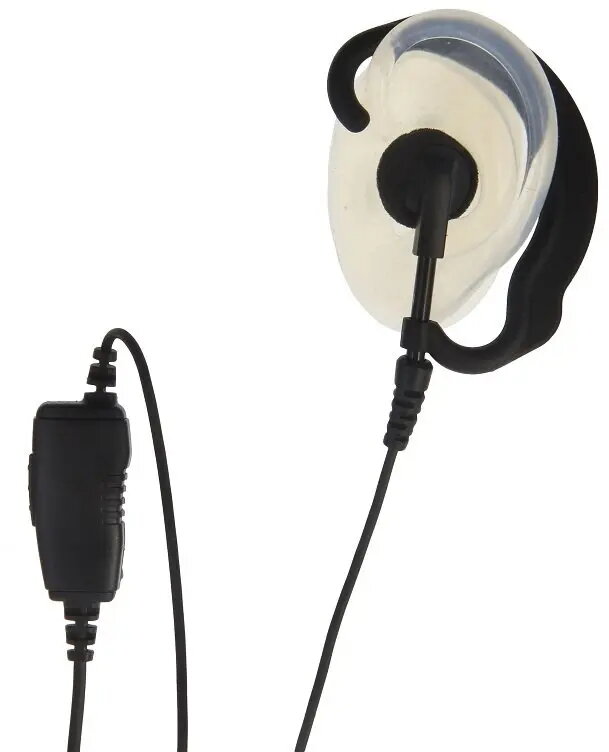
HP Headset with Inline PTT Microphone and Flexible Earpiece for Motorola SL1600 and SL4000 Series
The HP headset is a professional-grade audio accessory engineered specifically for compatibility with Motorola SL1600 and SL4000 series two-way radios. This device integrates a high-quality inline PTT (Push-to-Talk) microphone, allowing for seamless and efficient communication. The flexible earpiece design ensures a secure and comfortable fit, making it suitable for extended periods of use in professional settings where reliable audio performance is essential.
This headset offers significant benefits for professionals who require hands-free operation during their daily tasks. The integrated inline microphone provides clear voice transmission, ensuring that messages are received accurately even in busy environments. Its ergonomic and flexible earpiece construction minimizes discomfort during long shifts, while the durable build quality ensures consistent performance. By facilitating discreet communication, this accessory helps maintain a professional atmosphere in client-facing roles.
This headset may not be suitable for environments with extreme noise levels where noise-canceling features are required, as the standard microphone design is optimized for general professional use rather than high-decibel industrial settings. Additionally, it is specifically wired for Motorola SL1600 and SL4000 series radios and will not function with devices from other manufacturers or incompatible radio models.
To use the headset, connect the plug securely into the accessory port of your Motorola SL1600 or SL4000 radio. Ensure the connection is firm to prevent audio dropouts. Position the earpiece comfortably in your ear and clip the inline PTT microphone to your clothing in a location that allows for easy access. When you need to transmit, press the PTT button on the inline module and speak clearly toward the microphone.
For optimal longevity, avoid pulling on the cable when disconnecting the headset from the radio. Regularly inspect the earpiece for debris and clean it with a soft, dry cloth to maintain hygiene and audio clarity.
{{highlightedFeature.featureTitle}}:
{{getProductFeatureValueById(product, highlightedFeature.featureId)}}
{{ productComparisonGenerationError }}
