
Powerful EcoFlow stations for energy anywhere!
In cart {{totalProductsCount}} item(s)
Your cart is empty
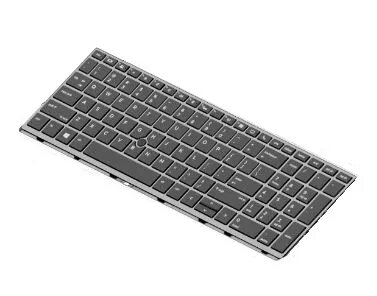
HP L14367-091 Replacement Keyboard for EliteBook 755 G5, Norwegian Layout, Black
The HP L14367-091 replacement keyboard is a precision-engineered component designed specifically for the HP EliteBook 755 G5 laptop. This high-quality spare part features a standard Norwegian layout and a sleek black finish, ensuring that your device maintains its professional appearance while restoring optimal typing performance. It serves as a reliable solution for users looking to repair a damaged or non-functional keyboard, providing a seamless fit and consistent tactile feedback identical to the original hardware.
This replacement keyboard offers excellent durability and is manufactured to meet strict quality standards, ensuring long-term reliability for your laptop. The installation process is straightforward, allowing for a quick and efficient repair without the need for complex tools or professional assistance. By choosing this genuine-style replacement, you ensure full compatibility with your EliteBook 755 G5, maintaining the integrity of your system and restoring the full functionality of your input device.
This keyboard is not suitable for laptop models other than the HP EliteBook 755 G5. Attempting to install this component on incompatible hardware may result in physical damage to the laptop or the keyboard itself, and it will not function as intended.
To replace the keyboard, first ensure that the laptop is completely powered off and disconnected from any power source. Remove the battery if possible to prevent accidental electrical shorts. Carefully remove the screws or clips securing the original keyboard, gently lift it from the chassis, and disconnect the ribbon cable from the motherboard. Align the new keyboard, connect the ribbon cable securely, and press the keyboard into place before re-securing it with the original fasteners.
Usage recommendations: Before finalizing the installation, test all keys to ensure they register correctly. If you are not confident in performing the hardware replacement yourself, it is recommended to consult a professional technician to avoid damaging internal components.
{{highlightedFeature.featureTitle}}:
{{getProductFeatureValueById(product, highlightedFeature.featureId)}}
{{ productComparisonGenerationError }}
