
Hurry and order now – up to 50% off!
In cart {{totalProductsCount}} item(s)
Your cart is empty
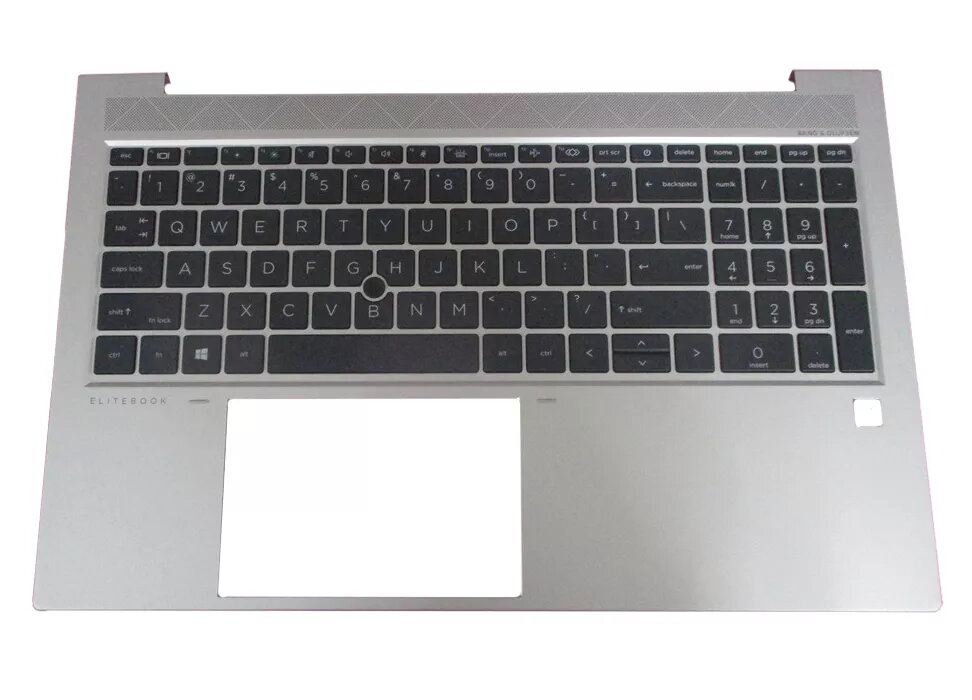
Cover + keyboard HP EliteBook 855 G7 M21678-051
The HP EliteBook 855 G7 cover and keyboard assembly is a high-quality replacement component designed to restore the functionality and appearance of your laptop. This unit combines a durable top cover with an integrated keyboard, specifically engineered to fit the EliteBook 855 G7 series. Featuring a French AZERTY layout, it provides a familiar and efficient typing experience for users who require this specific configuration. The assembly is finished in a professional black and silver color scheme, maintaining the original aesthetic standards of your device.
This replacement part offers a seamless integration with your laptop, ensuring that all mechanical and structural components align perfectly with the original chassis. The keyboard is built for durability and responsiveness, allowing for comfortable long-term use during intensive work sessions. By replacing both the cover and the keyboard simultaneously, you effectively address wear and tear on the palm rest and input surface, providing a refreshed look and feel to your workstation. The construction materials are selected to withstand daily usage while protecting the internal components of your laptop.
This product is not suitable for users who require a backlit keyboard, as this specific model does not include backlighting functionality. Additionally, it is not compatible with other laptop series or different generations of the EliteBook line, so verification of your specific model is necessary before installation.
Installation of this component requires technical knowledge of laptop disassembly. It is recommended to power off the device, disconnect the battery, and remove all peripheral devices before beginning. You will need appropriate precision screwdrivers and plastic prying tools to carefully remove the existing top cover assembly. Ensure that all ribbon cables are disconnected gently and reconnected securely to the motherboard during the installation of the new unit. If you are not experienced with laptop hardware repairs, professional installation is advised to avoid damaging internal components.
Regularly clean the keyboard surface with a dry, lint-free cloth to maintain responsiveness and prevent debris accumulation. Avoid using liquid cleaners directly on the keys to prevent damage to the internal circuitry.
{{highlightedFeature.featureTitle}}:
{{getProductFeatureValueById(product, highlightedFeature.featureId)}}
{{ productComparisonGenerationError }}
