
This is due to long delivery times and limited product warranties.
JBL speakers and headphones for pure and deep sound!
In cart {{totalProductsCount}} item(s)
Your cart is empty
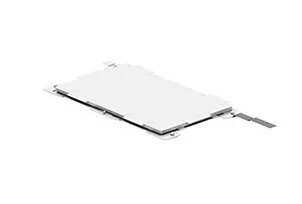
Touchpad HP M21999-001 Laptop Spare Part
The HP M21999-001 touchpad is a replacement laptop input device designed to restore original cursor control and multi-touch responsiveness on compatible HP notebooks. This spare part replicates the form and function of the factory-installed touchpad, providing smooth tracking, precise gesture recognition, and a durable surface for everyday navigation tasks. It is intended for use when the original touchpad becomes unresponsive, physically damaged, or shows signs of wear.
This touchpad offers accurate cursor movement and consistent multi-touch support to maintain the laptop's intended user interactions. The unit is manufactured to match OEM dimensions and mounting points, simplifying installation and ensuring physical compatibility. Built with durable materials, the touch surface resists daily abrasion and preserves tactile feedback. Designed for reliable electrical and mechanical performance, it restores original functionality without requiring modifications to the laptop chassis.
Power down the laptop and disconnect any external power source and battery if user-accessible. Remove the bottom cover or keyboard assembly as required to access the existing touchpad, following the manufacturer service manual or a trusted repair guide for your specific HP model. Disconnect the touchpad flex cable from the motherboard by releasing the connector latch, then remove mounting screws or clips and lift out the old touchpad. Position the replacement touchpad in the chassis, secure it with the original screws or clips, and reconnect the flex cable ensuring the connector latch is closed. Reassemble the laptop, reattach the battery and power, then boot the system to verify cursor movement, click function, and multi-touch gestures. If necessary, install or update drivers from HP support to ensure full compatibility.
Handle the replacement touchpad and its flex cable with care to avoid static discharge and connector damage. Use appropriate precision tools and follow an official service guide for your laptop model. After installation, test all gestures and clicks; if unexpected behavior occurs, check cable seating and driver versions before considering further repairs.
{{highlightedFeature.featureTitle}}:
{{getProductFeatureValueById(product, highlightedFeature.featureId)}}
| Warehouse | Stock | Delivery to the store | Store Price | |
| EU6 | 2 | 01.07.2026 Best delivery | 99.99 € Best price | |
| WH109 | 2 | 15.07.2026 | 134.49 € |
|
99.99 €
Stock:
2
Delivery Date:
01.07.2026
Best delivery
Warehouse: EU6
|
|
134.49 €
Stock:
2
Delivery Date:
15.07.2026
Warehouse: WH109
|
