
Filters you can trust. Pure water every day.
In cart {{totalProductsCount}} item(s)
Your cart is empty
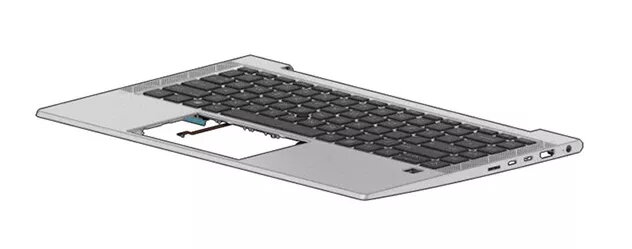
Keyboard HP M36312-B31
The HP M36312-B31 Keyboard is a replacement laptop keyboard with a Dutch (NL) layout and integrated backlighting. Designed for compatibility with select HP laptop models, this keyboard provides standard key spacing and a familiar layout for Dutch-speaking users. Backlit keys improve visibility in dim environments, and the keyboard is intended as a direct spare part to restore full typing functionality in a compatible HP laptop.
This keyboard combines a country-specific layout with backlighting to support efficient typing in low-light situations. It is manufactured to fit the physical dimensions and connector type used in compatible HP laptops, enabling straightforward replacement without modifications. The design maintains conventional key travel and spacing for a predictable typing feel while preserving the original laptop appearance.
To install, power off the laptop and disconnect any power sources including the battery if removable. Remove the laptop bezel or access panel according to the service manual for the specific HP model, then detach the old keyboard by unscrewing fasteners and disconnecting the ribbon cable. Align the replacement keyboard and connect its ribbon cable to the internal socket, secure the keyboard with the original fasteners, and reassemble the bezel. Reconnect power and verify backlight function and key responsiveness in the operating system.
Handle the keyboard and its ribbon cable with care to avoid bending or creasing the connector. Use an anti-static wrist strap or discharge static before touching internal components. Follow the specific disassembly and reassembly instructions for your HP laptop model to prevent damage to surrounding parts and ensure proper fit and function.
{{highlightedFeature.featureTitle}}:
{{getProductFeatureValueById(product, highlightedFeature.featureId)}}
{{ productComparisonGenerationError }}
