
Filters you can trust. Pure water every day.
In cart {{totalProductsCount}} item(s)
Your cart is empty
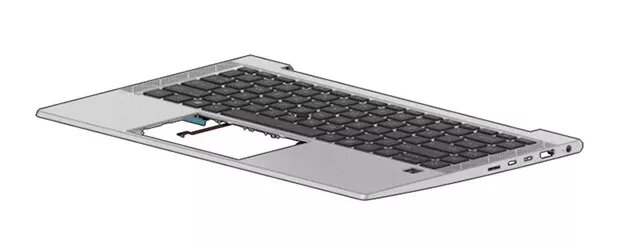
Keyboard HP M36312-FL1 Czech Slovakian Backlit
The HP M36312-FL1 Czech Slovakian Backlit keyboard is a replacement keyboard designed for compatible HP laptops. It features a Czech and Slovakian layout with clearly marked diacritics and a built-in backlight to improve key visibility in dim environments. The keyboard provides a low-profile key design and standard key spacing intended to maintain familiar typing feel while restoring full keyboard functionality to a laptop.
This backlit keyboard improves typing visibility in low-light conditions and supports both Czech and Slovakian character sets on the same physical layout. It is built to match laptop mounting points and connector type for straightforward replacement. The low-profile keys and consistent key travel are designed to provide dependable tactile response and help maintain typing speed and accuracy after installation.
Before installation, power off the laptop and remove the battery if accessible. Access the internal keyboard area according to the laptop model service guide, carefully disconnect the old keyboard ribbon cable and remove mounting screws or clips. Align the replacement keyboard in the chassis, secure mounting points, and reconnect the keyboard ribbon to the motherboard connector. Reassemble the laptop, reinstall the battery, and power on to verify that the keys and backlight function correctly. If the backlight does not activate, check keyboard settings in the operating system or BIOS and ensure the backlight enable cable is properly connected.
Use gentle, non-abrasive cleaning methods for the key surface and avoid liquid ingress. When servicing the keyboard, follow anti-static precautions and refer to the specific laptop model’s service documentation to prevent damage to connectors and components.
{{highlightedFeature.featureTitle}}:
{{getProductFeatureValueById(product, highlightedFeature.featureId)}}
{{ productComparisonGenerationError }}
