
Filters you can trust. Pure water every day.
In cart {{totalProductsCount}} item(s)
Your cart is empty
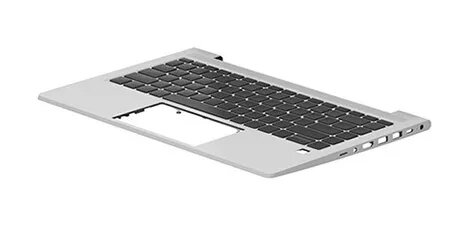
Keyboard HP N01286-B31 Dutch
The HP N01286-B31 Dutch keyboard is a replacement laptop keyboard designed to restore full typing functionality on compatible HP notebook models. It provides a standard Dutch (NL) key layout with labeled characters and function keys arranged to match the original equipment, enabling straightforward swap-in replacement and continued use of laptop features.
This replacement keyboard offers reliable tactile feedback and a layout adapted for Dutch language input. It is manufactured to fit specific HP laptop models, ensuring physical compatibility, correct key spacing, and stable mounting. The keyboard supports standard laptop shortcuts and function key operations, maintaining access to brightness, volume, and other hardware controls without requiring software changes.
To install the HP Dutch keyboard, power off the laptop and disconnect any power sources and batteries if removable. Carefully remove the laptop bezel or top cover according to the service manual for your specific HP model to access the existing keyboard. Detach the old keyboard’s ribbon cable from the motherboard connector and unfasten its mounting points. Position the replacement keyboard, secure its mounting clips or screws, and reconnect the ribbon cable with correct orientation. Reassemble the bezel or top cover and reconnect power. Boot the laptop and verify that all keys and function controls operate as expected.
Installations should follow the service instructions for the exact HP model to avoid damage to connectors or surrounding components. Use an anti-static wrist strap when handling internal parts, and test the keyboard before final reassembly. If any keys remain unresponsive after installation, recheck the ribbon cable seating and locking mechanism or consult a professional repair service.
{{highlightedFeature.featureTitle}}:
{{getProductFeatureValueById(product, highlightedFeature.featureId)}}
{{ productComparisonGenerationError }}
