
Save time and money with our discounts!
In cart {{totalProductsCount}} item(s)
Your cart is empty
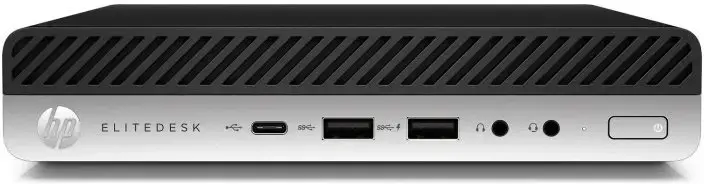
HP EliteDesk 800 G4 USFF Desktop, Intel Core i5-9500T, 16GB RAM, 512GB SSD, Windows 11 Pro, Refurbished Grade A
The HP EliteDesk 800 G4 USFF is a compact, professional-grade desktop computer designed to deliver reliable performance in a space-saving form factor. Equipped with an Intel Core i5-9500T processor, 16GB of RAM, and a high-speed 512GB SSD, this machine ensures efficient multitasking and quick system responsiveness for demanding office environments. As a refurbished Grade A unit, it provides a cost-effective computing solution without compromising on quality or stability, coming pre-installed with Windows 11 Pro to meet modern business software requirements.
This desktop offers a significant advantage in environments where desk space is limited due to its ultra-small form factor design. The combination of a powerful i5 processor and ample memory allows for smooth operation of multiple applications simultaneously, while the solid-state drive significantly reduces boot times and improves file access speeds. Being a professional-grade device, it is built for durability and long-term reliability, making it an excellent choice for users who need a stable workstation that fits seamlessly into any professional or home office setup.
This desktop may not be suitable for users requiring high-end graphical performance, such as professional video editing, 3D rendering, or modern high-demand gaming, as it lacks a dedicated graphics card. Additionally, due to its ultra-small form factor, internal hardware expansion options are limited compared to larger tower-style desktop computers.
To set up the HP EliteDesk 800 G4, connect your monitor via the available video ports, attach a keyboard and mouse to the USB ports, and plug the power adapter into a standard wall outlet. Once connected, press the power button on the front panel to initiate the system. The pre-installed Windows 11 Pro will guide you through the initial configuration process, including language selection and network setup. Ensure the device is placed in a well-ventilated area to maintain optimal operating temperatures.
Usage recommendations: For optimal performance, keep the device updated with the latest Windows security patches and drivers. Regularly clear temporary files to maintain the speed of the SSD and ensure the ventilation vents remain unobstructed to prevent overheating during extended use.
{{highlightedFeature.featureTitle}}:
{{getProductFeatureValueById(product, highlightedFeature.featureId)}}
{{ productComparisonGenerationError }}
