{{ totalProductsCount }}

In cart {{totalProductsCount}} item(s)

Total:
{{sum | formatAmount}}

Your cart is empty

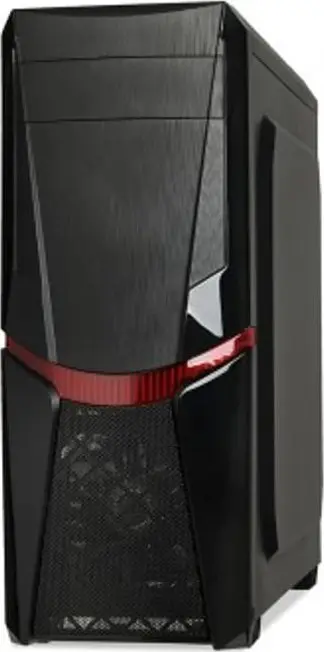
header-product PC case IBOX ORCUS X14 Midi Tower Black — ITX/ATX, side window, red illumination, 3×3.5" bays, 2×2.5" bays, 1×5.25", USB 3.2 Gen1 Type-A
33.99 €

PC case IBOX ORCUS X14 Midi Tower Black — ITX/ATX, side window, red illumination, 3×3.5" bays, 2×2.5" bays, 1×5.25", USB 3.2 Gen1 Type-A

PC case IBOX ORCUS X14 Midi Tower Black Photo 1
PC case IBOX ORCUS X14 Midi Tower Black Photo 2
PC case IBOX ORCUS X14 Midi Tower Black Photo 3
PC case IBOX ORCUS X14 Midi Tower Black Photo 4
PC case IBOX ORCUS X14 Midi Tower Black Photo 5
PC case IBOX ORCUS X14 Midi Tower Black Photo 6
PC case IBOX ORCUS X14 Midi Tower Black Photo 7
PC case IBOX ORCUS X14 Midi Tower Black Photo 8
PC case IBOX ORCUS X14 Midi Tower Black Photo 9
PC case IBOX ORCUS X14 Midi Tower Black Photo 10
PC case IBOX ORCUS X14 Midi Tower Black Photo 11
PC case IBOX ORCUS X14 Midi Tower Black Photo 12
PC case IBOX ORCUS X14 Midi Tower Black Photo 1
PC case IBOX ORCUS X14 Midi Tower Black Photo 2
PC case IBOX ORCUS X14 Midi Tower Black Photo 3
PC case IBOX ORCUS X14 Midi Tower Black Photo 4
PC case IBOX ORCUS X14 Midi Tower Black Photo 5
PC case IBOX ORCUS X14 Midi Tower Black Photo 6
PC case IBOX ORCUS X14 Midi Tower Black Photo 7
PC case IBOX ORCUS X14 Midi Tower Black Photo 8
PC case IBOX ORCUS X14 Midi Tower Black Photo 9
PC case IBOX ORCUS X14 Midi Tower Black Photo 10
PC case IBOX ORCUS X14 Midi Tower Black Photo 11
PC case IBOX ORCUS X14 Midi Tower Black Photo 12
Keep track of price changes You keep track of price changes
Watch the price drop

Leave your address - as soon as the price of the product goes down, you'll know about it right away

You keep track of price changes

PC case IBOX ORCUS X14 Midi Tower Black — ITX/ATX, side window, red illumination, 3×3.5" bays, 2×2.5" bays, 1×5.25", USB 3.2 Gen1 Type-A

{{email}}
You keep track of price changes

PC case IBOX ORCUS X14 Midi Tower Black — ITX/ATX, side window, red illumination, 3×3.5" bays, 2×2.5" bays, 1×5.25", USB 3.2 Gen1 Type-A

{{email}}
{{selectedOffer && selectedOffer.price | formatAmount}}

Short description

IBOX ORCUS X14 is a Midi Tower PC case in black with a side window and red illumination. It supports ITX and ATX motherboards, has three internal 3.5" bays, two 2.5" bays and one 5.25" external bay. Front I/O includes 2× USB 2.0, 1× USB 3.2 Gen1 Type-A and audio. The case fits bottom-mounted PSU, offers seven expansion slots and preinstalled 120 mm front and rear fans.
Available at price 33.99 €: 9 pcs.
Total available for order: 25 pcs.
Warranty: 2 Years
SKU: 299487
Manufacturer: IBOX
free shipment

Cheapest delivery:

Unisend LV

Pick-up points

Unisend LV

Cost

1.99 €

Deliver

{{selectedOffer.parcelStationDeliveryString}}

Customer service center
2b. Kengaraga str., Riga, Latvia, LV-1063
Tuesday {{selectedOffer.officeDeliveryString}}
free
Courier Delivery Please note that in case of a large parcel additional delivery costs may apply!
13.11.2026 {{selectedOffer.courierDeliveryString}}
From 5.16 € (Weight: 5.24 kg)
Parcel couriers
Unisend LV
13.11.2026 {{selectedOffer.parcelStationDeliveryString}}
From 1.99 €
payment
Payment Methods:
Bank transfer, Bank cards on-line, Apple Pay, Google Pay
Together cheaper
{{product.price | formatAmount}}
{{product.title}}
{{productBundle.reference.specialPrice | formatAmount}}
{{productBundle.title}}
{{productBundlePreviousPrice | formatAmount}}
{{productBundleSpecialPrice | formatAmount}}

You saving {{productBundleYouSave | formatAmount}}

Product information

Description

The iBox ORCUS X14 Midi Tower Black is a mid-tower PC case designed to balance compact footprint and internal space for standard desktop components. It comes with a bottom-mounted power supply layout and two pre-installed 120 mm fans (one front, one rear) to promote steady airflow. The case accommodates multiple drive sizes and offers a transparent side window for component visibility while keeping a matte black exterior that fits most desktop setups.

Advantages

This case provides practical cooling with two 120 mm fans included and support for additional fans or radiators, improving heat dissipation for CPU and GPU components. Multiple drive bays support 2.5", 3.5" and 5.25" storage devices, enabling flexible storage configurations. The Midi Tower form factor supports ITX and ATX motherboards, giving compatibility with a wide range of motherboards and standard PC parts. Front panel connectors include USB 2.0 and a USB 3.2 Gen 1 Type-A port for convenient access to peripherals.

Suitable for

  • Home or office desktop builds requiring a compact mid-tower case
  • Budget to mid-range gaming systems with standard ATX or ITX motherboards
  • Systems needing multiple storage drives (2.5" SSDs and 3.5" HDDs) and an optical bay

Key specifications

  • Form factor: Midi Tower
  • Supported motherboard sizes: ITX, ATX
  • Pre-installed fans: 1 × 120 mm front, 1 × 120 mm rear
  • Drive bays: 3 × 3.5" bays, 2 × 2.5" bays, 1 × 5.25" bay
  • Side panel: Windowed side panel for component visibility
  • Front I/O: 2 × USB 2.0, 1 × USB 3.2 Gen 1 (Type-A)
  • Chassis colour: Black
  • Dimensions (W×D×H): 192 × 462 × 464 mm

How to use

Install the motherboard aligned with the standoff pattern that matches ITX or ATX form factors, then mount the CPU cooler and RAM before fitting the GPU and storage devices into the designated bays. Connect the included front-panel cables (USB, power, and LEDs) to the motherboard headers according to the motherboard manual. Position and secure the power supply in the bottom compartment, route cables through the available cutouts to maintain tidy airflow, and verify fan orientation to ensure intake at the front and exhaust at the rear.

Usage recommendations

For optimal cooling, consider adding additional case fans or a front radiator if your build includes high-thermal components. Use the 2.5" mounts for SSDs to improve boot and application performance, and reserve 3.5" bays for high-capacity storage. Maintain regular dust cleaning using compressed air to preserve airflow through the pre-installed fans and vents.

Specifications

USB 3.2 Gen 1 (3.1 Gen 1) Type-A ports quantity:
1
USB 2.0 ports quantity: Number of USB 2.0 ports (connecting interfaces) in the device. USB 2.0 was released in April 2000 (now called "Hi-Speed"), adding higher maximum signaling rate of 480 Mbit/s (effective throughput up to 35 MB/s or 280 Mbit/s), USB 2.0 ports are usually black.
2
Number of 5.25" bays: A drive bay is a standard-area for adding hardware to a computer. Most drive bays are fixed to the inside of a case, but some can be removed. A 5.25" drive bay, also known as full-height bays, were found in old PCs in the early to mid-1980s. They were 3¼″ high by 5¾″ wide, and up to 8″ deep (83 × 146 × 200 mm), used mainly for hard disks and floppy disk drives.
1
Number of 3.5" bays: A drive bay is a standard-area for adding hardware to a computer. Most drive bays are fixed to the inside of a case, but some can be removed. A 3.5" drive bay is for floppy disks.
3
Type: Characteristics of the device.
PC
Form factor: The shape or design of the product.
Midi Tower
Supported HDD sizes: The size of the hard disk drives which can be used by the device.
2.5, 3.5, 5.25
Supported motherboard form factors: Design of the supported motherboards.
ITX, ATX
Product colour: The colour e.g. red, blue, green, black, white.
Black
All features

Weight & dimensions

Height: The measurement of the product from head to foot or from base to top.
464 mm
Depth: The distance from the front to the back of something.
462 mm
Width: The measurement or extent of something from side to side.
192 mm

Storage

Supported HDD sizes: The size of the hard disk drives which can be used by the device.
2.5, 3.5, 5.25

Cooling

Rear fans diameters supported:
120
Rear fans installed:
1x 120 mm
Front fans diameters supported:
120
Number of front fans supported (max):
1
Front fans installed:
1x 120 mm

Ports & interfaces

Audio input: The type of audio input that the device requires, and the connection needed.
Yes
USB 3.2 Gen 1 (3.1 Gen 1) Type-A ports quantity:
1
USB 2.0 ports quantity: Number of USB 2.0 ports (connecting interfaces) in the device. USB 2.0 was released in April 2000 (now called "Hi-Speed"), adding higher maximum signaling rate of 480 Mbit/s (effective throughput up to 35 MB/s or 280 Mbit/s), USB 2.0 ports are usually black.
2

Power supply

Power supply location: Where the power supply is positioned.
Bottom

Design

Anti-dust filter:
Yes
Illumination colour: The colour of the illumination, which is the light which allows you to see the display etc. clearly.
Red
Illumination: The device has illumination.
Yes
Side window: A side window is a transparent side (or part of side) in a housing which enables you to see the internal space of the device.
Yes
Number of expansion slots:
7
Number of external 5.25" bays:
1
Number of internal 3.5" bays:
3
Number of 2.5" bays:
2
Number of 5.25" bays: A drive bay is a standard-area for adding hardware to a computer. Most drive bays are fixed to the inside of a case, but some can be removed. A 5.25" drive bay, also known as full-height bays, were found in old PCs in the early to mid-1980s. They were 3¼″ high by 5¾″ wide, and up to 8″ deep (83 × 146 × 200 mm), used mainly for hard disks and floppy disk drives.
1
Number of 3.5" bays: A drive bay is a standard-area for adding hardware to a computer. Most drive bays are fixed to the inside of a case, but some can be removed. A 3.5" drive bay is for floppy disks.
3
Supported motherboard form factors: Design of the supported motherboards.
ITX, ATX
Product colour: The colour e.g. red, blue, green, black, white.
Black
Type: Characteristics of the device.
PC
Form factor: The shape or design of the product.
Midi Tower

Description

Machine translation.

Similar products

{{product.title}}
Show details Hide details

{{highlightedFeature.featureTitle}}:

{{getProductFeatureValueById(product, highlightedFeature.featureId)}}

{{product.price | formatAmount}}

Product comparison

This product page focuses on the PC case IBOX ORCUS X14 Midi Tower Black. We will compare it with other similar models from the same brand: IBOX CETUS 908, IBOX LUPUS 27, IBOX CETUS 906, IBOX ANTILA 39, and IBOX CETUS 903. All reviewed items belong to the Midi Tower form factor, come in black, support ATX motherboards, and feature side windows. The main differences lie in the type of illumination, the number of storage bays, the presence of an external 5.25-inch bay, and specific clearance limits for graphics cards and CPU coolers in the alternative models.

⚙️ The table below compares key specifications: motherboard form factor support, storage and optical drive bay configurations, front I/O ports, and the practical purpose and real-world differences of each model for PC building.

Comparison parameterIBOX ORCUS X14IBOX CETUS 908IBOX LUPUS 27IBOX CETUS 906IBOX ANTILA 39IBOX CETUS 903Practical significance
Form factorMidi TowerMidi TowerMidi Tower ATXMidi TowerMidi TowerMidi TowerAll models use a versatile mid-tower layout suited for standard desktop components.
Supported motherboardsITX, ATXATX, Micro ATXATXATX, Micro ATXATX, Micro ATXATX, Micro ATXIBOX ORCUS X14 and IBOX LUPUS 27 support full ATX boards, while the alternatives also accommodate Micro ATX form factors.
3.5" / 2.5" bays3 × 3.5", 2 × 2.5"1 × 3.5", 2 × 2.5"1 × 3.5", 4 × 2.5"1 × 3.5", 2 × 2.5"1 × 3.5", 1 × 2.5"1 × 3.5", 2 × 2.5"IBOX ORCUS X14 provides significantly more space for traditional 3.5-inch hard drives, whereas competitors focus more on 2.5-inch SSDs.
External 5.25" bay1 (yes)NoNoNoNoNoOnly IBOX ORCUS X14 retains support for legacy optical drives or 5.25-inch expansion accessories.
Front I/O ports2× USB 2.0, 1× USB 3.2 Gen11× USB 2.0, 1× USB 3.2 Gen1USB 2.0, USB 3.2 Gen11× USB 2.0, 1× USB 3.2 Gen12x USB 2.0, 1x USB 3.2 Gen11× USB 2.0, 1× USB 3.2 Gen1Front panel connectivity is very similar across all options, providing standard USB and audio ports.
IlluminationRedRGB (multi-colour)RGBRGBNot specifiedRGBIBOX ORCUS X14 features fixed red illumination, while the alternative models come with multi-colour RGB fans.

◎ The table below evaluates how well each case suits different usage scenarios, storage requirements, and buyer preferences during PC assembly.

Usage scenarioRecommended productWhy
Build with multiple hard drives and an optical driveIBOX ORCUS X14Provides three 3.5-inch drive spaces and a rare external 5.25-inch bay for optical drives or control panels.
Modern gaming build focused on SSDs and multi-colour RGB lightingIBOX LUPUS 27 or IBOX CETUS 908Offer tempered glass side panels, more mounting spots for fast 2.5-inch SSDs, and dynamic RGB fan lighting.
Versatile office or home PC with standard componentsIBOX ANTILA 39 or IBOX CETUS 906Balanced modern chassis featuring bottom PSU placement and support for discrete graphics cards of moderate length.
The IBOX ORCUS X14 differs from the alternative models in this lineup by focusing on classic compatibility: it is the only case in the comparison to retain an external 5.25-inch bay and offer an increased number of mounting slots for 3.5-inch hard drives. It is best suited for users who need to install an optical drive and multiple mechanical hard disks. If you prioritize modern aesthetics with RGB lighting, a tempered glass side panel, and support for longer gaming graphics cards, you may prefer alternatives such as IBOX LUPUS 27 or the CETUS series models.
Might be useful
{{product.manufacturerName}}
{{product.categoryName}}
{{product.title}}
{{product.specialPrice}}
{{product.price}}
Stock data
Warehouse Stock Delivery to the store Store Price
EU2 9 Tuesday Best delivery
33.99 €
WH355 7 20.11.2026
46.99 €
EU58 9 30.11.2026
54.49 €
33.99 €
Stock: 9
Delivery Date: Tuesday Best delivery
Warehouse: EU2
46.99 €
Stock: 7
Delivery Date: 20.11.2026
Warehouse: WH355
54.49 €
Stock: 9
Delivery Date: 30.11.2026
Warehouse: EU58

Customer reviews

Customer questions

FAQ

How much does the PC case IBOX ORCUS X14 Midi Tower Black cost, and is it available for purchase?

The price is 33.99 € (valid at the time of publication and already includes all taxes). The item is available for order — 25 pcs. are in stock, and you can place your purchase right now with delivery across Latvia and Europe or choose pickup at the Riga collection point. We offer favorable purchase terms, including the option to split the payment into convenient monthly installments. Availability and price are updated in real time, so we recommend placing your order in advance.

If I order this product today, when will I receive my order?

If you place your order today, delivery will be as fast and convenient as possible. You will be able to pick up your order on Tuesday at the Riga pickup point or choose delivery across Latvia and Europe. We carefully inspect every purchase and pack it securely for safe transportation.

What payment options are available?

AiO.lv offers several payment methods: Bank transfer, Bank cards on-line, Apple Pay, Google Pay. All transactions are 100% secure and encrypted.

Can this product be purchased for a company (with VAT)?

Yes. AiO.lv works with legal entities in Latvia and across Europe. The product price already includes VAT. For certain product categories, as well as for companies from other EU countries with a valid VAT number, a 0% VAT rate may apply. We issue the invoice immediately after the order is placed, support electronic BIS invoices, and automatically generate all necessary accounting documents. You can complete the purchase for a company online — simply select the company profile and choose bank transfer as the payment method during checkout.

What is the warranty period?

All IBOX products come with an official 2 Years warranty. It covers all manufacturing defects and malfunctions that may occur during use. The warranty is valid at all authorized IBOX service centers and through AiO.lv

Can the product be returned after purchase?

Yes, you can return the product within 14 days of purchase if you bought it as a consumer (not a legal entity). Returns are possible without giving any reason — the main condition is that the product retains its original appearance and full set of accessories. We will make the process as simple and convenient as possible: just contact our customer support team, and we will help you arrange the return.

Where should I contact for warranty service?

For warranty-related questions you can contact the AiO.lv (SIA VSPRO) customer support team. We will assist with consultation, warranty claim processing, and coordination with certified service centers.

How can I tell if this product suits my needs?

When making a choice, we recommend paying attention to the key features: usb 3.2 gen 1 (3.1 gen 1) type-a ports quantity, usb 2.0 ports quantity, number of 5.25" bays, number of 3.5" bays, type, form factor, supported hdd sizes, supported motherboard form factors, product colour, compatibility with your devices or usage conditions, material quality, functionality, and warranty terms. These characteristics will help you determine how well the model meets your needs.
warranty
14-Day Return Policy
We are confident in our quality, but if the purchase doesn’t fit — you have 14 days to return the product with peace of mind.
shipping
Fast Delivery
Get your orders as quickly as possible — right to your door, parcel lockers, or pickup points across Latvia and the EU.
payment
Secure Payment
Pay the way you prefer: cash, VISA, MasterCard, Apple Pay, Google Pay, bank transfer, or 0% installment plan.
warranty
Quality Since 2008
AiO.lv has been on the market for over 18 years and has earned trust — with more than 6000 genuine positive reviews on Google.