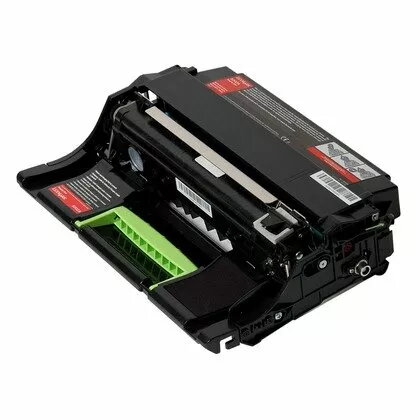
Compatible imaging unit Lexmark 500ZA is designed as a direct replacement for the OEM drum assembly in compatible Lexmark printers. With an approximate page yield of 20,000 pages, the unit restores consistent imaging performance and helps maintain uniform monochrome or color output across print jobs. The unit is intended for office and home environments that require predictable print quality and cost-effective maintenance of their Lexmark-compatible devices.
Advantages
This imaging unit provides reliable print consistency across its rated life, reducing variation in density and sharpness compared with a worn drum. The assembly is engineered for compatibility with supported Lexmark printers, enabling straightforward installation and minimizing downtime. Its rated yield of around 20,000 pages helps plan maintenance intervals and manage consumables budget. Using a compatible drum unit can lower replacement costs while maintaining acceptable print quality for everyday office documents and reports.
Подходит для
- Ежедневная печать офисных и административных документов
- Печать отчётов и служебной корреспонденции
- Использование в малом и среднем бизнесе
- Домашний офис с периодическими объёмами печати
Key specifications
- Approximate page yield: 20,000 pages under standard printing conditions
- Function: Imaging/drum unit for laser printing
- Compatibility: Designed for use with compatible Lexmark monochrome and color laser printers (see printer documentation for exact models)
- Form factor: Complete drum assembly for direct replacement
- Expected imaging: Restores toner transfer and image definition to factory-like levels when used with appropriate toner cartridges
How to use
Turn the printer off and allow it to cool if necessary, then open the printer access panel according to the device manual. Remove the used imaging unit by following the printer’s removal steps, handle the replacement unit by its edges to avoid touching the imaging surface, and insert the compatible imaging unit until it clicks into place. Close the access panel, power the printer on, and let any initialization cycle complete. If the printer requires calibration or a drum reset procedure, follow the instructions in the printer user guide to ensure accurate page counting and image calibration.
Usage recommendations
Store the imaging unit in its original packaging in a cool, dry place away from direct sunlight and high humidity. Do not expose the imaging surface to bright light for extended periods. Replace the imaging unit when print density, streaking, or image defects appear despite correct toner levels; perform periodic printer maintenance and use recommended toner cartridges to maximize life and image consistency.