
Save time and money with our discounts!
In cart {{totalProductsCount}} item(s)
Your cart is empty
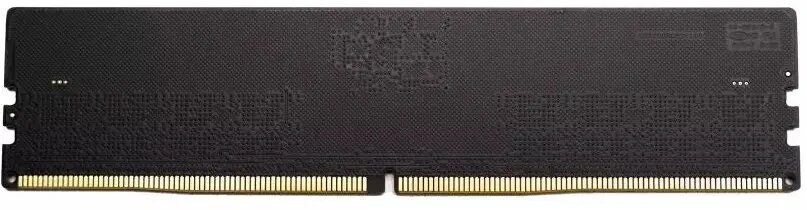
DDR4 4800 8GB RAM module Innovation IT CL40 1.10V
8GB DDR4 4800 RAM module from Innovation IT delivers a single-channel memory upgrade with 4800 MT/s data rate, CL40 latency and a low operating voltage of 1.10V. Designed for desktop systems and motherboards that explicitly support DDR4-4800, this module increases available RAM capacity to improve multitasking performance, reduce application loading times and enhance responsiveness in everyday computing and light gaming scenarios. The standard DIMM form factor fits typical desktop memory slots and is intended as a straightforward capacity expansion for compatible systems.
The module combines high transfer rate and energy-efficient operation at 1.10V, offering a balance between throughput and power consumption. With a CL40 timing specification and 4800 MT/s speed, it supports faster data access than lower-frequency DDR4 modules, which helps when running multiple applications, browser tabs or memory-intensive tasks. Installation requires no special tools and the single-module approach allows flexible upgrade paths without replacing existing memory.
Power down the computer and disconnect it from the power source before installing the RAM module. Open the system case, locate an available compatible DDR4 DIMM slot on the motherboard and align the module with the notch in the slot. Insert the module by pressing down evenly on both ends until the retention clips click into place. After installation, reconnect power and boot the system; verify that the BIOS/UEFI recognizes the new 8GB module and that memory speed is set or negotiated to 4800 MT/s according to motherboard support. If the system does not boot or reports different timings, consult the motherboard manual for supported memory settings and enable the appropriate profile or adjust memory parameters in BIOS/UEFI.
Use this module in motherboards that explicitly list support for DDR4-4800 to ensure stable operation. For best results, install memory modules in matched pairs if the motherboard supports dual-channel mode, and confirm BIOS/UEFI settings after installation. Keep the module and contacts free of dust and avoid bending the circuit board during installation.
{{highlightedFeature.featureTitle}}:
{{getProductFeatureValueById(product, highlightedFeature.featureId)}}
{{ productComparisonGenerationError }}