
Save time and money with our discounts!
In cart {{totalProductsCount}} item(s)
Your cart is empty
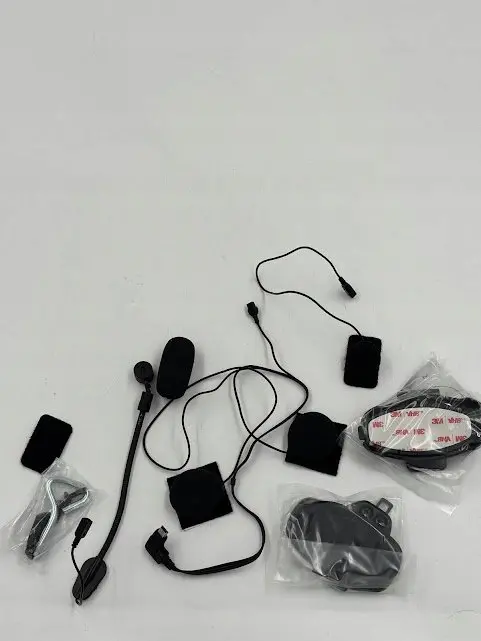
INTERPHONE HD Audio Kit with Flat Microphone for Tour, Active, and Connect Series
The INTERPHONE HD Audio Kit with Flat Microphone is a high-quality replacement accessory specifically engineered for the Tour, Active, and Connect series of motorcycle intercom systems. This kit is designed to restore or enhance the audio performance of your communication setup, ensuring that riders can maintain clear and reliable contact while on the road. By utilizing high-fidelity components, the kit provides a significant improvement in sound clarity, making it an essential upgrade for those who prioritize communication quality during their motorcycle journeys.
The primary advantage of this audio kit is its superior sound quality, which is achieved through high-definition audio components that minimize background noise and distortion. The inclusion of a flat microphone design allows for a discreet and comfortable fit inside various helmet types without causing pressure points or discomfort. Furthermore, the kit is fully compatible with the specified INTERPHONE intercom models, ensuring a seamless plug-and-play installation process that does not require complex technical modifications.
This audio kit is not compatible with INTERPHONE models outside of the Tour, Active, and Connect series. It is also not intended for use with intercom systems from other manufacturers, as the connector types and audio processing standards are specific to the INTERPHONE ecosystem.
To install the kit, first remove the existing headset components from your helmet lining. Carefully route the wiring of the new HD audio kit through the helmet padding, ensuring that the speakers are positioned directly over the ear cavities for optimal sound delivery. Secure the flat microphone in a position close to your mouth, typically near the chin bar, using the provided adhesive or hook-and-loop fasteners. Once positioned, connect the headset cable to your INTERPHONE intercom unit and perform a sound test to verify that the microphone and speakers are functioning correctly.
Usage recommendations: Regularly inspect the cable connections for any signs of wear or debris to maintain consistent audio performance. Keep the microphone foam cover clean to ensure clear voice transmission and protect the sensor from moisture.
{{highlightedFeature.featureTitle}}:
{{getProductFeatureValueById(product, highlightedFeature.featureId)}}
{{ productComparisonGenerationError }}
