
{{ totalProductsCount }}

In cart {{totalProductsCount}} item(s)

Total:
{{sum | formatAmount}}

Your cart is empty

header-product Scanner I.R.I.S. IRISCan Desk 6 Business A3 Black

Scanner I.R.I.S. IRISCan Desk 6 Business A3 Black

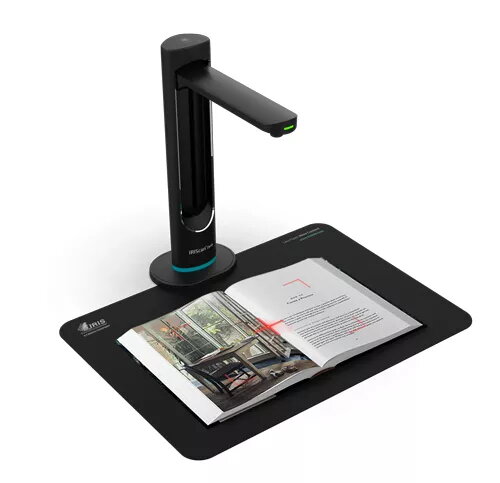
Scanner IRISCan Desk 6 Business Photo 1
Out of stock.
View similar!

Short description

The I.R.I.S. IRISCan Desk 6 Business A3 scanner features a maximum scan size of 420 x 297 mm and a high-resolution 32 MP CMOS sensor. It supports A3 paper size and connects via USB for easy power supply. With a maximum image resolution of 4608 x 3456 pixels, it ensures clear and detailed scans, making it ideal for business use.
Warranty: 2 Years
SKU: 4320914
delivery
Information regarding the items availability for purchase will be posted on this site
price
Item cost information will be published on this site
Together cheaper
{{product.price | formatAmount}}
{{product.title}}
{{productBundle.reference.specialPrice | formatAmount}}
{{productBundle.title}}
{{productBundlePreviousPrice | formatAmount}}
{{productBundleSpecialPrice | formatAmount}}

You saving {{productBundleYouSave | formatAmount}}

Product information

Description

The I.R.I.S. IRISCan Desk 6 Business A3 Black is a professional overhead document scanner designed for enterprise and institutional use. It supports A3-size materials (maximum scan area 420 x 297 mm) and uses a 32 MP CMOS sensor to capture high-resolution images up to 4608 x 3456 pixels. The device connects via USB and is suitable for scenarios that require reliable, high-detail document capture and support for distance learning sessions.

Advantages

The scanner delivers high-resolution scans with its 32 MP CMOS sensor, enabling detailed reproduction of documents, photos and drawings. Its support for A3 format increases versatility for larger originals while the USB connection provides both data transfer and power, simplifying setup. Lightweight construction (1.37 kg) and compact form factor make it suitable for shared workspaces and mobile use within an office environment.

Suitable for

  • Digitizing large-format documents (A3) such as posters, drawings and spreadsheets
  • Office and institutional scanning tasks in enterprises and schools
  • Remote teaching and distance learning demonstrations
  • Archiving and creating high-resolution digital records of paper materials

Key specifications

  • Maximum scan area: 420 x 297 mm (A3)
  • Image sensor: 32 MP CMOS
  • Maximum image resolution: 4608 x 3456 pixels
  • Interface: USB (power and data)
  • Weight: 1.37 kg
  • Colour: Black

How to use

Place the document flat under the scanner head within the 420 x 297 mm capture area and connect the device to a computer using the supplied USB cable. Launch the compatible scanning software, select the desired resolution and format, then initiate the scan. For distance learning, position the scanner to clearly capture the teaching material and use screen-sharing or conferencing software to broadcast the scanned view.

Usage recommendations

For best results, clean the scanning area and the underside of the scanner head regularly to avoid dust artifacts, use stable lighting conditions, and select an appropriate resolution (up to 4608 x 3456) depending on whether fine detail is required. Ensure the USB connection provides sufficient power or use a powered hub if needed.

Specifications

Power supply type: The type of power supply which this product uses.
USB
Sensor type: A sensor is a convertor than measures a physical quality (light, temperature etc.) and displays this electronically on a device.
CMOS
Product colour: The colour e.g. red, blue, green, black, white.
Black
All features
Megapixel (approx.): The number (in millions) of light-sensitive picture elements known as pixels actually used by the camera's image sensor (CCD) to record light, and which are reflected to the final number of recorded pixels stored on the memory card.
32 MP
Maximum scan size:
420 x 297
Colour scanning: Indicates whether this product scans in colour.
Yes
Duplex scanning: Feature of computer scanners and multifunction printers (MFPs) that allows the automatic scanning of a sheet of paper on both sides.
No
Scan to:
Image
Maximum image resolution: Resolution is the amount of detail held by an image. The higher the resolution, the better (sharper) the image. The maximum image resolution produces the best image.
4608 x 3456
USB version: Universal Serial Bus (USB) is an industry standard developed in the mid-1990s that defines the interface used for connection, communication and power supply between computers and electronic devices. Every new version - for example 1.1, 2.0, 3.0 - is much faster than the previous one.
2.0
Built-in display: A display which is part of the product, so you do not need to attach another display.
No
Maximum ISO A-series paper size: The maximum paper size the device can handle, defined by ISO A-series.
A3
Harmonized System (HS) code:
84716070
USB port: The device features a socket into which a USB cable can be plugged.
Yes

Weight & dimensions

Weight: Weight of the product without packaging (net weight). If possible, the net weight is given including standard accessories and supplies. Please note that sometimes the manufacturer leaves out the weight of accessories and/or supplies.
1.37 kg
Height: The measurement of the product from head to foot or from base to top.
157.4 mm
Depth: The distance from the front to the back of something.
55 mm
Width: The measurement or extent of something from side to side.
55 mm

Power

Power supply type: The type of power supply which this product uses.
USB

Technical details

Product colour: The colour e.g. red, blue, green, black, white.
Black

Camera

Sensor type: A sensor is a convertor than measures a physical quality (light, temperature etc.) and displays this electronically on a device.
CMOS

Description

Machine translation. Load original

Similar products

{{product.title}}
Show details Hide details

{{highlightedFeature.featureTitle}}:

{{getProductFeatureValueById(product, highlightedFeature.featureId)}}

{{product.price | formatAmount}}
Might be useful
{{product.manufacturerName}}
{{product.categoryName}}
{{product.title}}
{{product.specialPrice}}
{{product.price}}

Customer reviews

Customer questions

FAQ

What payment options are available?

AiO.lv offers several payment methods: Bank transfer. All transactions are 100% secure and encrypted.

Can this product be purchased for a company (with VAT)?

Yes. AiO.lv works with legal entities in Latvia and across Europe. The product price already includes VAT. For certain product categories, as well as for companies from other EU countries with a valid VAT number, a 0% VAT rate may apply. We issue the invoice immediately after the order is placed, support electronic BIS invoices, and automatically generate all necessary accounting documents. You can complete the purchase for a company online — simply select the company profile and choose bank transfer as the payment method during checkout.

What is the warranty period?

All I.R.I.S. products come with an official 2 Years warranty. It covers all manufacturing defects and malfunctions that may occur during use. The warranty is valid at all authorized I.R.I.S. service centers and through AiO.lv

Can the product be returned after purchase?

Yes, you can return the product within 14 days of purchase if you bought it as a consumer (not a legal entity). Returns are possible without giving any reason — the main condition is that the product retains its original appearance and full set of accessories. We will make the process as simple and convenient as possible: just contact our customer support team, and we will help you arrange the return.

Where should I contact for warranty service?

For warranty-related questions you can contact the AiO.lv (SIA VSPRO) customer support team. We will assist with consultation, warranty claim processing, and coordination with certified service centers.

How can I tell if this product suits my needs?

When making a choice, we recommend paying attention to the key features: power supply type, sensor type, product colour, compatibility with your devices or usage conditions, material quality, functionality, and warranty terms. These characteristics will help you determine how well the model meets your needs.

Where can I download the instructions for Scanner IRISCan Desk 6 Business?

You can download the instructions in PDF format from the “Instructions” section on the product description page. The file contains complete information about installation, setup, and usage.
warranty
14-Day Return Policy We are confident in our quality, but if the purchase doesn’t fit — you have 14 days to return the product with peace of mind.
shipping
Fast Delivery Get your orders as quickly as possible — right to your door, parcel lockers, or pickup points across Latvia and the EU.
payment
Secure Payment Pay the way you prefer: cash, VISA, MasterCard, Apple Pay, Google Pay, bank transfer, or 0% installment plan.
warranty
Quality Since 2008 AiO.lv has been on the market for over 18 years and has earned trust — with more than 6000 genuine positive reviews on Google.