
Dreame vacuums for fast and efficient cleaning!
In cart {{totalProductsCount}} item(s)
Your cart is empty
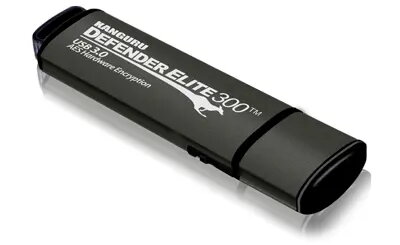
iStorage Kanguru Defender Elite300 128GB USB Flash Drive, USB 3.2 Gen 1 Type-A, Black and Grey
The iStorage Kanguru Defender Elite300 128GB USB Flash Drive is a high-performance, secure storage solution engineered for professionals and organizations that prioritize data integrity. Featuring a robust USB 3.2 Gen 1 Type-A interface, this drive provides rapid data transfer speeds while maintaining strict security protocols. Its durable construction and sophisticated black and grey design ensure that your sensitive information is protected in a reliable and portable format.
This flash drive stands out due to its advanced hardware-based AES 256-bit encryption, which ensures that all stored data remains inaccessible to unauthorized users. The inclusion of a physical write-protect switch allows users to toggle between read-only and read-write modes, providing an extra layer of defense against accidental data modification or malware infection. Furthermore, the device is built with tamper-resistant materials and utilizes digitally-signed secure firmware to mitigate risks associated with unauthorized firmware tampering, making it a trusted choice for high-security environments.
This drive may not be suitable for users who require massive storage capacities beyond 128GB or for those who do not need hardware-level encryption, as the security features may add complexity to the initial setup process compared to standard, non-encrypted USB drives.
To use the iStorage Kanguru Defender Elite300, simply insert the drive into an available USB Type-A port on your computer. Upon connection, you will be prompted to authenticate via the password protection interface. Once the correct credentials are entered, the drive will mount as a standard storage volume, allowing you to drag and drop files as needed. The physical switch on the side of the device can be adjusted to enable or disable write access at any time.
For maximum security, always ensure the physical write-protect switch is engaged when the drive is not actively being updated. Regularly update the device firmware if prompted by the management software to maintain protection against emerging digital threats.
{{highlightedFeature.featureTitle}}:
{{getProductFeatureValueById(product, highlightedFeature.featureId)}}
{{ productComparisonGenerationError }}
