JBL speakers and headphones for pure and deep sound!
In cart {{totalProductsCount}} item(s)
Your cart is empty
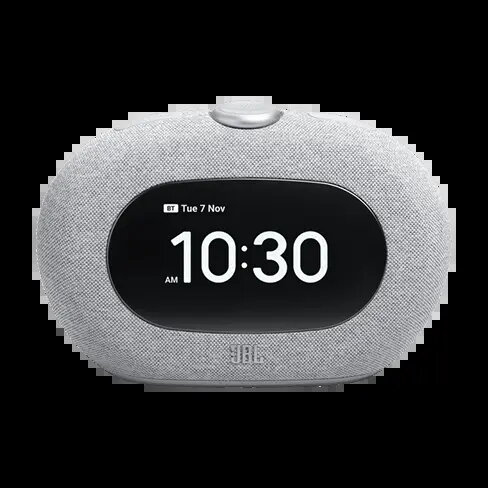
JBL Horizon 3 Clock Radio with Bluetooth Speaker and Ambient Light, Grey
The JBL Horizon 3 is a multifunctional bedside clock radio that combines high-fidelity audio performance with practical daily features. Designed to enhance your morning routine, this device integrates a high-quality Bluetooth speaker for wireless audio streaming, a clear digital display for time tracking, and a customizable ambient light that adds a modern touch to any bedroom decor. Its sleek grey finish ensures it fits seamlessly into contemporary living spaces while providing the reliable sound quality associated with the JBL brand.
This device offers a comprehensive solution for bedside needs by merging a clock, radio, and speaker into one compact unit. The integrated Bluetooth connectivity allows for effortless streaming from smartphones or tablets, while the dual alarm system provides flexibility for different schedules. The inclusion of an ambient light feature creates a soothing atmosphere, and the intuitive interface ensures that setting alarms or tuning into radio stations is straightforward and efficient.
This device may not be suitable for users seeking a high-power sound system for large rooms or outdoor events, as it is specifically engineered for bedside and personal use. Additionally, those who prefer purely analog clock interfaces or devices without any light-emitting components may find the digital display and ambient light features unnecessary for their specific requirements.
To use the JBL Horizon 3, connect the device to a power source using the provided adapter. Once powered on, use the control panel to set the current time and configure your preferred alarm settings. To pair a mobile device, activate the Bluetooth mode on the speaker and select it from your phone's settings menu. You can adjust the volume, radio stations, and ambient light intensity directly through the buttons located on the top or front of the unit.
For optimal performance, place the device on a flat, stable surface away from direct water sources. Regularly clean the exterior with a soft, dry cloth to maintain the aesthetic appearance and ensure the digital display remains clear and readable.
{{highlightedFeature.featureTitle}}:
{{getProductFeatureValueById(product, highlightedFeature.featureId)}}
{{ productComparisonGenerationError }}