
JBL speakers and headphones for pure and deep sound!
In cart {{totalProductsCount}} item(s)
Your cart is empty
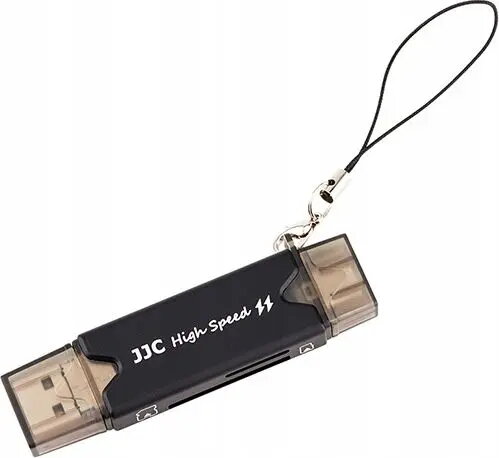
Card reader JJC SB5823 with USB 3.0, Micro USB and USB-C (Type-C) for microSD and SD cards
JJC SB5823 is a multi-interface card reader that accepts SD and microSD memory cards and provides three connection options: USB 3.0, Micro USB and USB-C (Type-C). The device enables direct file access and high-speed transfers between cameras’ memory cards and computers, laptops, tablets or smartphones that support USB host mode, without the need to install drivers on most operating systems. The compact housing and multi-port design make it a portable solution for photographers, videographers and mobile users who need quick access to card contents.
The card reader offers versatile connectivity with USB 3.0 for high transfer rates, plus Micro USB and USB-C for compatibility with a wide range of mobile devices and modern laptops. It supports both full-size SD and microSD cards, simplifying workflows by eliminating the need for multiple adapters. Plug-and-play operation on compatible devices reduces setup time and allows immediate card access for file transfer and backup tasks. The compact and lightweight design enhances portability for field and studio use.
Insert an SD or microSD card into the appropriate slot until it clicks into place. Choose the connector that matches your host device (USB 3.0 Type-A for many computers, Micro USB or USB-C for mobile devices and modern laptops) and plug the reader into the host port. The host device should recognize the card as external storage; open the file manager to browse, copy or move files. After transferring data, use the host’s eject or safe removal procedure before disconnecting the reader to avoid data corruption.
For best performance, connect via the USB 3.0 Type-A port when transferring large photo or video files from high-speed cards. When using mobile devices, ensure the device supports OTG/host mode and use the appropriate connector. Regularly back up important files to another storage location and avoid removing the card during active read/write operations.
{{highlightedFeature.featureTitle}}:
{{getProductFeatureValueById(product, highlightedFeature.featureId)}}
{{ productComparisonGenerationError }}